
Description
Push Back Recorder is an MSFS2020 Push Back utility add-on which allows you to record and playback your push backs
What can i do with Push Back Recorder?
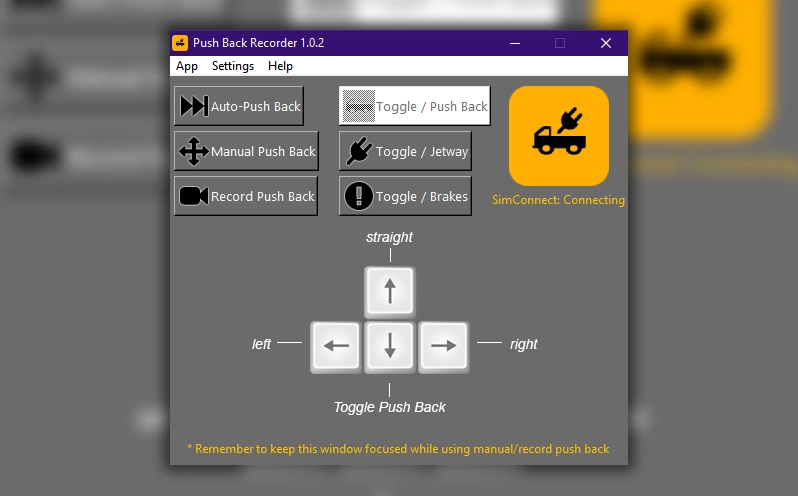
- Auto-Push Back: Select a recorded PBR file and playback your push backs
- Planned Push Back: Select from Short/Medium/Long, Left/Right, 75°/90°/180° Pre-Planned Push back options
- Manual Push Back: Use your keyboard keys to perform a manual push back
- Record Push Back: Record your push back using your keyboard keys and save your PBR file so it can be played back with the Auto-Push Back feature later on
- Toggle / Push Back: Toggles the push back tug
- Toggle / Jetway: Toggles the jetway connection (If available at your spot)
- Toggle / Brakes: Toggles the Parking Brakes
Installation
- Run pbrsetupxxx.exe and complete the install wizard
- Please keep the default install path to avoid issues with the log generator
Known issues
- PBR won't work if SimRate is above x1.0
- Log error: Could not create pbr.log (Use the default install path to avoid this issue)
Reporting issues
Please report any issues or feature request in GitHub Issues: https://github.com/RushScript/MSFS-PBR/issues
Special thanks to OverKill for his collaboration on those amazing audio files!
Project link: https://github.com/RushScript/MSFS-PBR
Please report any issues!
Push Back Recorder
Record and playback your push backs with Push Back Recorder, an MSFS2020 utility add-on. Choose from auto-push back, planned push back options, manual push back, and more. Installation is easy - simply run pbrsetupxxx.exe and follow the install wizard. Check out the project link for more information and remember to report any issues encountered.


User Reviews
6 reviews
Version History
-- [FIX] Planned push back not responding and keeps going straight (This might have been sorted, please report if the problem persists) -- [FIX] Fine-tuned push back templates values to avoid static movement at the end of push back -- [FIX] The app wont run in the background anymore after closing the GUI -- [ADD] Added Parking Brakes toggle button to the GUI -- [ADD] You can now use your PBR files in different spots (An information message will be displayed letting you know that the PBR file belongs to a different spot)
Log in to join the discussion
Log InComments(38)
over 5 years ago
A few of you have reported an issue with push back recorder not being able to move the plane.
I'm working on get it sorted asap (A lot have changed since MSFS and FBW updates)
almost 3 years ago
about 5 years ago
Is it working with SU5?
about 5 years ago
This is awesome :D - finally time to set up the aircraft instead of handling the pushback.
Sadly there seems to be an error (at least on my side) - at the end of the PB the Tug won't disconnect, even if i set the parkingbrake.
over 5 years ago
A few of you have reported an issue with push back recorder not being able to move the plane.
I'm working on get it sorted asap (A lot have changed since MSFS and FBW updates)
over 5 years ago
over 5 years ago
over 5 years ago
over 5 years ago
over 5 years ago
over 5 years ago
over 5 years ago
over 5 years ago
Are you using another SimConnect addon simultaneously?
I recently find out that using multiple SimConnect addons a the same time creates a lot of issues.
Really appreciate your Feedback! Thank you!
over 5 years ago
No, I don't have any other simconnect apps running. I thought it might be a "focus" issue, however version 1 pushes correctly even if I am clicking items in the cockpit when my Voice Attack co-pilot requests push-back.
I start the sim, configure auto push, switch to VR. Later I tell the Voice Attack co-pilot to request push-back. He does so by pressing "alt-p".
Thank you for your help. Hopefully this will assist you with adding VR support.