
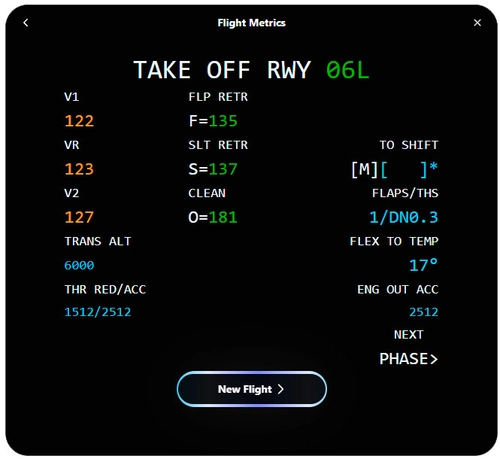
![FlightMetrics | Takeoff Performance Calculator [for now only Airbus] - Image 2](https://cdn.flightsim.to/images/26/757001-1707592295-8GWqQ.jpg)
Description
🛫 Simplify Aircraft Performance with FlightMetrics 🛬
Ready to take your flight simulation experience to the next level? Meet FlightMetrics, your ultimate app for calculate aircraft performance effortlessly!
Features
🔍 Seamless Analysis: Dive into aircraft performance metrics with ease, no complex procedures involved.
🌐 Universal Compatibility: Whether you're a seasoned pilot or an aviation enthusiast, FlightMetrics works with various aircraft performance data formats, making it accessible to all.
📊 Realistic Visualization: Visualize your aircraft's performance metrics in a clear and realistic way.
💡 Informed Decision-Making: Gain insights into your aircraft's performance to make informed decisions during your simulations.
✨ User-Friendly Experience: Say goodbye to complicated interfaces. FlightMetrics offers a user-friendly design, making aircraft performance analysis intuitive and enjoyable.
🔄 Automatic Updates: Stay up-to-date effortlessly with automatic updates, ensuring you always have the latest features and improvements at your fingertips.
🚀 Start Today: Ready to explore the skies like never before? Download FlightMetrics now and embark on a journey to enhance your flight simulation experience!
Elevate your flight simulations with FlightMetrics. Download now and see the difference it makes! ✈️✨
Installation1. Download FlightMetrics.
2. Ensure that you are using Windows 10 or a later version.
3. Open FlightMetrics installer and install.
4. Open and enjoy FlightMetrics.
🛠️ Built with TypeScript, Next.js, and Tauri 🚀
FlightMetrics is crafted using cutting-edge technologies, including TypeScript for robust type-checking, Next.js, and Tauri for powerful cross-platform desktop application development. This powerful combination ensures a smooth and efficient user experience, making FlightMetrics a top choice for aviation enthusiasts and professionals alike.
🔗Explore FlightMetrics on GitHub: https://github.com/ZeroxyDev/FlightMetrics
🌐 Additionally, FlightMetrics is available on the web! Visit FlightMetrics Web App (https://flightmetrics.vercel.app/) to experience it in your browser. Happy flying! 🛫✨
🔗Explore the safety analysis of FlightMetrics with VirusTotal.
🔍 VirusTotal Analysis: https://www.virustotal.com/gui/file/3a891448fab3dd37d8bf7b9cefbd6db9a3b951d1c9c6eeee4d60ce44a6d8155d?nocache=1
Made with love by ZeroxyDev for aviation enthusiasts <3
FlightMetrics | Takeoff Performance Calculator [for now only Airbus]
FlightMetrics is your ultimate app for effortlessly calculating aircraft performance metrics, offering seamless analysis, realistic visualization, and user-friendly experience. Compatible with various aircraft performance data formats, it provides insights for informed decision-making during simulations. Stay up-to-date with automatic updates and elevate your flight experience with FlightMetrics.


User Reviews
4 reviews
Version History
📜 Changelog - FlightMetrics v1.4.0 ✨ Added: Option to minimize the application Application initializes centered on the screen



Log in to join the discussion
Log InComments(41)
5 months ago
8 months ago
- Add the option of the A330neo in the aircraft list.
- Add an "OFF" and replace the "Tail" option by an "Engine + Wings" option for the anti-ice setting. It would make more sense as there is no "Tail" option on the Airbus anti-ice section of the overhead.
over 1 year ago
over 1 year ago
almost 2 years ago
over 2 years ago
over 2 years ago
over 2 years ago
Application error: a client-side exception has occured (see the browser console for more information)
The manual entry works
Thanks for your help
Klaus
over 2 years ago
Thank you so much.
over 2 years ago
over 2 years ago
over 2 years ago
over 2 years ago
over 2 years ago
over 2 years ago
over 2 years ago
over 2 years ago
over 2 years ago