
Description
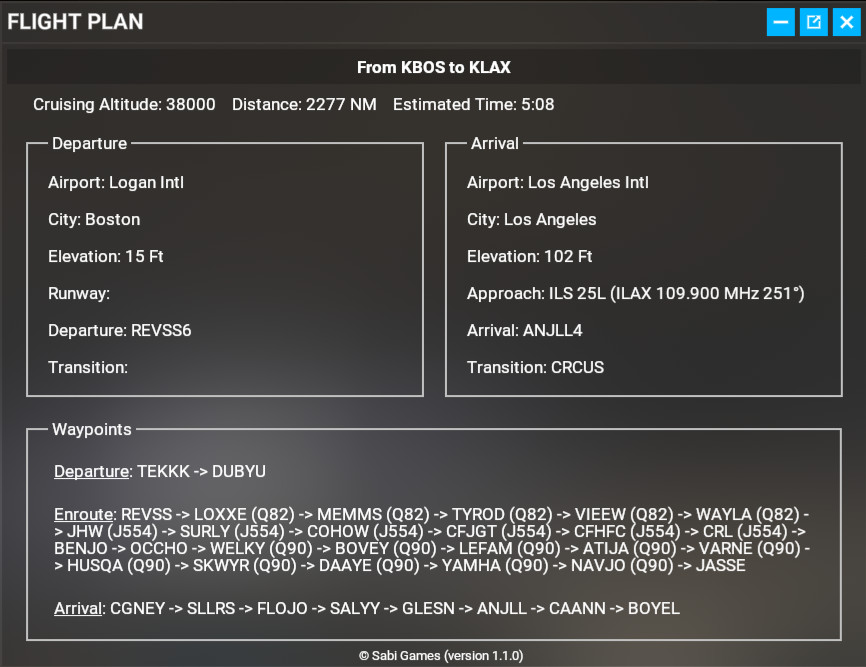
This custom toolbar displays a summary and extended infrormation about the created flight plan.
Contains:
1. Flight plan that has been created inside the simulator (using the default MSFS flight planner)
2. Syncronized with the MSFS ATC
3. Displays departure and arrival information
4. Cruising altitude
5. Distance
6. Waypoints including airways (if any)
7. On ILS approach, displays frequency and heading
8. No use with simconnect as an external application
9. No need online connection
10. Simple installation: just extract it and move it to community location
Thanks for downloading, I would appreciate your comments
Enjoy :)
Note: This tool is for users that like to use the default MSFS flight planner
Known issue: Sometimes not getting departure runway from MSFS flight plan - departure runway is blank (but ATC will command to takeoff from the active runway)
Flight Plan Summary Toolbar
Customize your flight planning experience with the Flight Plan Summary Toolbar. Access essential details like departure/arrival information, cruising altitude, distance, waypoints, and more - all synchronized with MSFS ATC. Perfect for users who prefer the default MSFS flight planner.


User Reviews
5 reviews
Version History
1. Add estimated flight time 2. Correction of distance calculation 3. Separate departure, enroute and arrival waypoints
Log in to join the discussion
Log InComments(15)
about 2 years ago
about 2 years ago
about 2 years ago
(back in the day someone would charge 5€ for it in FSX. Thanks for this!
about 2 years ago
over 2 years ago
This comment has been deleted
over 2 years ago
over 2 years ago
over 2 years ago
over 2 years ago
over 2 years ago
over 2 years ago
over 2 years ago
over 2 years ago
almost 3 years ago
over 2 years ago