
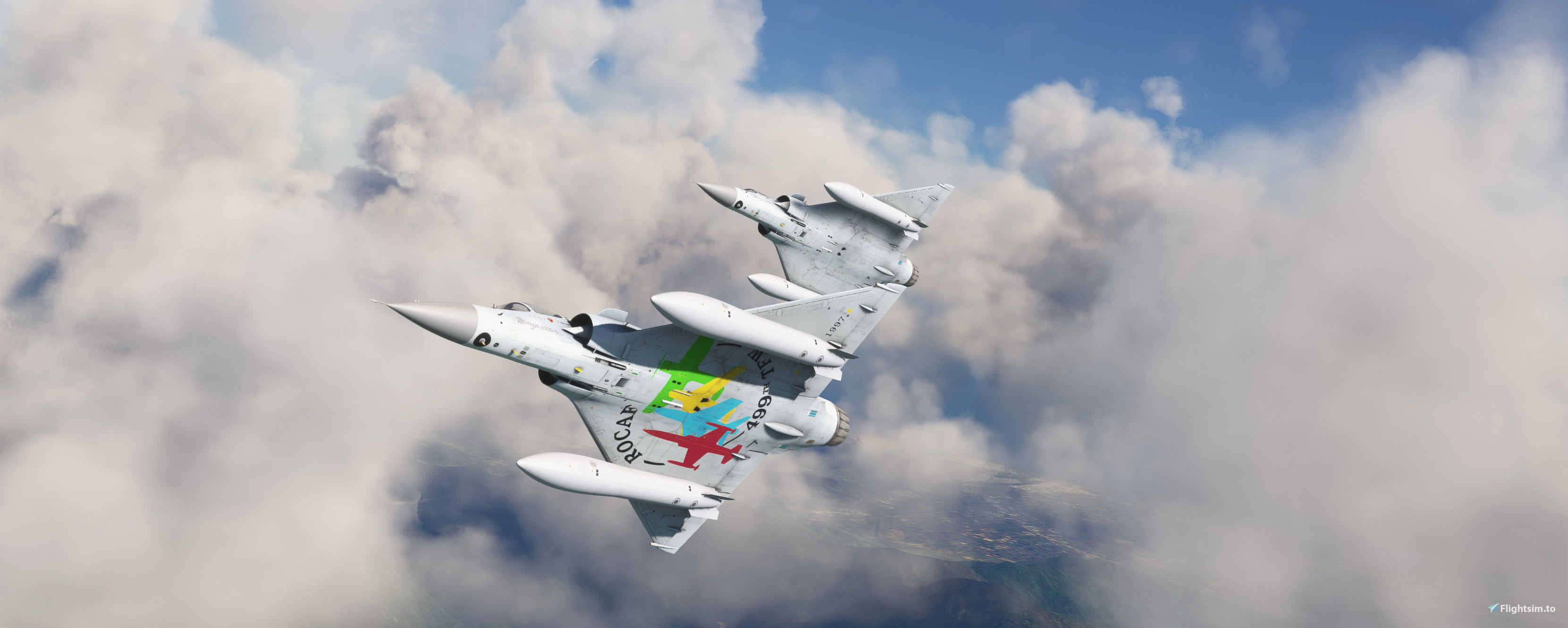
Description
This folder contains two repaints for Dassault Mirage 2000 by Metal2Mesh. It shows two aircraft of the Republic of China Air Force, #2033 in it normal paintscheme, and #2020 in a commemorative paintscheme for 20 years Mirage. Repaint by JanKees. For the model, a conversion from FSX, google 'MSFS Mirage 2000' and it will be (near the) top of the list.
Dassault Mirage 2000 ROCAF #2020 & #2033
Repaint pack for Dassault Mirage 2000 showcasing two Republic of China Air Force aircraft, #2033 in standard colors and #2020 in a special 20th-anniversary livery. Converted from FSX, these detailed repaints are a must-have for Mirage fans.
User Reviews
1 reviews
Version History
No version history available.
Related

Dassault Mirage 2000 EC 1/2 Cicognes 2-EN
Fly in style with the Dassault Mirage 2000 EC 1/2 Cicognes 2-EN repaint, showcasing the French Air Force #46 from EC 1/2 Cigognes based in Dijon. This repaint by JanKees is a visual treat for your Metal2Mesh Mirage 2000 model in Microsoft Flight Simulator.
by jankees

Dassault Mirage F1 N634AX ATAC
Repaint of the Dassault Mirage F1 N634AX of the Airborne Tactical Advantage Company, used for tactical airborne training. This mod is a repaint for the freeware Mirage F1 aircraft by Kirk Olsson and Henk Schuitemaker.
by jankees

Dassault Mirage 2000 Chevaliers du Ciel
Repaint pack for Dassault Mirage 2000 featuring two aircraft from the movie "Chevaliers du Ciel" in 2005. Includes markings from SPA26 and SPA 124, along with unique serial numbers. Repaint by JanKees for the Metal2Mesh Mirage 2000 model in Microsoft Flight Simulator.
by jankees

Dassault Mirage F1 N633AX ATAC
Repaint of the Dassault Mirage F1 N633AX from ATAC, used for tactical training, now available for the freeware Mirage F1 by Kirk Olsson and Henk Schuitemaker.
by jankees
Log in to join the discussion
Log InComments11
You may want to try to shorten the names of some of the folders I used, (e.g. take out the Mirage2000 in all folder names) but then you need to recompile the lay-out.json file
Possibly you can remove it by making it transparant in the textures?