
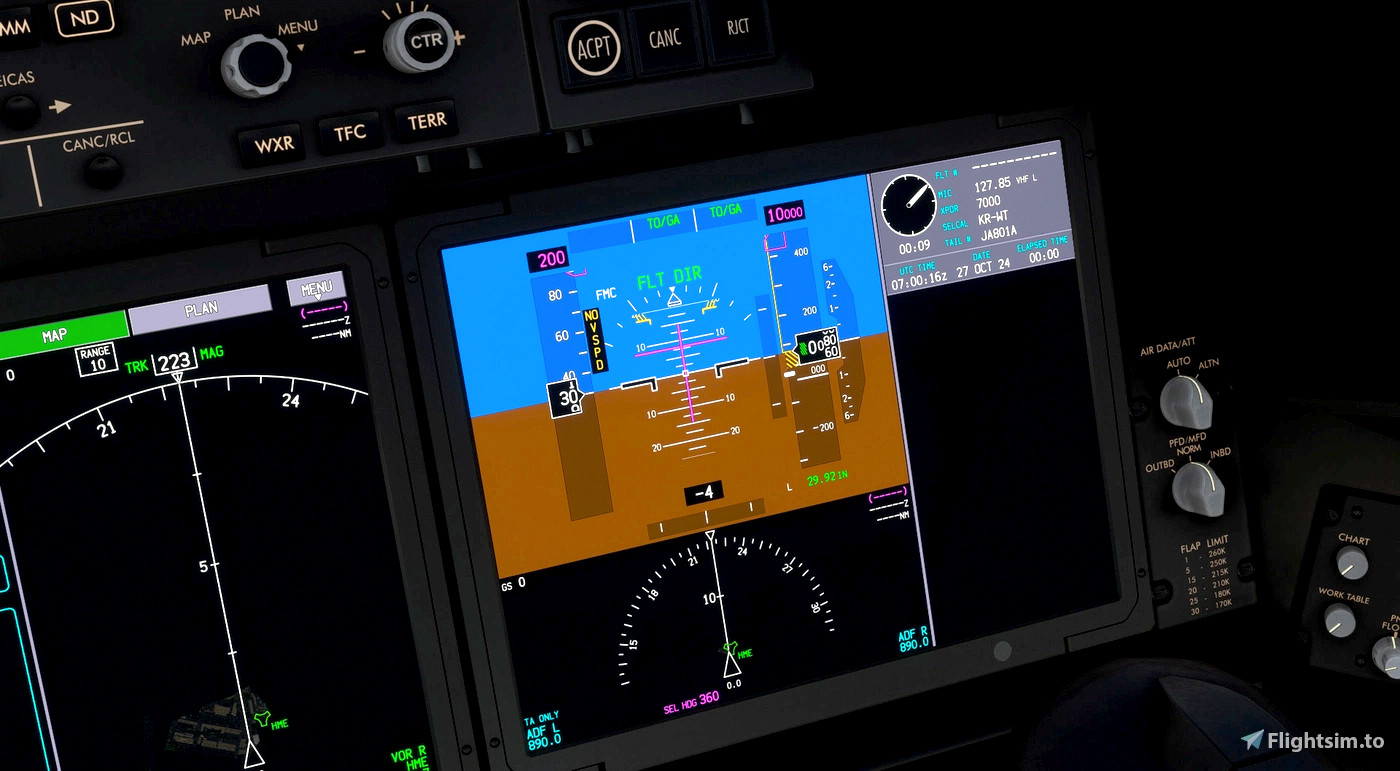
Description
B787 Unmirrored PFD
Can be used for Kuro B787-8 (v3.0.1), Horizon Sim B787-9 (v1.1.2)
(Excl. liveries using their original models/model.CFG)
Most credits goes to Microsoft, ASOBO Studios.
Flight Simulator 2020 © Microsoft Corporation.
"B787 Unmirrored PFD" was created under Microsoft's "Game Content Usage Rules" using assets from Microsoft Flight Simulator 2020 and it's not endorsed by or affiliated with Microsoft.
Microsoft's Rules: https://www.xbox.com/en-US/developers/rules
B788/B789 Unmirrored PFD
"B787 Unmirrored PFD" add-on designed for Kuro B788, and Horizon B789.

User Reviews
3 reviews
Version History
model updated
Related
![Kuro_B787-8 [Req: MSFS2020 Asobo B787-10 (v1)]](https://cdn.flightsim.to/images/25/boeing-787-8-55321-1687446838-eQ9nd.jpg?width=500)
Kuro_B787-8 [Req: MSFS2020 Asobo B787-10 (v1)]
Fly the skies in the Kuro_B787-8 | B787-8 Dreamliner add-on for Microsoft Flight Simulator, requiring the Premium Deluxe Edition (B787-10) to access. Customize your experience with available paint kits and a Discord community for support. Experience the realism and detail of this aircraft, crafted under Microsofts "Game Content Usage Rules."
by Kurorin
![B747-8i All Nippon Airways ANA v3.2.0 [8K ULTRA] (No mirror)](https://cdn.flightsim.to/images/15/JpxoEe03.png?width=500)
B747-8i All Nippon Airways ANA v3.2.0 [8K ULTRA] (No mirror)
Experience the iconic Boeing 747-8i in the livery of All Nippon Airways with this high-quality add-on. Dive into the world of aviation with improved textures and fixed effects to enhance your simulator experience. Compatible with SimUpdate 5, this update brings a more realistic model and instrument fix, offering a detailed and immersive flight simulation.
by Kurorin
![[Navdata] ROAH - Naha Airport](https://cdn.flightsim.to/images/22/naha-airport-roah-5t29p.jpg?width=500)
[Navdata] ROAH - Naha Airport
Enhance your Naha Airport experience with this NavData add-on, merging seamlessly into KAZEs scenery in Microsoft Flight Simulator. Make sure to use V1.4 or later for accurate utilization. Navigraph users are advised not to install for potential compatibility issues. Download now for an updated airport navigation data experience.
by Kurorin
![[Asobo B737 MAX 8] TUI Fleet Pack](https://cdn.flightsim.to/images/27/asobo-b737-max-8-tui-fleet-pack-55321-1734870008-xBE8k.jpg?width=500)
[Asobo B737 MAX 8] TUI Fleet Pack
The TUI Fleet Pack for the Asobo B737 MAX 8 adds a selection of TUI airlines liveries, including registrations from TUI Airways, TUI fly Deutschland, TUI fly Belgium, TUI fly Netherlands, and TUIfly Nordic. Additional liveries and wing markings are planned for future updates. This pack aims to enhance the realism of flying with the TUI fleet in Microsoft Flight Simulator.
by Kurorin
Log in to join the discussion
Log InComments(27)
6 months ago
2 months ago
about 1 year ago
Should have put a description on how to install this but someone already did
about 1 year ago
1. Copy the model.cfg file from Kuro_B787_8\model.v1 into Asobo_B787_10\model.
2. Run MSFSLayoutGenerator.exe with the layout.json file to update the layout.
3. Rename the folder to start with "z" so it loads on top of all other mods.
12 months ago
over 1 year ago
over 1 year ago
over 1 year ago
over 1 year ago
over 1 year ago
over 1 year ago
over 1 year ago
almost 2 years ago
over 1 year ago
almost 2 years ago
over 1 year ago
almost 2 years ago
Should at least have the option to download the old version that works with all liveries.
almost 2 years ago
almost 2 years ago
This comment has been deleted
almost 2 years ago
Other than that looks amazing... Still wondering how you do managed to make it work without any panel.cfg file...