
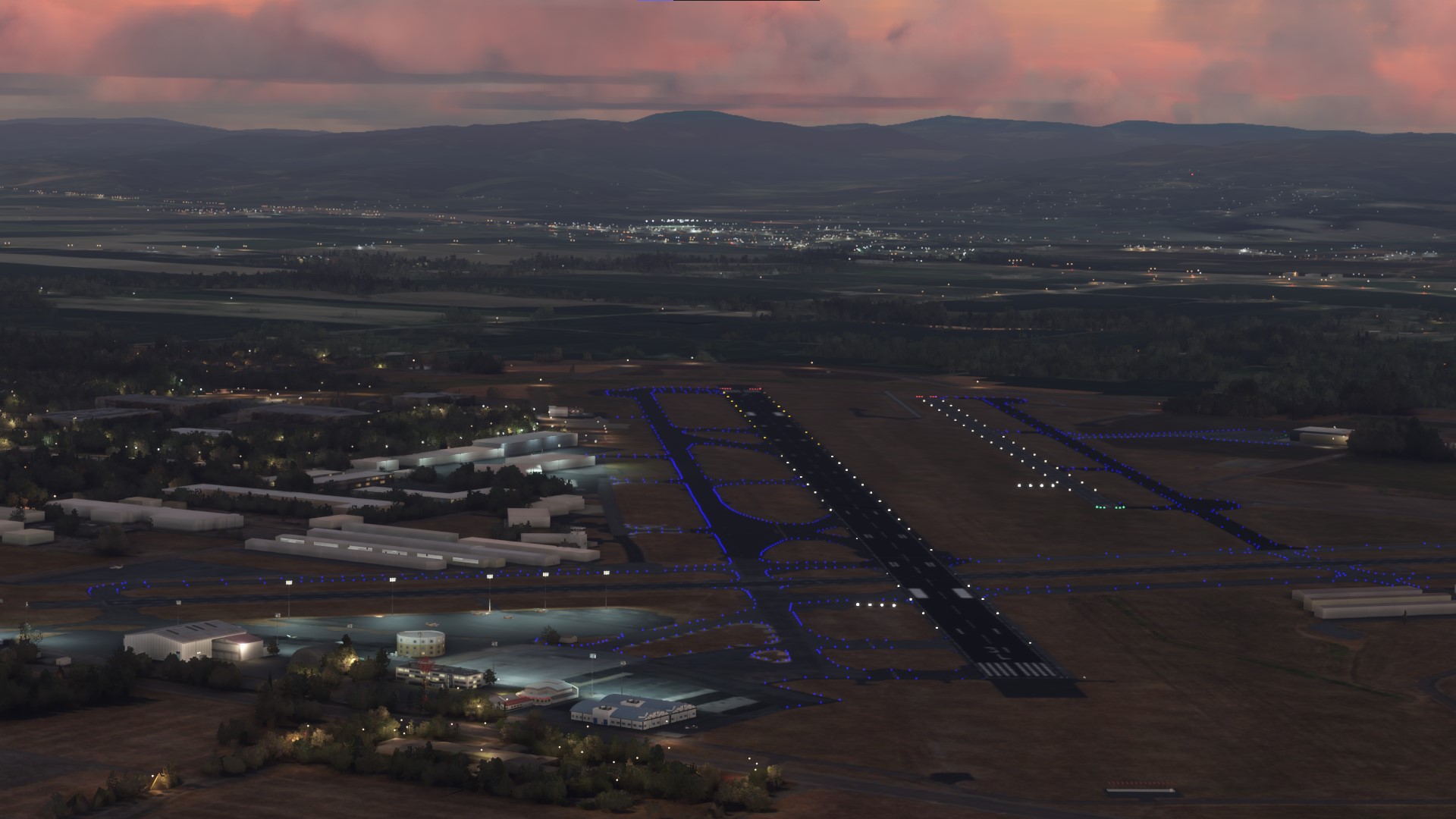
Description
Original Release Date: November 22, 2023
Relase Type: Major Release
Version: 1.0
Current Version: 1.2.0
In Remembrance:
This scenery and any future work I share with this wonderful community is dedicated to my late brother who we suddenly lost in February 2020. You are deeply missed by all of us. My (HIO) Portland-Hillsboro Airport scenery in honor of him, his life achievements, and to his family. This is for you. You are deeply missed by all of us.
Full Project Summary:
KHIO needed some love. A lot has already been done to layout the foundational work ahead. Some textures are custome made me, like the ground markings, and taxiway painted lines. Taxiway lighting along the aprons have been corrected, Incorrect taxiway signs have been relocaed to their correct locations, the elevation of the airport was corrected, the North Airporon has a complete overhall, I added the missing runway 13L/31R, and corrected the patern flow directions on all runways to that of the real airport, and a lot more. The complete feature list can be found in the information below. Fetures added to future releases will be avalible in the change long avalible in the scenary package root folder unless otherise mention here.
This project will remain in an active state of development until it’s completion. All iterations of Version [1.0+] will remain free to the MSFS2020 simming community in conjunction with my self educated learning process. As I learn to create and design the project, it will always be offered to anyone in the community at no cost. Please feel free to help with suggestions so I can continue improving the scenery for all of us to enjoy. I am always eager to hear your suggestions, helpful ideas or useful information, especially from those of you who are more familiar with the airfield. Do not hesitate reaching out and contacting me if you think a specific feature is missing or incorrectly modeled. I want to replicate KHIO as close to its real world counterpart as I can; knowledgeable community input is an invaluable part of the process to achieving that goal.
My commitment to this community is this: all variants of version [1.0+] will always remain free as an alternative option here on Flightsim.to for anyone who can’t afford the commercial version of this project, [KHIO: Portland-Hillsboro Airport v2.0] which is apart of my long term strategy and development roadmap.
Release Notes:
NOTAMS:
NOTICE: To the best of my knowledge and ability, I have included only the stock MSFS2020 library objects in this initial launch release v1.0 other than the custom textures I created myself. If I mistakenly included objects from any 3rd party scenery library, please notify me and I will gladly remove it then replaced with a stock library object as this was my intentions. If in the future I include 3rd party library objects it will be noted and all authors of the libraries will be credited for their hard work.
NOTICE: Several of the auto generated buildings were replaced with MSFS2020 stock library objects as well as additional scenery elements. This was done to enhance the look of the airport. These objects are temporary placeholders only. This is an ongoing development project. Eventually, these buildings, other objects, and more textures will be replaced with detailed 3d buildings to replicate this airfield and the surrounding area as close to the real-world Portland-Hillsboro Airport counterpart as possible.
DISCLAIMER: I did not copy any aspect of anyone’s original work or design into my project. I inspected similar projects for studying purposes only. I drew inspiration from these similar projects but everything found inside my KHIO scenery was designed and created by me.
- This scenery uses my custom materialLib ground paint textures and were made specifically for this project.
- Custom designed documentation that are helpful for sim pilots unfamiliar with the airfield. This includes:
- airport information aid
- airfield layout
- an up-to-date taxiway map
- tie-down apron locations map
- windsock placements map
- other useful information is included for user convenience
General Airport Information:
Portland-Hillsboro Airport is one of three local Airports in the Portland-metropolitan area; all three are managed and maintained by the Port of Portland. It is the second busiest airport in Oregon, serving the needs of the public for general aviation and corporate flights in and out of the airport.HIO is also the home to several aviation school facilities at the airport, assisting as a local hub for new student pilots.
Over the years it has grown more popular as an alternative landing destination for sports teams, high profile celebrities, and politicians. This is due to its out of the way location, and its smaller and more discrete size. Compared to KPDX (Portland International Airport), the state's largest airport, KHIO is a much more accessible option for traffic flying into the metro area. This also makes it a great training opportunity for real-world pilots to practice their ATC communication skills with the professional friendly staffed tower but in a less congested airspace
KHIO is located 15 miles SW of Portland on 900 acres of land. This airport is notoriously known in the Pacific Northwest and across the country as being an extremely challenging airport for pilots who are not familiar with the airfield or newer and less experienced pilots due to its unusual runway and taxiway layout. As a result, the Portland-Hillsboro Airport leads the Pacific Northwest in close calls and safety risks resulting from higher-than-normal runway incursions.
Generalised Feature List:
[NEW] - Added missing parallel RWY 13L-31R from the default MSFS2020 airport
[NEW] - Terraformed (HIO) airport to its correct elevation of 208 ft/63.4 m (surveyed)
[NEW] - Added and repositioned the correct number of windsocks around the airport. (Diagram Reference information can be found in the documents folder included in this package)
[NEW] - Created/Added the painted **“U.S. Customs” ground textures to the Terminal East Apron
[NEW] - Added ongoing construction project along side Twy Alpha next to the fire station
[NEW] - Added airport perimeter fencing and security gates into correct positions
[NEW] - Added an ILS antenna object
[NEW] - Added localizer building and antenna objects that were missing
[NEW] - Added fuel station library objects in front of the out of commission “Mushroom fuel station”
[NEW] - Added custom (HIO) GA parking paint lines used at real world Terminal East Tie-down apron
[NEW] - Added correct number of parking slots to Terminal East Tie-down**
[NEW] - Added correct number of parking slots to Terminal West Tie-down apron
[NEW] - Added Taxiway ID “L” and edge lighting to North FBO (HAI)
[IMPROVED] - Recolored and resurfaced textures on Terminal East Tie-down, Terminal West Tie-down, Center Tie-Down, and other leaseholder aprons to match the real-world counterpart
[IMPROVED] - Replaced all default MSFS2020 taxiway texture markings and painted lines with custom taxiway textures
[IMPROVED] - Updated traffic pattern direction flow on all existing runways depicting real airport operational flows
[IMPROVED] - All runways were updated with accurate missing data
[IMPROVED] - All runways papi light systems were repositioned into their correct locations.
[IMPROVED] - All Airport apron textures were reshaped and realigned to more accurate positions, shapes,sizes, and colors.
[IMPROVED] - All default Airport edge lighting was replaced and repositioned for a more realistic representation of the real-world airport twy lighting system.
[IMPROVED] - Replaced default Generated Air Traffic Control Tower with a closer matched Tower library object
[IMPROVED] - Replaced several default hangers and buildings including the Fire station and the main HIO FBO with default library hangers and objects to improve the look of the airport scenery
Featured Improvements to North FBO (HAI):
[IMPROVED] - Added a default library building object into the existing default generated building to better resemble its real-world counterpart
[IMPROVED] - Added and recolored new apron gnd textures from default library. Now replicating its real-world counterpart
[IMPROVED] - Redesigned entire complex and surrounding area which now includes a feature rich environment closely matching the most current aerial imagery. (Data provided by Google, Bing, and other sources like ODOT.)*
[IMPROVED] - Added the correct GA and corporate aircraft parking slots (*data provided by Port of Portland reports)*
Bug Fixes and Incorrect Information Updates
[FIXED] - Relocated all taxiways, taxiway paths, taxiway signs and taxiway markings to their correct and present-day locations
[FIXED] - Moved the rotating beacon tower and lamp into its correct location
[FIXED] - Terraformed surrounding terrain and removed large blocky generated trees from several problematic areas that broke the immersion experience
[FIXED] - Other minor adjustments and bug fixes that I might have forgotten
[FIXED] - Added the correct GA and corporate aircraft parking slots to the North FBO (HAI) (accurate data provided by Port of Portland reports)
Technical Details:
Installing Instructions
Installation is a straightforward 4 step process.
Step 1 - Download file from Flightsim.to:
After downloading the file from Flightsim.to, you’ll have a compressed zip file titled, KHIO - Portland-Hillsboro Airport v1.+, Where the + represents the current version.
Step 2 - Examine the content:
(Full instructions with an image is included in the README PDF inside the package under the KHIO Bonsus folder.)
For those who are folowing the instructions here — the folder you drag into your commnity folder is.vpacsimulations-khio-airport. It can be found inside the root zipped package you dowloaded.
Step 3 - Extract Folder Into the MSFS2020:
Extract or drag that folder into your MSFS2020 community folder (wherever it’s located depends on where it wqs initially installed).
Alternatively, If MSFS_Addon_Linker is how you manage your addons then you can extract or drag the folder into the folder of your choice within the root folder holding your addons.
Step 4 - Load into MSFS2020:
Donations are now accepted and apprciated but never required.
I hope you all enjoy my improved (KHIO) Portland-Hillsboro Airport
VPac
Comments(10)
Log in to join the discussion
Log Inover 1 year ago
over 2 years ago
over 2 years ago
I assure you that I have no plans to abandon the project. In fact I am currently testing a minor update as I am writing it. I am updating Rwy 13R to reflect the new txy changes reflected in Navigraph charts related to removing txy A2 and adjusting where txy A1 now is placed in relation to the Rwy. Also a few other minor texture fixes. Once I see it working good on my end, I'll be uploading here. It should be available to everyone in the next 48 hours. A much larger update is still on my to do list but I have no ETA.
Thank you again for the kind words. It helps motivate me for sure.
over 2 years ago
it is showing up on my side.Top work, but a few things only pop up, when you quite near to them.
over 2 years ago
I unzipped the 'KHIO - Portland ...' folder and then moved the 'vpacsimulations' into the community folder, same as any other add-on.
I guess it's possible another addon for the Portland area has taken priority of this file but I don't believe I have any other scenery that contains anything for the KHIO airport.
Below is a screenshot of my world map for reference.
https://ibb.co/bBVxRLt
Thanks again for your help.
over 2 years ago
over 2 years ago
over 2 years ago
over 2 years ago
Can you PM me more details on your system environment and some more detailed steps you took to installing the package. For example, did you install it into the traditional community folder or a 3rd party organizer like MSFS Addon Linker. It might make a difference in how I respond to your needed support . My directions to correctly install the addon may differ if it is in its traditional Community folder. For instance, I am not even sure how your MSFS2020 is installed? Are you using a steam addition? This could also have an adverse effect on how it is installed.
If it is an Xbox addition you own, this too could raise issues as I can not confirm this scenery is officially supported inside the console environment. I will add a notation in my docs if this is the case.
All of this will better help me assist you but also help me update the installation instructions based on a more detailed summary in regards to your specific problem.
Thanks for your patience in my follow up response because of the holiday break. I hope I can help resolve your issue. Until then, safe journeys for you when exploring the skies.
Kind Regards
VPac
KHIO | Portland-Hillsboro Airport
KHIO Portland-Hillsboro Airport is my first scenery development project I’ve worked on. It is being shared as a free 3rd party scenery package for MSFS2020 because it is a work in progress and a project to learn the necessary skills needed for the many other future projects I’d like to create.

User Reviews
2 reviews
Location
More Information
Version History
HOT FIX: v1.2.1: General Information: The core scenery package has been restructure, and rebuild. The package utilizes the standardized naming convention, and files no longer referenced in the project were removed. - [RECOMPILED] - Restructured new folder structure - [RECOMPILED] - Created new naming convention - [RECOMPILED] - Removed texture files with inconsistent naming convention. ## Technical Details - This update was for housekeeping purposes only. END v1.2.1 ################# HOTFIX v1.2.2 ## General Information: I’ve made subtle changes to the security gates, and fences to give the ‘walk around mode’ the necessary access points an avatar needs in order to maintain realistic immersion while using this scenery in MSFS2024. - [FIXES] - Rotated segments of several access points on fences and gates around the airport to give the appearance they are opened up during regular hours of operation. ## Technical Details - **IMPORTANT**: Since this hotfix is specific to MSFS2024. Those still using MSFS2020, if you want the fences to remain closed, then make sure you make a backup of the version you have now. Future versions will have the gates open and the new package structure. END VERSION 1.2.2
over 1 year ago