
Description
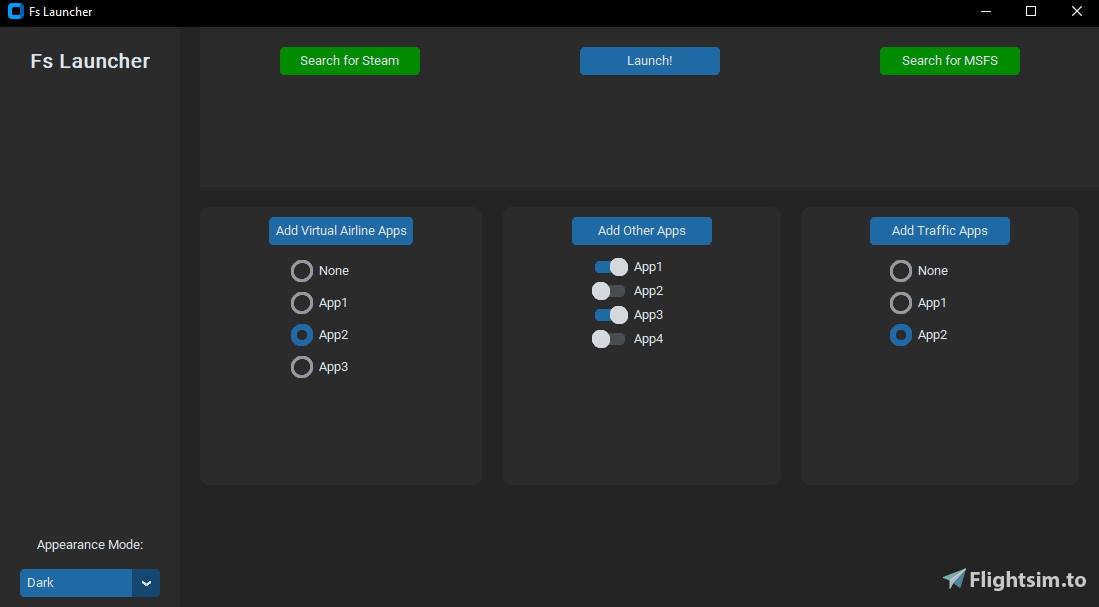
A small application to launch all Sim related apps such as vPilot, Volanta, etc. Just tell the app which other apps you want to run and then press Launch!
Currently the app is in the early stages of development, with more features in development.
Installation Instructions:
Unzip the folder to somewhere on your computer and run the FsLauncher.exe file. The first time you launch press the red “search for Steam” button which will look for steam. The same goes for the other button. Once both are green then it has found all it needs.
To add other apps, use the buttons at the top of the columns.
Upcoming Features:
Profiles/state saving
Copy files, e.g GSX sounds/textures
Notes:
When updating copy the paths.cvs file and then delete the whole folder. This stops you having to re add all the apps.
The latest version should now work with the Ms store version by leaving the steam button red, it should also work with other simulators, but this is not tested.
V1 is an almost complete re-write of the software using customtkinter by https://customtkinter.tomschimansky.com/.
Comments(21)
Log in to join the discussion
Log Inalmost 3 years ago
almost 3 years ago
almost 3 years ago
1. Указываю путь запуска MSFS(store)
2. Подключаю приложения
3. Нажимаю Launch......
Приложения запускаются, Симулятор - НЕТ, конпка Search for MSFS горит Красным цветом
almost 3 years ago
For now try deleting and re-download the app. When using it don’t look for steam just the MSFS executable. So the steam button should be red and the MSFS should be green.
Hope this works but I’ll have a look through the code on my end.
almost 3 years ago
almost 3 years ago
I've done some testing and its likely an issue with the code so looking for a fix now!
almost 3 years ago
MSFS2020 Map Enhancement.exe,2,C:/Program Files/MSFS2020 Map Enhancement/MSFS2020 Map Enhancement.exe
Couatl64_MSFS.exe,2,C:/Program Files (x86)/Addon Manager/couatl64/Couatl64_MSFS.exe
FSUIPC7.exe,2,X:/Addons_MSFS2020/Others/FSUIPC7/FSUIPC7.exe
almost 3 years ago
almost 3 years ago
almost 3 years ago
almost 3 years ago
Unable to point to a program or open the settings
A lot of work has to be done
almost 3 years ago
When you press scan does it open up the file explorer window and allow you to select steam.exe?
almost 3 years ago
almost 3 years ago
Sorry for the confusion.
almost 3 years ago
And that not every app is starting on the same time - since some apps should be started, after MSFS is up and running.
almost 3 years ago
I am planning to add features such as remembering the last configuration you selected but the idea for setups for different adons is a great idea. I’ll see what I can do.
Fs Launcher
A small application designed to launch various flight simulator-related apps such as vPilot and Volanta. Simply select the apps you want to run and press Launch. Still in early development, with upcoming features including profiles/state saving and file copying capabilities. Easy installation by unzipping and running the FsLauncher.exe file.

User Reviews
2 reviews
More Information
Version History
Small bug fix - now able to use the "None" option properly!

over 2 years ago