
Description
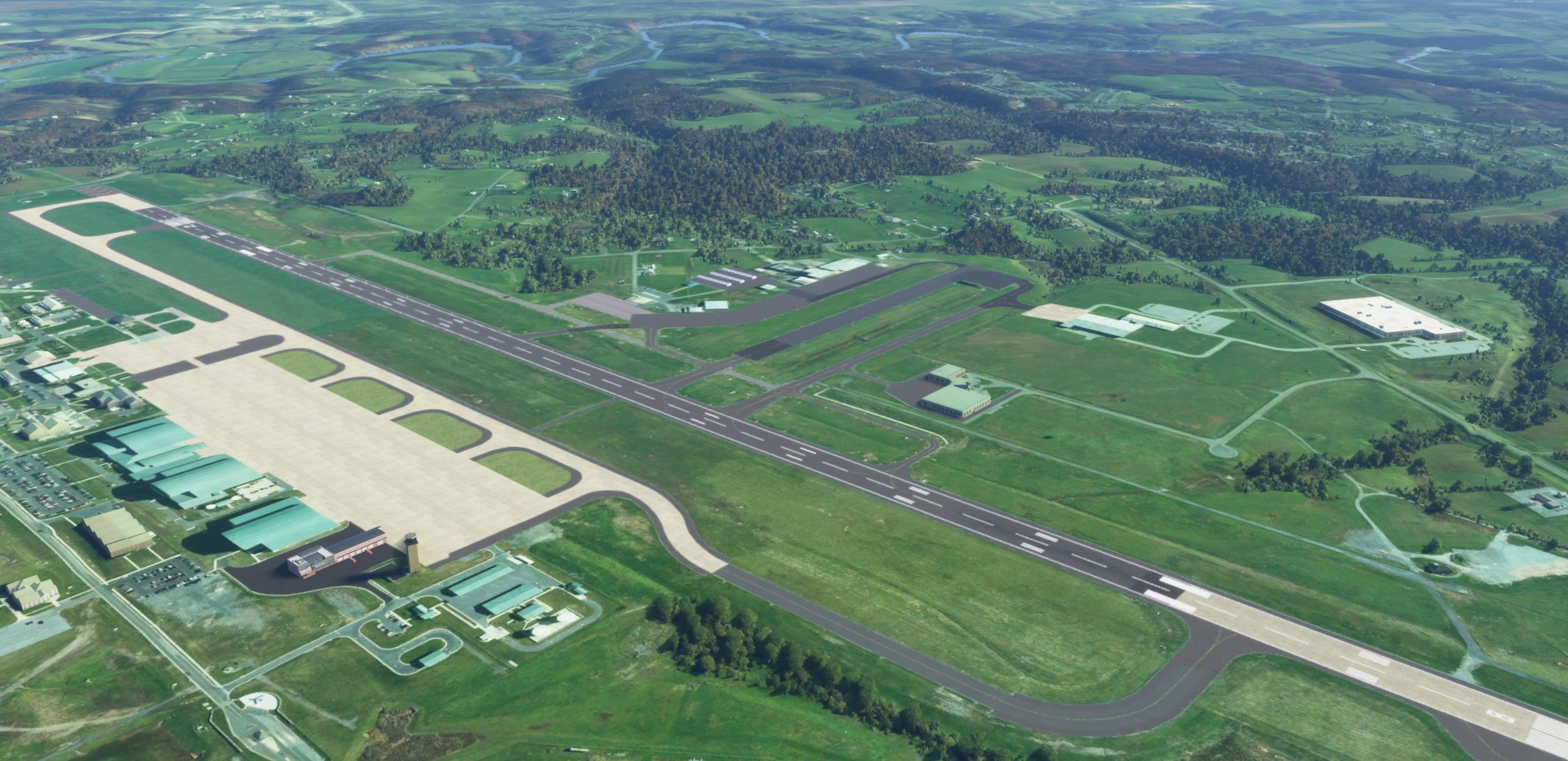
KMRB - Eastern West Virginia Regional Airport (Martinsburg) V.7by NightStalker (Mike W.)
This will be an ongoing project as i plan to model the buildings to match real life. Based off of Google Earth Satallite Photos. A big improvement over the default airport. Taxiway paths are the same as the real airport. Airport does not have taxiway signs or runway signs yet. VASI Light in correct location. Firestation (Placeholder building and vehicles added) Taxiway colors closely matched to real life. Military Cargo and Combat parking spots placed appropiately. Place holder hangers added. Removed construction area and covered with grass with some opacity to blend into the surrounding grass.
To Do: Add buildings among other various beautification tasks.
Installation:Extract and copy "ns-airport-kmrb-easternwv" into the community folder.
0.7- Taxiway Signs Completed- Taxiway Lights Completed- Various Buildings placed (Placeholders)- Various Lighting Placed around the airport (More to add later)
0.6- Taxiway Signs added- Some taxiway lighting added- ILS/Glideslope antenna added- Minor taxiway fixes- Fixed missing apron at the end of runway 08
0.5- Initial release
Feel free to donate to help support me to do more airports.
https://www.paypal.com/donate?hosted_button_id=YCXTFSRNJPVEN
Location
Eastern West Virginia Regional Airport KMRB (Martinsburg)
Enhance Eastern West Virginia Regional Airport (KMRB - Martinsburg) with detailed modeling based on real-life Google Earth Satellite Photos. This add-on features accurate taxiway paths, VASI lights, military parking spots, and placeholder buildings for an improved airport experience. Ongoing updates include adding buildings and enhancing airport aesthetics. Simply extract and copy the files to your community folder to enjoy the latest improvements.


User Reviews
4 reviews
Version History
Changelog v0.8 Started modeling the hangars on the airport Added roads to the airport Various props added Note- The various hangars around the airfield are placeholder. They will slowly be replaced with actual replicas. This mod uses the H135 which is parked on the apron at the Healthnet Airbase. It utilizes a Mercy Air Livery. These will be required to see on in the scenery. If you run into issues, please let me know.
Log in to join the discussion
Log InComments(6)
about 3 years ago
over 4 years ago
I live In Martinsburg it's nice to see this airport I use it as my main airport to fly out of but I do get some blue squares and odd textures doesn't always load in very good
over 4 years ago
Can you get screenshots and locations so that i can look into it? the next iteration will have proper naming in the community folder. This could be a possible conflict.
over 4 years ago
-I am glad you created this scenery. Thank you. Looking forward to your additions. The next information is simply advice.
-Update the name of the modellib.BGL file in all of the scenery files (only some have been processed like this) to reflect MS/Asobo guidelines (Oct. 2020) to give it a unique name, such as adding the 'ICAO code' for airports to the file: Example (ICAO-modellib.BGL) or in this case, maybe kmrb-modelLib.BGL, and then update the layout.json file to reflect the new name. (Your second file needs a unique name as well, maybe kmrb-hangar-modelLib.BGL and then update the layout.json file to reflect the new name.)
-Update the name of the modellib.BGL file in all of the scenery files (only some have been processed like this) to reflect MS/Asobo guidelines (Oct. 2020) to give it a unique name, such as adding the 'ICAO code' for airports to the file: Example (ICAO-modellib.BGL) or in this case, maybe KMRB-modelLib.BGL, and then update the layout.json file to reflect the new name. (Your second file needs a unique name as well, maybe kmlb-hangar-modelLib.BGL and then update the layout.json file to reflect the new name.)
-The Problem: MSFS only reads the first file in the Community folder named modellib.BGL and then uses that file for all others with the same name. Renaming it avoids conflicts with any other scenery in the Community folder and gives your scenery the proper appearance with fewer problems/conflicts with other files in the Community folder.
-The same is true for the 'mycompany' folder. If other companies use the 'mycompany' folder name, then conflicts can occur. EX: kmlb-mycompany or kmlb-hangar-mycompany.
-The same is true for 'mymaterials\ if that ever applies to your scenery. EX: kmlb-mymaterials
-The same is true for 'MaterialLibs\textures\' or 'MaterialLibs\mymaterials\textures\' if that ever applies to your scenery.
-Just remember to update the layout.json file so the entries match the folder or file names.
-I hope you don't this as a criticism of your work, because that is great.
-Read about the issue 'modellib.BGL' for developers at: https://forums.flightsimulator.com/t/scenery-creators-please-move-or-rename-your-modellib-bgl/307563
-There are multiple articles concerning the summary above in the MSFS Forum.
over 5 years ago
almost 6 years ago