
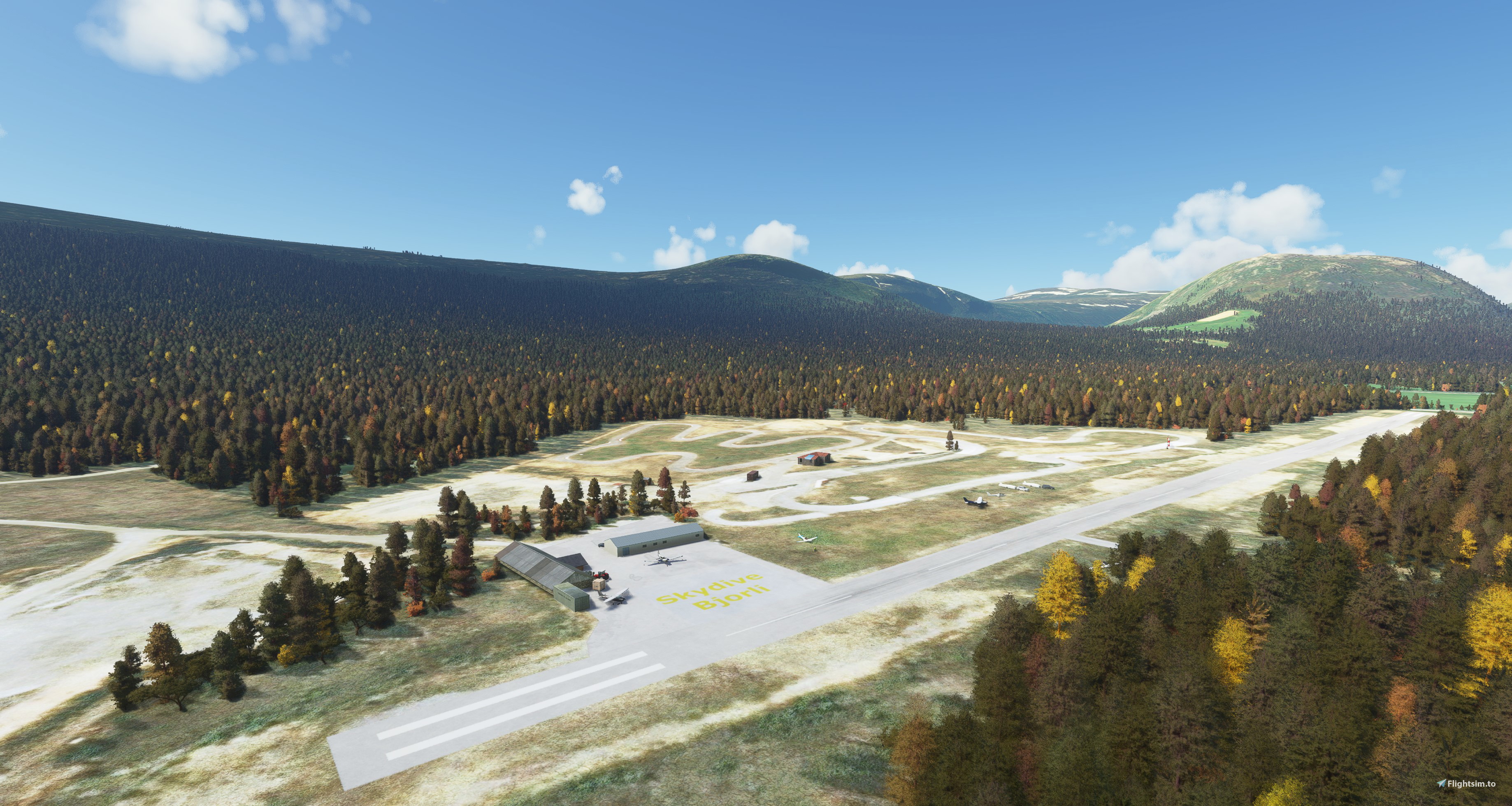
Description
ENLB Bjorli Airport ver 2.0
Oppland - Norway
Location 62°14′7.8″N, 8°14′48.12″E
Elevation 584 m - 1916 ft
Runways 12/30
Length 836 x 12 m - 2740 x 39 ft
Lights no lts
Surface Asphalt (ASPH)
ENLB Bjorli is a small airport located in the beautiful northwestern part of Innlandet county in Norway.
Some with an altitude close to 2000 meters in the northwestern and southwestern directions from the airport.
Bjorli airport is operated by "Lesja Fallskjermklubb" skydiver club.
This package contains of 2 folders.
"ocl-airport-enbi-bjorli-excl" excludes the default Bjorli airport wrongly called ENBI in the sim.
"ocl-airport-enlb-bjorli" are the new ENLB Bjorli airport.
The airport is built with use of default scenery elements, elements from "Mikea.at - AssetPack" https://flightsim.to/file/1923/mikea-at-assetpack and some people from "Dave's 3D People Library" https://flightsim.to/file/5452/dave-s-3d-people-library
You have to have the assetpack installed to get all the elements to show and the people library to get the people to show.
Installation:
1. Make shure Mikea.at - AssetPack https://flightsim.to/file/1923/mikea-at-assetpack is installed.
2. If you want some people around the airfield, install "Dave's 3D People Library" (not mandatory)
- https://flightsim.to/file/5452/dave-s-3d-people-library
3. Copy "ocl-airport-enbi-bjorli-excl" to your community folder
4. Copy "ocl-airport-enlb-bjorli" to your community folder
5. Be aware of wildlife on the runway :-)
Issues (I'm not shure if this still is a issue after SimUpdate 5):
I've encountered double runways due to conflict with the Navigraph AIRAC data. This is because the Navigraph AIRAC data supplies a "dummy" airport if a valid
ICAO coded airport is missing in the sim. Normally, any correct built addon airport should be prioritised above the Navigraph dummy airport, but there are
a bug (surpise :-D) in the sim regardig this.
Workaround:
To correct the problem (this should also correct the problem on airports with similar problems):
1. Close the sim
2. Open the Navigraph Navdata Client and remove the installed AIRAC cycle
3. Delete the content.xml file.
Marketplace version (x:\Users\xxx\AppData\Local\Packages\Microsoft.FlightSimulator_8wekyb3d8bbwe\LocalCache\content.xml)
Steam version (x:\Usersxxx\AppData\Roaming\Microsoft.FlightSimulator\content.xml)
4. Start the sim (make shure all of your addon's are installed).
A new content.xml file has been buildt.
5. Close the sim.
6. Start the Navigraph Navdata Client and install the AIRAC cycle again.
7. Start the sim and enjoy ENLB Bjorli airport!
Thanks to Mikeaat for his assets and BadMed for his people.
Ver 2.0
- Removed a incompatible asset missing textures.
- Compiled with SDK 0.14.1 for compatibility with Sim Update 5.
- Renamed ref MSFS recomandations.
Ver 2.1.1
- Fixed unintended exclution of GA services on all airport (please report if issue still appears....)
- Compiled with SDK 0.16.0
Location
ENLB Bjorli airfield
Explore ENLB Bjorli Airport in Norway, a small airfield surrounded by stunning landscapes. Operated by "Lesja Fallskjermklubb" skydiver club, this package features a new airport layout excluding the default version. With realistic elements and 3D people, enhance your flight simulation experience at an altitude of 1916 ft. Be cautious of wildlife on the runway and enjoy the updated version 2.1.1 with improved features.
Deleted by Creator
This addon has been deleted by the creator and is no longer available.


Version History
Ver 2.1.1 - Fixed unintended exclution of GA services on all airport (please report if issue still appears....) - Compiled with SDK 0.16.0
Log in to join the discussion
Log InComments7
WARNING: This airport (v2) removes all push-back trucks for small airplanes. Not only for this airport, but globally. It probably also has a negative influence on the availability of marshals guiding you to park, but that I can not confirm.
Sorry for that. Thank you for making me aware of this issue. I'm looking in to it, and will upload a new version as soon as possible.
New version uploaded today. Hopefully the problem is fixed.
Great. I will install your airport again.
Hi
Thanks for the job.
Why did you give it "ENLB" ICAO code? The ICAO code in MSFS is "ENBI".
ENBI is Sandviken Heliport in Bergen. ENLB is the correct ICAO code for Bjorli. If you use Navigraph navigational data in MSFS, you will get two Bjorli airstrips on top of each other, one ENBI and one ENLB...
Bjorli Airstrip has wrongly got ICAO code ENBI in MSFS.
https://www.airmate.aero/?page=airport_page&code=ENLB&lang=en
https://www.airmate.aero/?page=airport_page&code=ENBI&lang=en
Thanks for your answer.
The "ourairports site" give me NO-0019 for Bjorli
https://ourairports.com/airports/NO-0019/But the important thing is to be able to found it in MSFS
Thanks for the good job