
Description
DESCRIPTION:
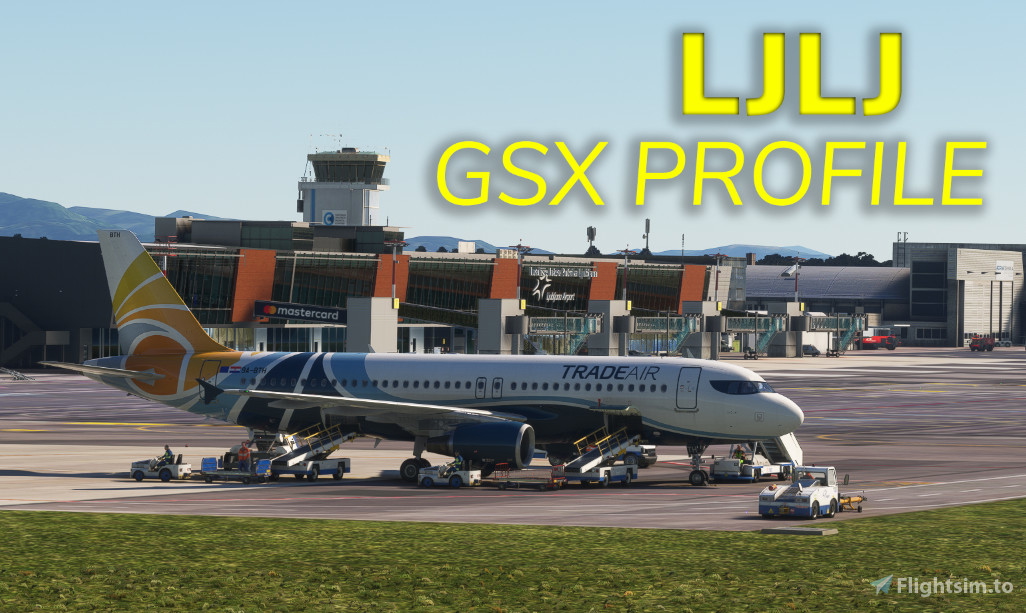
Custom made MSFS2020 GSX Pro profile made for Ljubljana Airport. With Enhancements and fixes from NastranDesign this airport will be as real as it get's. NastranDesign fix will update the general airport positions for all stands and parking positions, there are also vehicle roads redefined so GSX will use correct paths to the parking positions. This GSX addon will position all GSE (Ground Service Equipment) on correct positions and add correct pushback procedures. Fuel truck station is added by NastranDesign and fuel truck will drive all the way from the station to the parking position. There are also Fraport liveries painted on all GSE and other vehicles.
- Correct GSE positions
- Correct and real pushback procedures (towbar option now as default)
- Real GSE liveries
- Stands 1 - 12, 1A, 3A, A18, A20, A22 were configured using Airbus A320 as default aircraft
- Stands 31-38, 32A, 32B, 38L, 38R were configured using Bombardier CRJ900 as default aircraft
- Stands A21 & B13 were configured using Airbus A310 as default aircraft
- Stand A19 was configured using Airbus A340-300 as default aircraft
- Stands 4 & 7 are Walk-In stands
- Stand 8 is Walk-In for deboarding and Bus stand for boarding
- Stands 9 - 11 & B13 are configured for Cargo planes. All other stands are not normally used for Cargo planes in reality!
- De-Icing areas DE1, TWY P, TWY N & TWY M now configured
- More...
IMPORTANT:
- You will need payware GSX Pro addon available HERE
- Profile works only on Scenic Routes payware scenery available HERE
- You need NastranDesign - LJLJ Scenic Routes - Enhancements and fixes available HERE
INSTALLATION:
- Download Scenic Routes scenery and follow installation instructions. Don't forget to install all updates.
- Download LJLJ Scenic Routes - Enhancements and fixes and follow installation instructions. Latest version: 1.5
- Download file of this addon.
- Navigate to your folder for GSX Pro profiles available in C:\Users\Name\AppData\Roaming\Virtuali\GSX\MSFS and drop the .ini file within.
- In the same folder C:\Users\Name\AppData\Roaming\Virtuali\GSX\MSFS copy the following files: Airport-general-fixes.bgl located in CommunityFolder\nastrandesign-ljlj-fixes\scenery\ljlj-fixes
- Open the .ini file and add the afcad path (red line below) in the second line from the start. it should look like this:
[general]
afcad_path = \?\C:\Users\YourUsername\AppData\Roaming\Virtuali\GSX\MSFS\Airport-general-fixes.bgl
[parking 8]
......
......
...... - That's it. Load MSFS2020 and enjoy!
KNOWN BUGS:
- Buses may drive on grass between the apron and TWY A on positions from 31 - 38 due to the GSX logic.
- Position 3A can not use jetway from position 3, due GSX logic of only one jetway for each position.
- No ground service equipment on Adria, general aviation, police, military aprons.
CONTACT:
If you have any questions or find any problem, contact me via email: gal.perne@gmail.com
LJLJ - Ljubljana Airport - Accurate GSX profile
Custom GSX file for Ljubljana Airport made with knowledge from time spend at Ljubljana Airport in real life. All positions are correctly defined with correct ground service equipment and correct pushback procedures. Use this file if you want enhanced Ljubljana Airport.

User Reviews
1 reviews
Version History
Changes: -New main apron layout (stands 13-15, 13A, 15A, 39 and 40 are deleted with Nastran Design fix and new stands A18-A22 and B13 added) - Custom GSE locations for new stands made (A18, A20, A22 stands were configured using A320, A21 and B13 configured using A310 and A19 configured using A343) - Custom pushback positions made for new stands - All nose-in stands at LJLJ now have towbar pushback as default option - Stand 4 is now also Walk-In position - Stand 8 is now Walk-In during deboarding and Bus option is used for boarding - All self manoeuvring stands now have pushback disabled - De-Icing areas DE1, TWY P, TWY N and TWY M defined
Log in to join the discussion
Log InComments(16)
over 1 year ago
about 1 year ago
almost 2 years ago
I still have the old one though, do I keep that one, or is the file no longer needed? Thanks.
almost 2 years ago
over 2 years ago
about 2 years ago
over 2 years ago
about 2 years ago
about 2 years ago
almost 3 years ago
almost 3 years ago
over 3 years ago
somehow the profile doesn't work for me. It says it has 54 unmatched parking positions.. I have copied the .bgl into the folder but I wonder if it has to do with the navdata API?
over 3 years ago
Hey, did you install the NastranDesign Scenic Routes - Enhancements and fixes?
over 3 years ago
Hi, yes I have installed it and also set the priority to 1 in the .xml
Idk what's wrong, but I have found out that GSX wants the gates to be named differently (like for "Gate 5" it wants it to be named "Gate A 5", if I rename the gate it works, kinda strange
over 3 years ago
Hmm, that's really kinda strange. It should work without problem on the latest version of the NastranDesign Scenic Routes. We worked together to name all the gates correctly so it shouldn't be a problem. Will see if anyone else reports same problem.
over 3 years ago
Hey, another user has reported the same problem with stands but this is not directly connected to my addon for GSX file but it connects to scenery.
Mistake was probably made when installing NastranDesign Scenic Routes addon (that was the case when checking with another user). You should check if you have correctly installed the scenery. The main problem is that the scenery priority is set incorrectly (check information in his description) - set scenery priority to "1" and stands will be corrected as at the moment the airport layout is still the default one and not the one from NastranDesign.
If problem still persists you should contact NastranDesign.