
Description
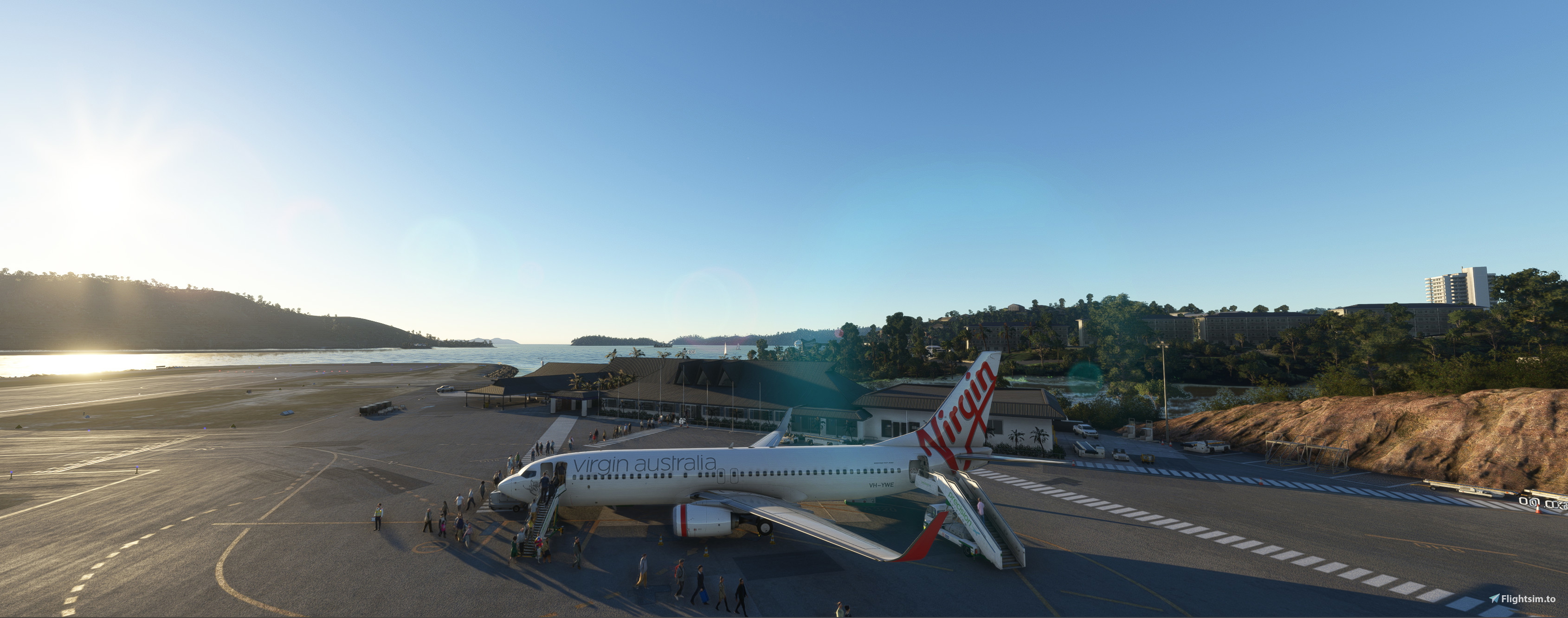
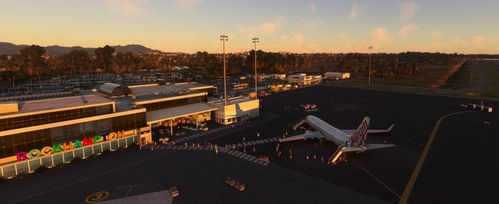
NEW GSX Profile for YBHM airport, applying to AUscene's outstanding payware scenery add-on. This profile is designed to suit the PMDG 737-800.
Applies to bays 1A, 2, 4 and 5. No pushback is required for any of these bays and all ground equipment is clear of aircraft. Passenger walking paths are tailored to the terminal doors and pathways, for all bays.
I have allocated bays 1A and 5 to VA, and 3 and 4 to QF. In real life, they use any bays available, but in the GSX handling, using these bays ensures VA equipment handles VA aircraft, and QF equipment handles QF aircraft.
In the add-on scenery, there is no mention of Bay 1, but there is a Bay 1A. Bay 3 is currently missing. (This provides parking opposite to Bay 2). Be careful to follow the lines for Bay 1A as they are almost indistinct in the scenery. Keep an eye out for the marshaller too.
If you either spawn or arrive into YBHM, ensure you select GATE not Parking so as to accommodate the 737.
To install, unzip from the folder and place the configuration file in the pathway:
c:>users>users>AppData>Roaming>virtuali/GSX/MSFS (or your equivalent).
If you have any comments for improvement or change, please feel free to suggest.
Comments(9)
Log in to join the discussion
Log Inover 1 year ago
almost 3 years ago
I don't actually think this works. I'm having the same issue as the other poster - no options for gate, only parking. Looks like something isn't quite right.
Edit: I take it back, it seemed like I needed to run the GSX live updater. It turns out it wasn't reading the correct BGL for the airport and was picking up the official version and not the payware. Works perfectly now.
about 3 years ago
Hi! I just tried it with the PMDG 737 800 and GSX told me there is no parking area big enough exept the two runway ends. Any chance to fix that?
about 3 years ago
Odd, as I fly the 800 in regularly without that message. Will look again though....and advise.
OBI90 is that spawning at HM or flying in there?
about 3 years ago
Hi Obi90 I've had another look both spawning and arriving. There's no issue if you select GATE (not parking). Any gate (1A (but parks at 1) or 2,4,5) will work fine for the 737-800. Hope OK for you now
about 3 years ago
Hey Thx for the quick reply! I flew there from Cairns but I try it later again. I have to say I am new to GSX so there might me an error on my side. But I´ll let you know!
about 3 years ago
that's good. I find GSX (generally) good - there are some issues with it and it can usually be 'tweaked' a little, but it does have some limitations. See how you go anyway...
about 3 years ago
I send you a PM. Maybe we can find whats wrong
Thx!
GSX Profile (new) - YBHM (HTI) Hamilton Island Qld (Scenery by AUscene)
GSX Profile for YBHM airport, applying to AUscene's outstanding payware scenery add-on. This profile is designed to suit the PMDG 737-800. Applies to bays 1, 2, 4 and 5. No pushback is required for any of these bays and all ground equipment is clear of aircraft. Passenger walking paths are tailored to the terminal doors and pathways, for all bays.

More Information
Version History
V1.2 Bay 1A Stop Point Re-calibrated to prevent pax walking into Stairs
Related
GSX Profile - YBRK (ROK) Rockhampton Qld (ORBX Scenery)
Following ORBX's release of YBRK for MSFS2020, this GSX profile has been created to suit this scenery. It is designed for the PMDG 737-800. The ground apron markings are superb and clearly delineate the most relevant parking bays. Accordingly, for handling and catering services, Bays 1 and 2 have been allocated to Virgin Australia, and Bays 3 and 4 to Qantas/Jetstar.
by Transair
GSX Profile - YBSU (MCY) Sunshine Coast Qld(Scenery by Shunt's).
GSX Profile for YBSU airport, for use with Shunt's excellent scenery. Applies to bays 12-18 with common pushback direction to facilitate both runway operations. Ground Equipment clear of aircraft. Passenger walking paths tailored to the terminal doors and pathways, for all bays
by Transair
GSX Profile - LGHI (JKH) Chios, Greece (Scenery by inibuilds) v1.1
GSX Profile for LGHI (JKH) Chios airport in the beautiful Greek Islands. Designed to fit the scenery of inibuilds. Bays 1 and 2 are designed to suit the PMDG737-800, although in real life most airport schedules are serviced with ATR42 and ATR72 aircraft. All equipment is parked away from the bays and passenger walkways are provided.
by Transair
GSX Profile - YBRK (ROK) Rockhampton Qld(Scenery by Shanman).
This is a GSX profile for Rockhampton Airport in Queensland, building on the outstanding scenery by Shanman (at https://flightsim.to/file/26236/rockhampton-ybrk) Bays 2B and 3C have been allocated to Qantas (handling/catering) and bays 4D and 5E to Virgin Australia.
by Transair
9 months ago