
Description
This is ONLY for the payware F-35 that has weapons. This is NOT, for the Market Place version.
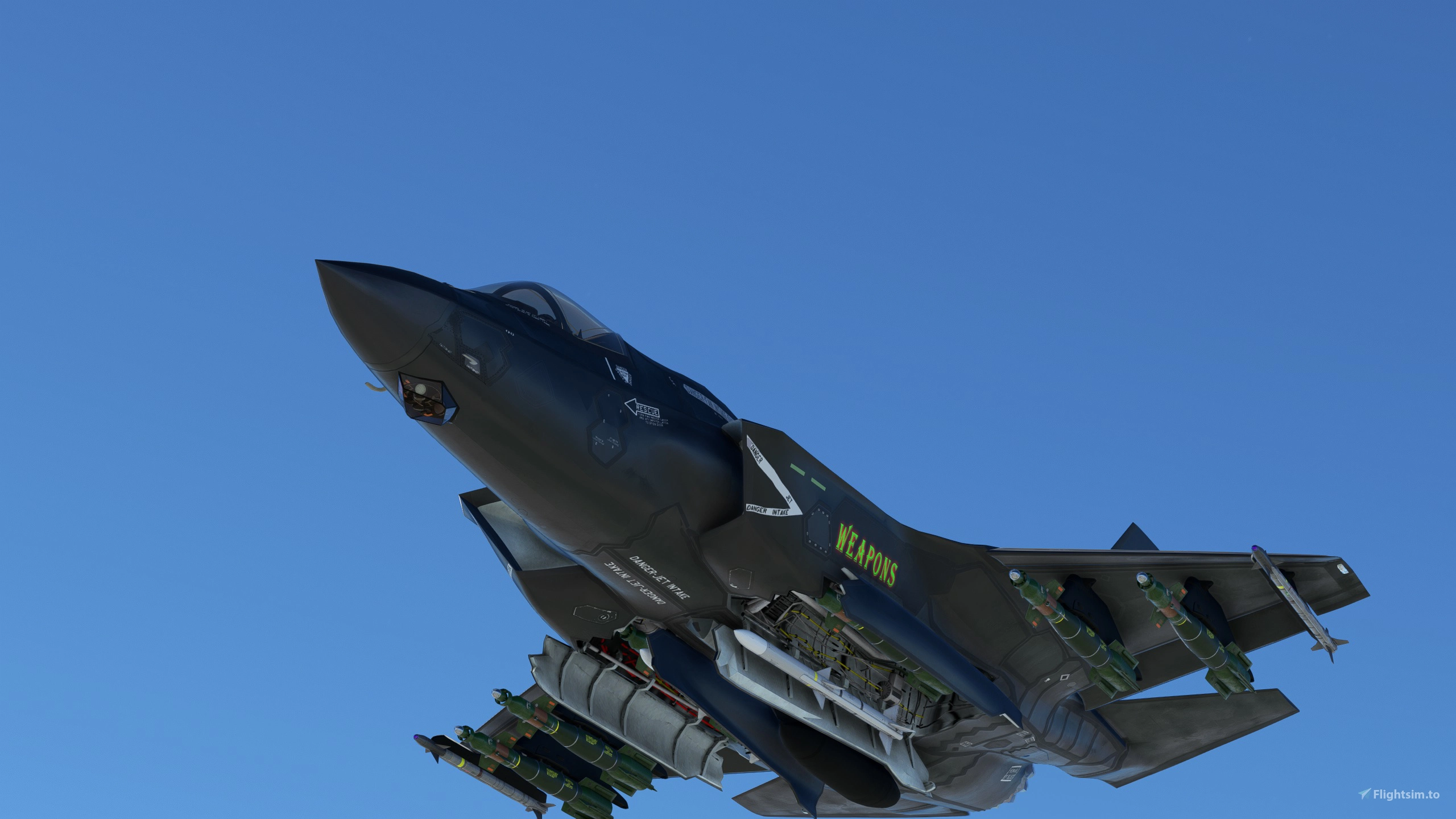
New weapons pack for all 3 F-35 variations. These are new custom textures for all the weapons on the Joint Strike Fighter. All textures are 4K.
All weapons with the new update have been completely retextured to be as close to accurate as possible.
STILL NOT FIXED: The new update has issues with it. All 3 variants have the AIM-120 inside the bay at stations 4 & 8 by default. You will see the fins if you load a GBU in the mentioned bays. The F-35B also has by default the AIM-132 without pylons when loaded in game. Also, on the F-35B, if you load station 1 & 11 at 200, you will have both the AIM-9X and AIM-132 on the wing tips. Dino needs to fix both of these ASAP!
For just the pylons to show without weapons, 1 & 11 should be 180. 2, 3, 9, 10 should be 300. Again, for pylons only without weapons.
F-35 Weapons
A new weapons pack for all 3 F-35 variations with custom 4K textures. The update enhances the accuracy of all retextured weapons. Note: there are known issues with the placement of certain weapons that the developer is working to fix. Adjustments to pylon settings can display pylons without weapons.


User Reviews
4 reviews
Log in to join the discussion
Log InComments(54)
7 months ago
6 months ago
5 months ago
over 2 years ago
over 2 years ago
over 2 years ago
over 2 years ago
over 2 years ago
over 2 years ago
Sorry for late response because I didn't find out your reply..
The CTD was suddenly happened. I had no idea whether it comes right after put your mod to my community folder or it comes after that. So, I tried to find solution by myself first.
(1) removing all mod in community folder => no CTD comes
(2) removing each portion in community folder => only aircraft portion brings CTD
(3) check one by one in aircraft portion in community folder => found out CTD is unfortunately happened related to your mod.
I tried to many times with/without your mod. I'm sorry to say that CTD definitely comes with yours.
For the safety's sake, I did do this trouble shooting after reinstallation of MSFS.
If there is no one reported this happening, there is a possibility that CTD appeared only my PC. And it means that it may not caused by your mod. Ok, I agreed with you. There is no proofing that your mod is origin of the issue. It's not fair. I will remove one star evaluation on your mod.
Thanks for your attention.
over 2 years ago
I wish I could help, but I'm not sure I can.
over 2 years ago
over 2 years ago
over 2 years ago
over 2 years ago
over 2 years ago
over 2 years ago