

Description
Cessna C172 - Livery "Blue and Orange" Classic
This is a repaint of ANN0V's great N12860 livery. Many thanks for letting me use it as a template. With this version the tail number can be changed.
This livery will work with the following C172 versions:
Asobo C172 Classic
Asobo C172 Classic (Skis)
Asobo C172 Classic (Floats)
WB-Sim C172 Classic
WB-Sim C172 Classic (Skis)
WB-Sim C172 Classic (No Pants)
WB-Sim C172 Classic (Floats)
Bagolu C172 Classic (No Wheel Fairings)
Installation:
Just drop into the Community folder.
Happy flying
Archer374
Cessna C172 - Livery "Blue and Orange" (Classic/Floats/Skis/Bagolu/WB-Sim)
A classic Blue and Orange livery for the Cessna C172, now customizable with different tail numbers. Compatible with various versions including Asobo and WB-Sim variations. Simply drag and drop into your Community folder for easy installation. Happy flying!

User Reviews
7 reviews
Version History
- recreated the whole file structure and finally fixed the problem with AP, Transponder and DME not switching on with the WBSim addon - optimised the fuselage texture
Related
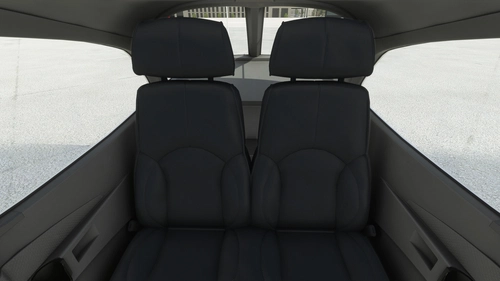
Asobo + WBSim + Bagolu Cessna C172 (Classic and G1000) - Grey Cockpit with Dark Seats (TWO versions)
Enhance your Cessna C172 experience with this mod featuring grey cockpit with dark seats. Compatible with various Asobo and Bagolu C172 models, choose between two versions for a customized look. Simply download, install, and enjoy the new interior design created by Archer374.
by Archer374
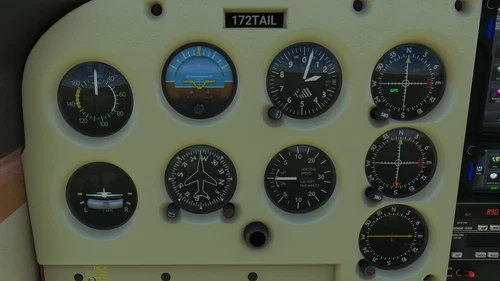
Bagolu FR172 Reims Rocket + C172 Tail Dragger - Instrument Mod
Enhance your flight experience with this mod that updates the fonts and faces of dial instruments for the Bagolu Cessna C172 Taildragger and Bagolu FR172 Reims-Rocket aircraft. Bring back a more Cessna-like look to instruments such as tachometer, airspeed indicator, and gyro compass, among others. Choose between tan or black panel covers during installation to customize your cockpit to your preference. Join Archer374 and enjoy a refreshed cockpit experience in Microsoft Flight Simulator.
by Archer374
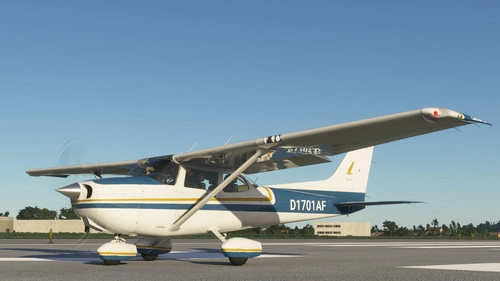
Cessna C172 - Livery "Blue and Orange" (G1000/Floats/Skis)
This Cessna C172 add-on features a vibrant "Blue and Orange" livery with G1000, floats, and skis compatibility. Easily customize the tail number with this repaint of ANN0Vs N12860 livery. Simply drop it into your Community folder to enjoy.
by Archer374 / ANN0V
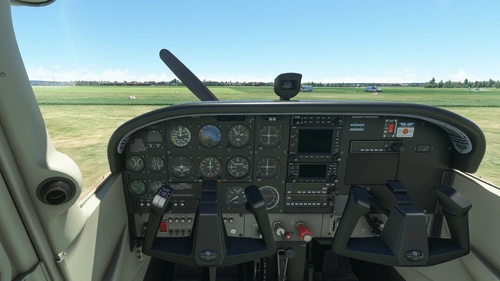
Asobo + WBSim + Bogalu Cessna C172 (Classic and G1000) - Brown Seats with Tan Interior
Enhance your Microsoft Flight Simulator experience with the Asobo + WBSim + Bogalu Cessna C172 add-on, featuring a modernized interior with brown seats and tan accents. This modification provides a fresh look for your training aircraft, compatible with various C172 Skyhawk models and select improvement mods. Simply drag and drop the files into your Community folder to enjoy the updated cockpit design by Archer374.
by Archer374
Log in to join the discussion
Log InComments(29)
about 1 year ago
P.S. Sorry, the non working MFD softkeys are "Lean" and "System". They appear greyed out, and their respective pages don't work. Thanks again
about 2 years ago
over 3 years ago
Thanks for fixing this! Glad I wasn't going crazy ;)
https://flightsim.to/file/5101/cessna-c172-blue-and-orange-livery-classic/329431
over 3 years ago
Awesome livery but I have a problem. The transponder screen does not show anything when it is on and the garmin does not use the Working Tittle version
over 3 years ago
I'll have to check. Thanks for telling me. Haven't used the C172 Classic since I got the WBSim version
Could you send me a PM with a screenshot, please?
over 3 years ago
With the update, the livery is perfect. Thanks!!!!
over 3 years ago
Thanks for your feedback. Glad I could solve it.
over 3 years ago
Hi. This doesnt seem to work with WBsim C172. Im not a pro on MSFS addon file structure and whatnot, but it doesn't seem that there is anything in the file that assigns the texture to WBsim or Bagolu's C172. I can only see (in the aircraft CFG) that this texture will only be on the Asobo C172....can you please help? Would really like to have it on the wbsim (liveries with custom reg for WbSim C172 are very rare). Thanks so muc
over 3 years ago
Thanks for the heads-up. Seems I uploaded the wrong file. Sorry about that.
Just did an update. Please try again and let me know.
over 3 years ago
No problem! Thank YOU for sorting it out so quickly. Just took it for a spin with the wbsim mod....works perfectly. Would really love if you could do more custom reg liveries for the wbsim. Would reall really appreciate it. Thanks again for this one though, will be enjoying it for a while!
over 3 years ago
FYI doesn't show up for the latest WB_sim 172 variants (with their official WT GNS530 fix). Livery looks superb so hopefully this can be fixed.
over 3 years ago
So it did show up for the previous one?
I'm using the 1.0.6 version. Don't know anything about a WT GNS530 fix. Where did you get that?
over 3 years ago
I don't know if showed up previous to the GTN fix, sorry. Only just obtained the wb-sim. The GTN fix was posted on their discord yesterday. https://discord.com/channels/955520899094818886/1067566792622473286
about 4 years ago
I've got an issue with the transponder not displaying properly with this livery - the instrument is there of course, but the screen remains empty. Nothing is displayed. Any thoughts?
about 4 years ago
Can't have anything to do with the livery as far as I can see. Sorry to ask, but: did you turn on the transponder? Mine is often switched off even if avionics are on.
about 4 years ago
Haha yes I did turn it on. And tried out all the modes too ;) it even lights up, but the ‘LCD’ remains empty. I don’t know, maybe a glitch. Will try again later.
Usually when there are issues like this, I check whether the livery includes a panel.cfg since that is often the offender, and this one does, so I thought I’d ask
over 5 years ago
Well i am looking for a new interior based on a r182 interior, i have captures.
over 5 years ago
send them over via PM. I'll have a look at them
over 5 years ago
Excuse me for bothering you, but can you make a custom INTERIOR only for the C172 classic?, if there is any charge, tell me please.
Thanks.
over 5 years ago
No bother. What did you have in mind? Incidentally I finished a grey and black interior for the C172 yesterday. But I haven't found a way to make a custom interior for Carenado or encrypted Asobo planes yet. They don't work "drag and drop" as with the Arrow or most other planes. You'd have to change the files in the aircrafts folder manually.