
Description
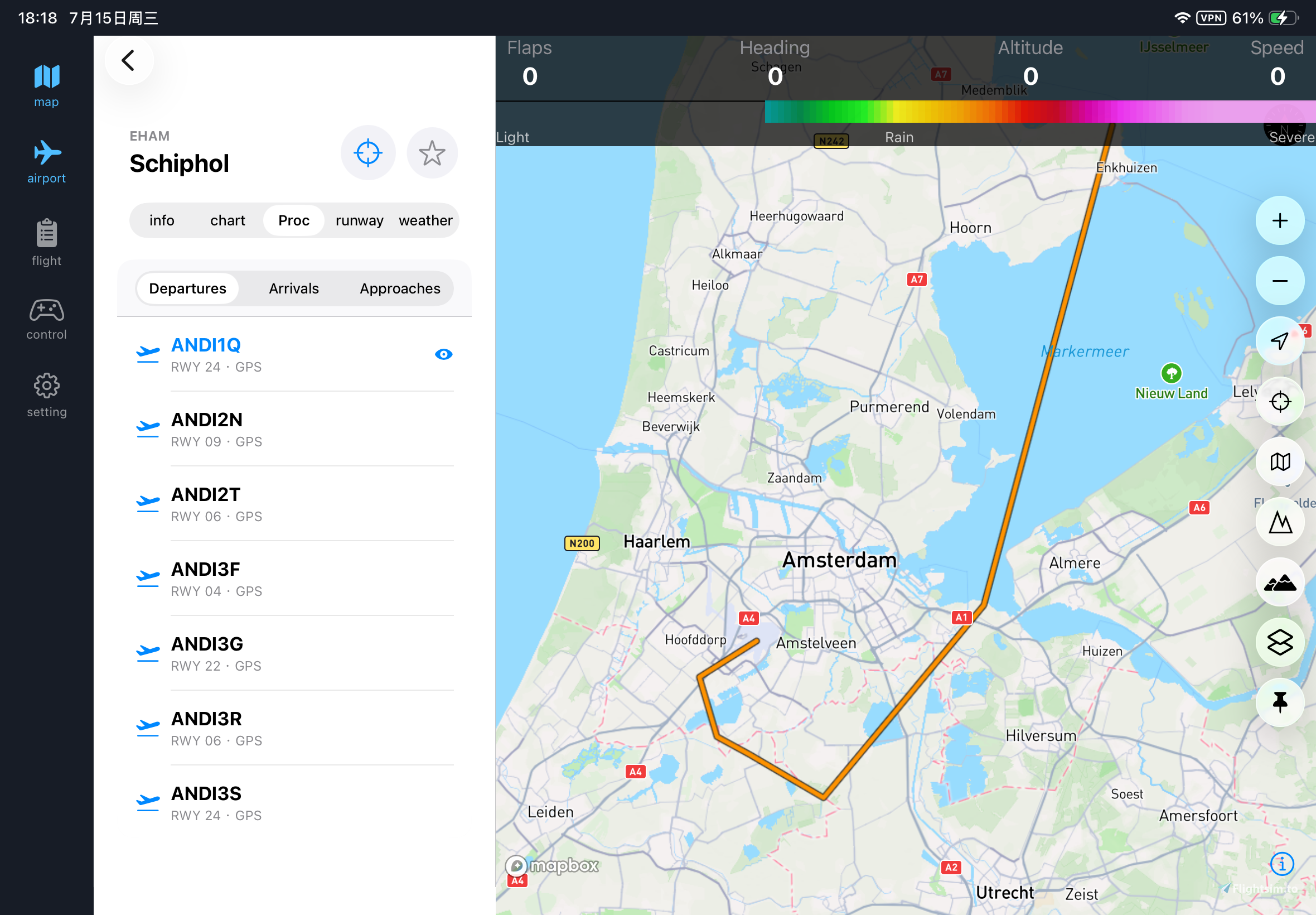
MSFS MAP NG is now avaiable on iphone and ipad,you can get it from App store.
MSFS MAP NG is the next generation companion map app of MSFS2020/2024 on the mobile device.
I just release it on Google Play and App Store
News :msfs map ng now support Panel Streaming
Features:
- 120fps full animation!It is much fluenter/smoother than other similar app such as Little nav map,Navigraph Chart etc.Watch video from https://youtu.be/heI260NuG18
- High resolution vector map
- 65000 + charts
- you can see your plane' s aviation info such as flaps、airspeed 、altitude、heading and etc
- way point,airway,VOR,NDB,airspace,airport and other info(updated every month!)
- 9 different map styles include satellite
- weather radar map layer
- dynamic terraindisplay(watch the demo video from https://www.youtube.com/watch?v=E2_YP0kBQxQ)
- vertical profile,you can see the elevation chart 100nm ahead of you! The elevation data is from NASA.
- airport search and 3D airport preview(https://www.youtube.com/watch?v=J8314ypZMDc)
- find nearest airport
- weather info of airports include META and TAF
- import flight plan from simbrief
- import flight plan from local storage.
- open flight map
- FAA VFR sectional chart map style
- airport approach,SID,STAR route
- VATSIM layer
- panel stream,no popout needed!
Features under development
- multimap display
- 3D Terrain +3D plane model
note:The ios version only have the fundmental furtures.
Installing:
1.Download MSFS MAP NG app from Google play
2.Start Microsoft Flight Simulator 2020
3.Download MSFS MAP NG server.zip ,unzip it on your computer
5.Start MSFS MAP NG server by open MSFS MAP NG server.exe and get your ip address in the console.
6.Open the MSFS MAP NG appication on your phone/tablet and enter your ip address(make sure your phone/tablet and computer connect to same network!) If the connection fails, there may be a problem with the firewall, you should add port number 7788 to the inbound rules of the firewall or just close the firewall.
7.Click CONNECT button and enjoy your fly!
If you have any problem or advice join the discord server https://discord.gg/e2Ghjcz6 or contact gshengyue1996@gmail.com.Suggestions welcome。
MSFS MAP NG Server
Moving map and charts for MSFS2020/2024, with terrain radar, metar,TAF,vatsim,runnway,FAA sectional charts and etc

User Reviews
5 reviews
Version History
MSFS MAP NG now support panel Streaming.
Log in to join the discussion
Log InComments(54)
about 2 months ago
4 months ago
6 months ago
Webservice start faild:HTTP could not register URL http://+:7788/. Your process does not have access rights to this namespace (see http://go.microsoft.com/fwlink/?LinkId=70353 for details).
at System.ServiceModel.Channels.SharedHttpTransportManager.OnOpen()
at System.ServiceModel.Channels.TransportManager.Open(TransportChannelListener channelListener)
at System.ServiceModel.Channels.TransportManagerContainer.Open(SelectTransportManagersCallback selectTransportManagerCallback)
at System.ServiceModel.Channels.TransportChannelListener.OnOpen(TimeSpan timeout)
at System.ServiceModel.Channels.HttpChannelListener`1.OnOpen(TimeSpan timeout)
at System.ServiceModel.Channels.CommunicationObject.Open(TimeSpan timeout)
at System.ServiceModel.Dispatcher.ChannelDispatcher.OnOpen(TimeSpan timeout)
at System.ServiceModel.Channels.CommunicationObject.Open(TimeSpan timeout)
at System.ServiceModel.ServiceHostBase.OnOpen(TimeSpan timeout)
at System.ServiceModel.Channels.CommunicationObject.Open(TimeSpan timeout)
at gsytest.Program.startRestService(String ip) in F:\Study\.Net\FsConnect-master\src\gsytest\Program.cs:line 164
6 months ago
6 months ago
6 months ago
8 months ago
10 months ago
https://www.youtube.com/watch?v=nRmp5bjRTQE&t=11s
11 months ago
Since last update no way of use anymore due to command line behind the taskbar of the tablet.
also turning the screen wont fix it cause the taskbar moves with the angle of the screen.
on the phone it works with turning the screen.
I use a Samsung Tablet S10
thats the reason why I wont buy it yet
11 months ago
about 1 year ago
about 1 year ago
The heading display in the header is incorrect beyond 180 degrees. Negative values appear.
over 1 year ago
Your ip address is 192.168.1.85
Connecting to Flight Simulator...
Connected to Flight Simulator
Application: KittyHawk
Application Version: 11.0
Application Build: 282174.999
SimConnect Version: 11.0
SimConnect Build: 62651.3
Connect success to Flight Simulator !
IF no I have this after :
msfs could nt create Simconnect.cfg file: access denied
websservice start faild : http can ' write URL //*:7788. the process has no access rights ,bur firewall are stopped , and its the good IP adress?
in both choice nothing work same when I stop the firewall
can you help me?
ty.
over 1 year ago
Your ip address is 192.168.1.85
Connecting to Flight Simulator...
Connected to Flight Simulator
Application: KittyHawk
Application Version: 11.0
Application Build: 282174.999
SimConnect Version: 11.0
SimConnect Build: 62651.3
Connect success to Flight Simulator !
If you see that, it means the server connect to the game successfully.
over 1 year ago
almost 2 years ago
almost 2 years ago