
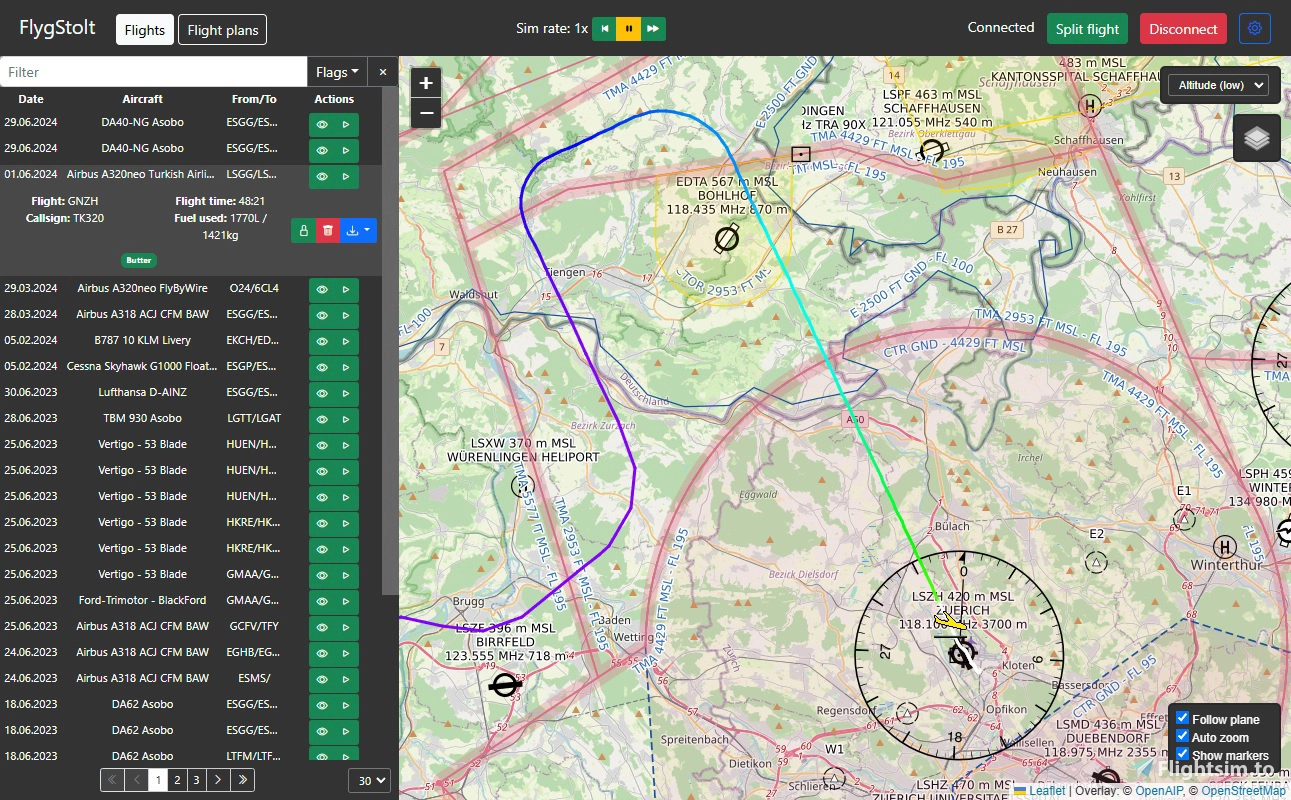
Description
FlygStolt - Flight Journal & Replay
Description
FlygStolt is a standalone flight recorder and replayer for MSFS2020. The goal of this app is to have several different simple functions in one single small app.
The name is a mockery on a swedish word flygskam ("shame of flying") and means "proud to fly".
Versions 1.4.5+ will now hide to tray!A new "Split flight" function was added (primarily for bush flight activities). In order to use it the following conditions must be met: The plane must be on ground and not moving after being airborne at least once.
NEW IN 1.3.0+: ReplaysReplays are still under development and there might still be some issues. More things to come later.
It is recommended to set DB saving interval to 1s in the app and also disable crash damage in the sim.
Old flights replays can be enabled via settings.
Akima spline interpolation provides smoother replay, but is in beta and might cause a freeze/crash and therefore disabled by default.
Live flight experience
- Automatic flight recording
- Web UI with dark mode support
- Auto-following plane during flight with automatic zoom
- Landing performance toasts with porpoising detection
- Some live flight data (speed, altitude, etc.)
- Simulation rate selector + real pause
- UDP data broadcaster (for e.g. ForeFlight, Garmin Pilot, etc., only X-Plane format)
Replays
- Flight replay
- Take control while in replay
Map
- Color-coded flight paths
- Flight event markers (take-off, landing, crash, upset, flaps)
- VFR overlay
- Bing maps layer (you need to get their API key first)
- Azure maps layer (you need to get their API key first) and weather radar
- Custom map tile source support
Flight management
- Split current flight
- Simbrief flight plan import
- XML (.pln) flight plan import
- Flight flags and filtering (stall, extreme pitch/bank, hard landing etc.)
- Export to KML, GPX, GeoJSON, JSON, FR24 CSV
Maintenance
- Sits in tray
- Autorun option
- Automatic connection to the sim on app startup
- Automatic browser opening option
- Cleaning of flight log (remove old/broken flights) and protecting flights from such cleanups
More features are planned to be implemented. Here they are (not in any particular order):
- Flight import
- Replay cutting
- Flight glueing
- Graphs for various parameters
- Airports on map
Would-be-nice-to-implement features
Some features are put into the pessimistic part of the TODO list, because they are either too sophisticated to spend much time on them, or require much deeper Web UI and/or SimConnect knowledge (though any help will be appreciated). Here they are:
- Navigraph enroute charts layer (NOT airport)
- AI/Multiplayer traffic on map
- Plane selector
- Primary flight display
Requirements
- Windows 10+
- .NET Runtime 8 and ASP.NET Core Runtime (Get them here)
- Microsoft Flight Simulator 2020 (might work with other versions though)
Installation and usage
- Unpack the archive to any non-system folder
- Start the sim
- Run FlygStolt.exe
- Open http://localhost:8320 in your browser
- Press Connect button in the top right corner after the sim has loaded into main menu
- Close the app if it is running
- Backup flights.db file located in the application folder to prevent any flight data loss. Optionally backup settings.json
- Extract the archive into the application folder with overwriting existing files
Configuration
- Press button with a cog in top right corner of the Web UI
- Adjust settings and press Save changes button
- Alternatively you can manually edit settings.json file located near the app executable
- Note that you need to restart the app for the changes to come into force with the exception of API keys, which are saved in your browser only.
- It is recommended to disable crashes and stress damage for replay playbacks.
- Verify that you have the latest .NET framework installed
- Verify that you unpacked the app into non-system folder (if it asked for permissions during unpacking, then it wasa a system one)
- If you have a firewall running, you might need to allow the FlygStolt.exe app to listen on port 8320
- There might be another app listening on this port, you can check it in Task Manager->Performance->Open Resource Monitor->Network->Listening ports.
If that is the case, then open settings.json file in the app folder and change the property webServerPort to some other non-used value between 1000 and 65535 and save the file.
- Some planes have more engines than they need for actual flight, which leads to flights not starting when they should. Darkstar and DG1001E are fixed, but other might exist.
- Glider support is not ideal now since they are categorized as "Airplanes" in the SDK and some of them (like DG1001E) can have an engine, which makes handling them even more difficult.
- Landing challenges restarts may produce erratic flights.
- There might be still some issues left (especially with gliders), when starting a flight right on a runway restarting or quitting to main menu.
- End of bush trip flight is not detected automatically. You can use "Split flight" button though.
- There is a bug in MSFS SDK that causes to return points of interests together with airports.
Q&A
- There is LittleNavMap with so much great features, why do we need this app?
Yes, LittleNavMap is a great tool with so mush great features, but what if for someone having so much features is a downside? LittleNavMap's interface is a bit overwhelming and cluttered, and I wanted to create a tool that is light and small. - But there is XXX flight bag that also has a map and also radio and autopilot and light controls and...and...stuff!
Yes, you can find very functional flight bags, most of which are payware, and if you own one of them, then you are already covered with abundance of functions and don't need this app. Also see previous question and the description. - Sooo... this is just a map with some history? Meh...
Look at planned features section. Also, if you have an idea, just suggest it in the comments, and it might be added to the list. - I found an issue in the code / I would like to help with something
You are more than welcome to create a new issue or a merge request. - How to use Azure Maps? Is it free?
You need to create an account here. Note that you have to provide payment info (no fee...yet). Then you need to create a new Azure Maps Account here. After that you need to enter your Primary Key from that account into corresponding field in Integrations tab of the settings menu in the FlygStolt Web UI. The key is only stored in your browser (as everything on that tab) and is not transferred anywhere else. Do not share the key with anyone.
Azure Maps have a free quota (75000 map tiles/1000 weather tiles), however, unlike Bing, you are forced to use Pay as You Go account after your trial ends. The free quota is still there, but if you overuse it, you will be charged for each 1000 transactions. See the details here. - What is custom map tiles?
The map that you see in the app is coming from different predefined tile servers. If you want to use other ones, now you can! The tiles are loaded using a specific URI template, which has placeholders for tile coordinates. For example, OSM has a template of https://tile.openstreetmap.org/{z}/{x}/{y}.png. The tiles must be in raster format, compatible with Leaflet/MapBox, and not use headers for authentication (query param is ok). Some map providers are free, some are paid, you can even host a tile server yourself. You can look into something from here.
Replays Q&A
- Will it work with %planename%? / I tried it with %planename% and it had no electrics on/gear not retracted etc.
The app should work with any plane flight-wise. As for engines and electrics - there are some restrictions. Some planes are more complex and have additional logic built in or/and are using custom variables, so you cannot just set them to a required state. Additionally, certain parameters and states can only be set using events, which is not yet implemented in the app. It is recommended to at least turn on the electrics and open fuel valves before starting a replay. - When I started a replay, my in-game time changed. Is it intended? Can it change the weather too?
Yes, it is a feature. In-game time will be saved and restored on both replay start and replay exit. Weather, unfortunately, cannot be set from outside the sim. - The replay is stuttering!
The app syncs with the simulator frames so it fully depends on your in-game FPS. Don't expect smooth replays near London or similar CPU-hungry places or if you have highly detailed addons. - Is it possible to replay my old flights?
There is such an option in the settings. However, old flights only have positional data, so there will be no flight controls movements, no engine and so on. - I found an option saying about some `Akima splines`. What is that?
Akima splines is a method of interpolation which gives smooth and more realistic transitions between points compared to "usual" splines which tend to oscilate a lot.
Note that this method is currently in beta stage and might freeze the sim if an invalid value occurs in the calculations.
This application is open source. The source code is available at GitLab.
LicenseThe app is using EUPL license, with the exception of .dll files, which are covered by MSFS SDK EULA, Math directory, which contains ported files from Apache Commons Math library (Apache 2.0), and wwwroot directory, which contains multiple third-party libraries with different licenses:
- Knockout.js (MIT)
- Leaflet.js (BSD 2-Clause)
- Bootstrap and Bootstrap Icons (MIT)
- Icons based on Vaadin Icons (CC BY 4.0)
FlygStolt - Flight Journal & Replay
FlygStolt is a standalone flight recorder that can automatically detect flights and then replay and display them with color-coding. Additionally, it shows landing performance, can change sim rate and can transmit position data to phone/tablet piloting apps. There are more different simple functions planned to be included in the app.


User Reviews
3 reviews
Version History
+ CSV Export + Take control of the plane from a replay + Azure maps + Custom map tile provider + Save default map view - OSM Stadia Dark * UI tweaks
Log in to join the discussion
Log InComments(24)
9 months ago
over 2 years ago
I tried to use FlygStolt for bush trips, but it seems without a flightplan the flown route will not be saved. The route flown is recognised by the programme, but not permanently saved.
Is there a setting that I have overlooked so that the flown route is saved even without a flight plan?
I don't want to create a flight plan beforehand so that I'm not spoilered as to where I have to land.
over 2 years ago
over 2 years ago
about 2 years ago
over 2 years ago
over 2 years ago
over 2 years ago
over 2 years ago
over 2 years ago
over 2 years ago
You need to go to .NET downloads section (a link is in requirements) and get a x64 versions of .NET Runtime and ASP.NET Core Runtime from the right side of the page.
over 2 years ago
about 3 years ago
about 3 years ago
over 2 years ago