
Description
MouseYoke for MSFS (github)
This is a small script written in Python that lets you fly with your mouse in Microsoft Flight Simulator 2020. (Why is this not implemented in the game yet?).
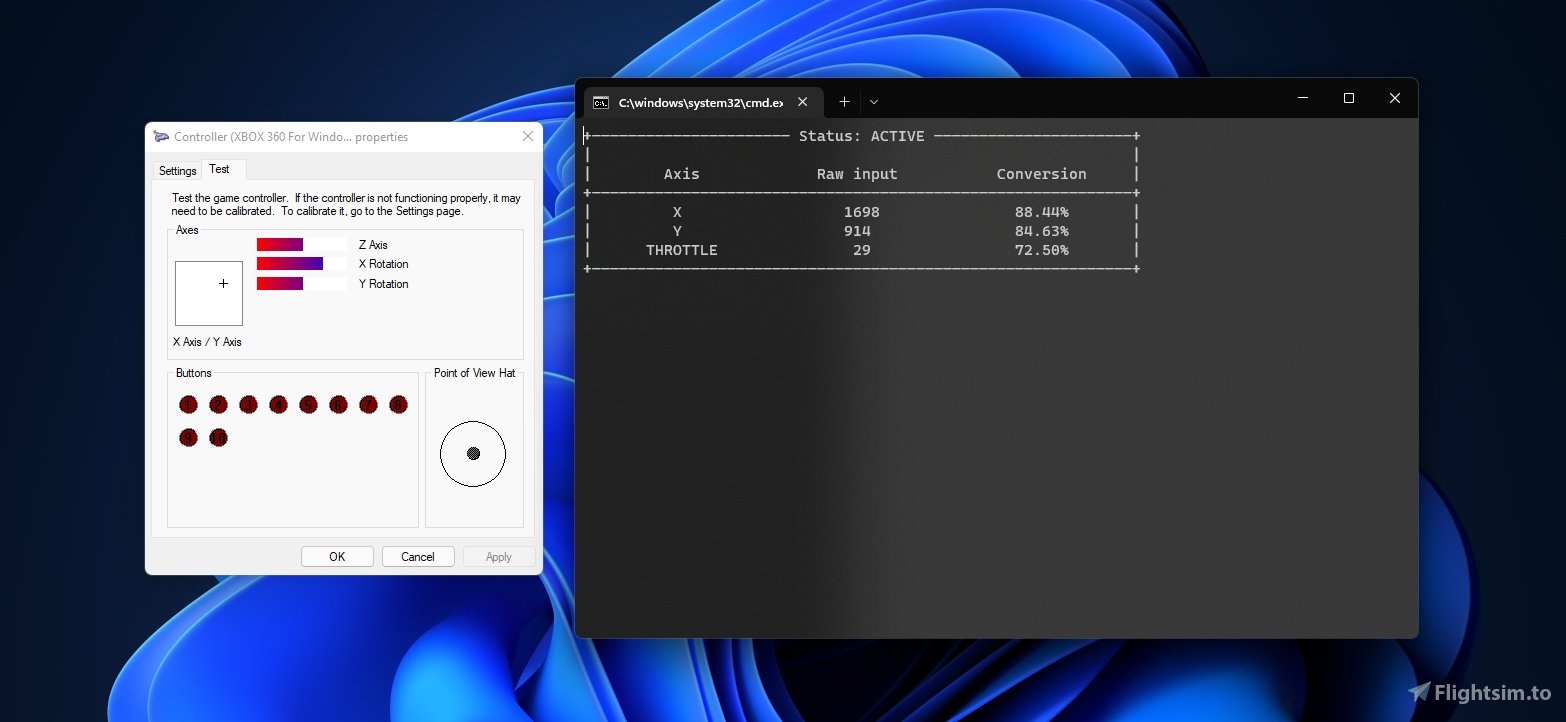
How does it work?The script is always listening for the mouse position and it transforms that into an xbox controller input. It also listens for the scroll wheel position, that way, you can use it as a throttle.
InstallationYou MUST have Python installed on your computer to run the script. You can find Python here.
Even though the process is relatively straightforward, I made a video showing step-by-step how to install the script. Have a look at it here!
But if you prefer to read...
1. To run the script, just open the file run.bat. The first time you open the file, it will take 1-2 minutes because it will install some dependencies that are necessary for it to run properly. After the first time, it will open almost instantly.
2. Set the bindings in the game. When you're doing so, make sure to remove ALL bindings that are set by default for xbox controllers, and leave only the axes that you need (which are only three). #Refer to picture 2.
3. Clear all the "filters" that the game adds to the xbox controller under the sensitivity tab. Leave it as raw as you can. #Refer to picture 3.
Done!
You can modify the "master_key" key inside config.json to turn on or off the script. Currently, it doesn't support key combinations such as shift+s.
// config.json

{
  "master_key": ",",
  "throttle_sensitivity": 20
}
You will also find "throttle_sensitivity". It lets you set how many steps your throttle will have. The default value is 20, so each step would equal 5% of thrust.
Note: This script doesn't require any external software, like vJoy or Virtual Controller.
Future updates:
- Making an in-game tool (widget) is currently being analized.
If you enjoy the stuff that I do and you want this mod to be updated over time, you can always buy me a coffee! Donate on PayPal Buy me a coffee
Happy flying!
MouseYoke for MSFS - Fly using your mouse in Microsoft Flight Simulator 2020!
Fly using your mouse in Microsoft Flight Simulator 2020 with MouseYoke - a Python script that transforms mouse movements into xbox controller inputs. Easily install the script and set up your bindings for a unique flying experience. No external software required, just install Python and start flying with your mouse!

User Reviews
6 reviews
Version History
- Implemented a way to center all positional axes (x, y) by a hotkey. - Now the last position that the yoke had is remembered. This option can be enabled/disabled in config.json. - Bug fix: previously, any space in the folder structure would make the mod to fail. That bug is now solved.
Log in to join the discussion
Log InComments(24)
over 1 year ago
over 1 year ago
Trying to update pip...
Trying to install dependencies...
Running mouse_yoke.py...
almost 2 years ago
about 2 years ago
BATCH file init
Trying to update pip...
Requirement already satisfied: pip in c:\users\vatsa\appdata\local\programs\python\python312\lib\site-packages (24.2)
Trying to install dependencies...
Requirement already satisfied: pynput==1.7.6 in c:\users\vatsa\appdata\local\programs\python\python312\lib\site-packages (from -r ./requirements.txt (line 1)) (1.7.6)
Requirement already satisfied: vgamepad==0.0.6 in c:\users\vatsa\appdata\local\programs\python\python312\lib\site-packages (from -r ./requirements.txt (line 2)) (0.0.6)
Requirement already satisfied: pyautogui==0.9.53 in c:\users\vatsa\appdata\local\programs\python\python312\lib\site-packages (from -r ./requirements.txt (line 3)) (0.9.53)
Requirement already satisfied: reprint==0.6.0 in c:\users\vatsa\appdata\local\programs\python\python312\lib\site-packages (from -r ./requirements.txt (line 4)) (0.6.0)
Requirement already satisfied: six in c:\users\vatsa\appdata\local\programs\python\python312\lib\site-packages (from pynput==1.7.6->-r ./requirements.txt (line 1)) (1.16.0)
Requirement already satisfied: pymsgbox in c:\users\vatsa\appdata\local\programs\python\python312\lib\site-packages (from pyautogui==0.9.53->-r ./requirements.txt (line 3)) (1.0.9)
Requirement already satisfied: PyTweening>=1.0.1 in c:\users\vatsa\appdata\local\programs\python\python312\lib\site-packages (from pyautogui==0.9.53->-r ./requirements.txt (line 3)) (1.2.0)
Requirement already satisfied: pyscreeze>=0.1.21 in c:\users\vatsa\appdata\local\programs\python\python312\lib\site-packages (from pyautogui==0.9.53->-r ./requirements.txt (line 3)) (1.0.1)
Requirement already satisfied: pygetwindow>=0.0.5 in c:\users\vatsa\appdata\local\programs\python\python312\lib\site-packages (from pyautogui==0.9.53->-r ./requirements.txt (line 3)) (0.0.9)
Requirement already satisfied: mouseinfo in c:\users\vatsa\appdata\local\programs\python\python312\lib\site-packages (from pyautogui==0.9.53->-r ./requirements.txt (line 3)) (0.1.3)
Requirement already satisfied: backports.shutil-get-terminal-size in c:\users\vatsa\appdata\local\programs\python\python312\lib\site-packages (from reprint==0.6.0->-r ./requirements.txt (line 4)) (1.0.0)
Requirement already satisfied: colorama in c:\users\vatsa\appdata\local\programs\python\python312\lib\site-packages (from reprint==0.6.0->-r ./requirements.txt (line 4)) (0.4.6)
Requirement already satisfied: pyrect in c:\users\vatsa\appdata\local\programs\python\python312\lib\site-packages (from pygetwindow>=0.0.5->pyautogui==0.9.53->-r ./requirements.txt (line 3)) (0.2.0)
Requirement already satisfied: pyperclip in c:\users\vatsa\appdata\local\programs\python\python312\lib\site-packages (from mouseinfo->pyautogui==0.9.53->-r ./requirements.txt (line 3)) (1.9.0)
Running mouse_yoke.py...
about 2 years ago
over 2 years ago
over 2 years ago
My only problem is that the throttle also pans the world map and it doesnt reset back to 50. Maybe change the throttle axis to the former rudder control?
I'm currently looking for some other options. If the ingame one comes out i will more than likely switch back :)
over 2 years ago
almost 3 years ago
over 2 years ago
almost 3 years ago
almost 3 years ago
about 3 years ago
about 3 years ago
about 3 years ago
about 3 years ago
over 3 years ago
Hello, I have been getting a problem with the script, will help me lot if you please provide me with the solution. So the problem is that I am not able to use the script in the background. The command box has to be in the msfs window and doesn't work in the background. It doesn't listen to the keys and mouse once the window is minimized.
over 3 years ago
Hi
It helps me a lot as disabled who cannot use a joystick. I basically use your script 1h a day since 3 months :) Thanks a lot
But I m having trouble flying level whenever I resume after any "script pause" (virtual cockpit buttons mouse use, using the GTN750, LittleNavMap, FSRealistic, VAC charts...). When I resume the script it sends a new value input, different to the one it had few seconds before (when I pressed the key for pausing).
Can you please try to work around it ?
Getting a second key to reset to zero the axis ?
My html/css knowledge is light to tackle it efficiently, and I m not sure I m ready to try chat gpt on that either ;D
Thank you again
Me
over 3 years ago
Hi Mistral33, thank you so much for leaving a comment and for your feedback! It's super heartwarming to hear the use case you have :)
Let me tell you that I am currently working on releasing a new, more polished version of the mod with cleaner code, a nice UI, and various additions based on user feedback. However, the development is progressing slowly due to other commitments I have to attend to.
As it is for now: I edited the mod by adding a way to reset the axes to zero, and also now the mouse cursor remembers its last position. Remember to edit the config.json file and assign a hotkey for centering them.
Hope you find it useful :)
Best,
Matias
over 3 years ago
Hi Would it be possible to use the mouse as collective yoke axis for helicopters ?