
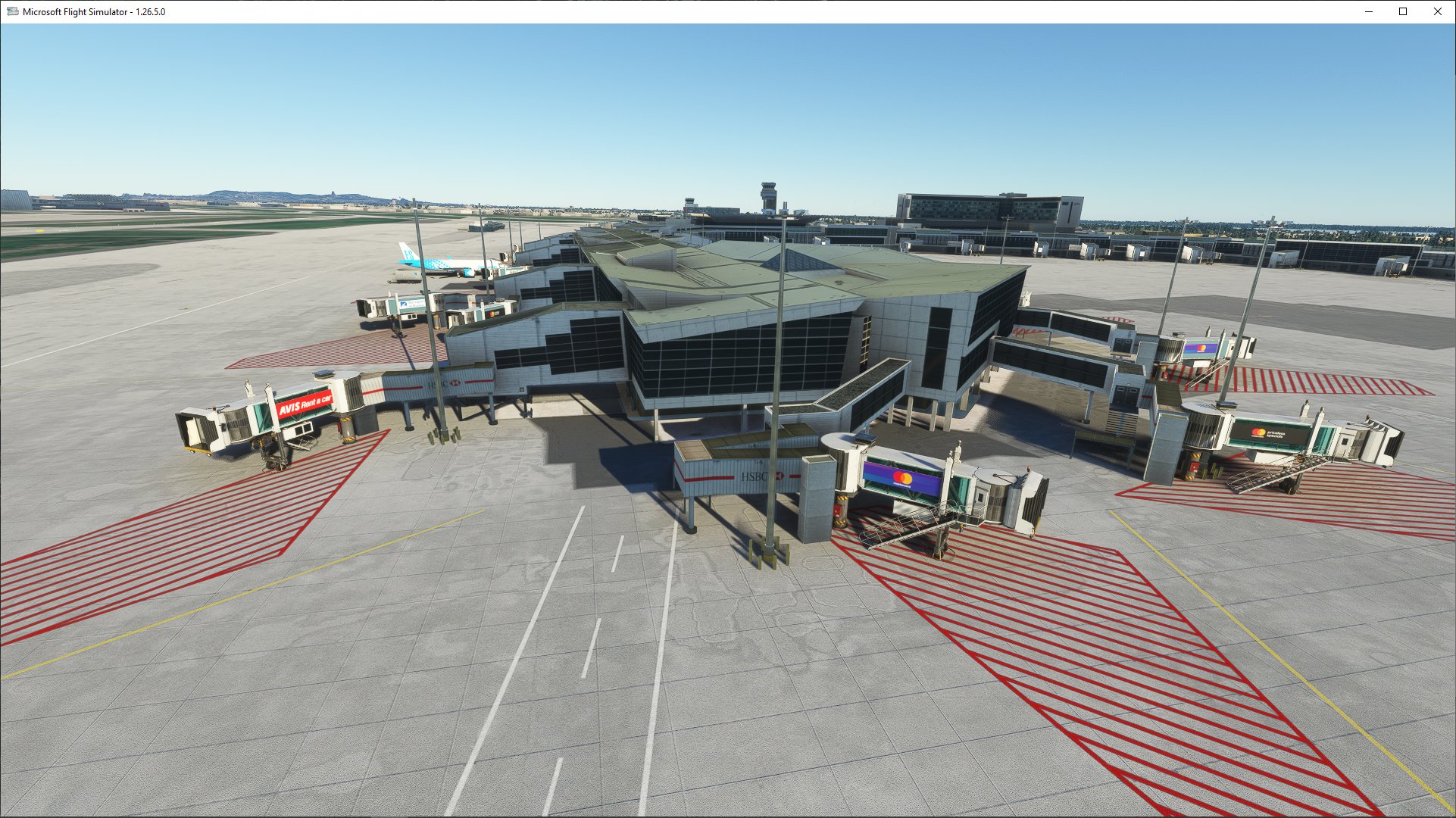
Description
This scenery pack enhances CYUL Montreal Airport scenery.
If you fly from/to CYUL you are welcome to try it out and let me know of any issues you see there that I might be able to fix.
NOTE: I cannot modify existing buildings etc.
This is an enhancement to CYUL Montreal Airport scenery. REQUIRED.
This enhancement uses fsdreamteam-gsx-world-of-jetways. OPTIONAL.
1. correct taxiways and taxi signs (hopefully)
2. correct placement of jetways, choose correct folder after download for your setup, GSX or NON-GSX if you do not have GSX
a) cyul-montreal-gsx is GSX
b) cyul-montreal-non-gsx is NON-GSX as per name.
3. additional ground markings and parking numbers
4. correct gate numbers and better sizes
5. changed de-icing area
To install.
1. If you already have CYUL Montreal installed go to step 2.
a). First install CYUL Montreal run simulator to ensure that CYUL-Montreal-Quebec gets registered.
2. Install this scenery simply by extracting cyul-montreal-gsx or * cyul-montreal-non-gsx folder to your comunity folder
Enjoy.
Dependencies
Location
CYUL Enhancement
Enhance your CYUL Montreal Airport experience with this scenery pack that corrects taxiways, jetway placements, ground markings, gate numbers, and more. Compatible with fsdreamteam-gsx-world-of-jetways for optional use. Simply extract the appropriate folder to your community folder to enjoy the enhancements.


Supporters

User Reviews
16 reviews
Version History
This is a minor update just removed the extra hangar that I was going to use to replace default MSFS generated Bombardier Hanger just north of Rwy 24L, I ended up using something else instead, but left the other one there by mistake :) Feel free to always let me know when you see goofs like that. :D
Related
CYXU London Ontario Intl. Airport
Discover the CYXU London Ontario Intl. Airport add-on, an exciting new enhancement for Microsoft Flight Simulator. Simply extract the folder into your Community Folder and immerse yourself in the detailed scenery of this Canadian airport. Enjoy a more authentic flying experience with this high-quality mod.
by AndyCYXU
MUCM Camaguey International Airport, CUBA
Explore the detailed rendition of MUCM Camaguey International Airport in Cuba. This add-on includes a GSX file for passenger boarding/deboarding and parking options for both international and domestic terminals. Simply extract the folder into your Community Folder to enhance your flying experience.
by AndyCYXU
CYQG Windsor Ontario Intl. Airport
Explore CYQG Windsor Ontario International Airport add-on, a detailed rendition of the airport with ongoing updates to enhance your flight simulation experience. Simply extract the folder into your Community Folder and discover the accurate representation of this airport in Microsoft Flight Simulator.
by AndyCYXU
Log in to join the discussion
Log InComments(84)
2 months ago
7 months ago
8 months ago
over 2 years ago
over 2 years ago
over 2 years ago
runways.
over 2 years ago
over 2 years ago
over 2 years ago
over 2 years ago
over 2 years ago
over 3 years ago
Amazing scenery
over 3 years ago
Great work, but I don't know if it's the base airport or the enhancement, but the framerate drops off a cliff when at or around CYUL.
over 3 years ago
not sure what to tell you, I flew in and out of there couple weeks ago in VR and had 0 issues with performance and I fly with VR, only way to see is disable my enhancement see if that works better, I cannot stress enough how I highly recommend using add-on linker, it is a-must for MSFS imo. There really is nothing that should have any serious effect on performance in either this or the original scenery that I can think of. Still waiting for pros maybe one day they make a nice CYUL :)
over 3 years ago
I do use Addons Linker and am hoping it was something else, but I haven’t had the time to troubleshoot everything. Thanks.
over 3 years ago
How do you ensure it is in the right order of priority now that the content.xml has been removed? I have installed both the base and enhancement package, but is seems two sets of scenery are displayed in the sim.
over 3 years ago
yeah, there is still that option there in the experimental and if I recall when you install both they will appear there and mine has to be higher priority I still have this file there that I made a picture of.. i will look tomorrow as i have brand new install of MFSF on brand new PC will see, my advice is install the main Scenery first then install mine after restart and all that, I am also using EPWA and EPWA ground and they seem to work very well, i haven't been to CYUL since new computer will look tomorrow, but anyways there is still an option which you can use for ordering scenery in experimental features,
over 3 years ago
https://forums.flightsimulator.com/t/package-reorder-tool-how-to-use-it/545769/22 seems content.xml is still in use just not how it used to be before and also use the tool in options I believe my scenery number has to be higher so set it to idk "3" see what happens, and remember my scenery does not modify the old buildings they are still original i only add jetways and ground scenery, and I thin 1 or 2 buildings but that is far away and lamps around terminal for night light, my scenery DOES NOT modify the actual terminal and or majority of buildings
over 3 years ago
https://devsupport.flightsimulator.com/articles/9407/changes-on-contentxml-behavior.html