
Description
Track your flight in real time on an online map
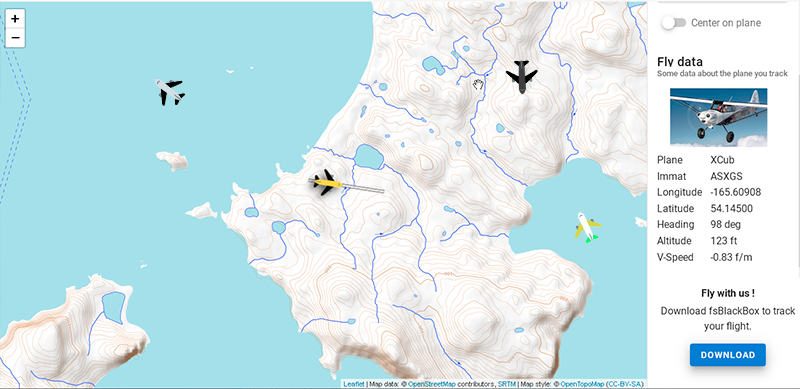
FsBlackBox is a small app that connect to Flight Simulator via simconnect and which send telemetry data to a central server to display an online multi-users map. (you know flightradar ? it's the same idea but for Flight Simulator).
Maps are accessible by a public URL so you can open it on any device (PC, smartphone, tablet...).
You can also share it with your friends, community, viewers (if you are a streamer),...
Last but not least, you can define groups and fly with your friends on the same map.
New on version 0.3.0: you can create flight plan.
See the Demo Here
Installation
- Download FsBlackBox installer.
- Run the installer.
Configuration
The installer will set a config.ini file in your ".../Documents/fsblackbox/" folder.
Edit this file to set your username (what you want).
You can also set a specific group, note thas all users with the same group will be displayed on the same map.
Enjoy ;)
FsBlackBox
Track your flights in real-time with FsBlackBox, a small app connecting to Flight Simulator to display telemetry data on an online map. Share your map with friends, create groups, and even fly together. Version 0.3.0 now allows you to create flight plans for a more organized flying experience. Enjoy the feature-packed app easily accessible on any device.

User Reviews
2 reviews
Version History
We've add the abilty to create flight plan. You do it by adding points on the map with your mouse. You can edit and re-order points. Note that the current flight plan automaticaly saved in your browser, so you can close your browser, when you will re-open it, your flight plan will steel be there. For next versions we are working on the ability to export fly plan as .ftl and import them from flight simulator or others services (like simbrief). Stay tuned ;)
Log in to join the discussion
Log InComments(13)
about 5 years ago
what is the url for the maps
over 5 years ago
I have for a second time added blackbox.exe to my firewall, because I was not sure if I succeeded the first time. But the same this seems to happen: It creates a firewall rule with the name "TODO: ,file description>" (without the " ")
There is nowhere to find a rule with FSBlackBox.
Though it is a bit confusing, is this "TODO: ,file description>" okay?
Kind regards
Bram
over 5 years ago
First thanks for develloping this utility.
By starting the exe, it says it is looking for updates and after a few seconds, I get this message:
"Oooops there were a bug in the matrice, retry later: Failed to connect: A connection attempt failed because the connected party did not properly respond after a period of time, or established connection failed because connected host has failed to respond.
Press any key to continue . . ."
I tried to manually add it to the firewall, but it seems not to change the problem. Is there something I have to do different, or is this a problem on your side? ;-)
Also I cannot find any websitelink on which the map should appear. Or should the software start the browser and correct address itself?
Regards! Bram Stikkel
over 5 years ago
over 5 years ago
over 5 years ago
almost 6 years ago
Ensure that this file is readable, and has no syntax error
Your config.ini file should be located located at: C:\Users\orank\OneDrive\??????\fsblackbox\config.ini
Press any key to continue . . .
almost 6 years ago
almost 6 years ago
almost 6 years ago
almost 6 years ago
almost 6 years ago
almost 6 years ago