
Description
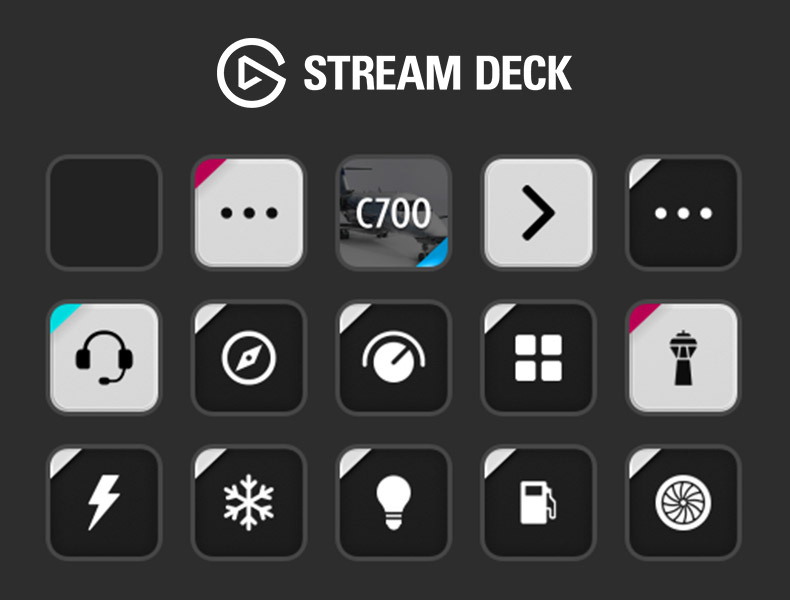
15-button Stream Deck profile for Cessna Citation Longitude, for use with AAO and the AAO Stream Deck plugin.
Features:
- Electrical Systems
- Deice Systems
- External & Internal Lighting
- Fuel Systems
- Engine Start
- Nav/Com
- AP Systems
- Configuration pages for Ground, Takeoff, Cruise, and Landing.
- A suite of instruments, dials, and gauges to customize your profile pages.
- + More!
Prerequisites:
- You must have both the Lorby AAO software, and the AAO Stream Deck plugin.
Installation:
- Remove any previous versions of this plugin from your Stream Deck profile.
- Double click or Right Click > Open on the Stream Deck profile file, this will load the profile into your Stream Deck.
- Import the included AAO script into AAO.
- Important: This profile utilizes B-vars - A recently added functionality to AAO. To take advantage of them and to allow numerous buttons in this profile to operate as intended, you must enable the AAO in-game panel within the simulator (this only needs to be done once). (Read more - Page 82)
Troubleshooting
This is a Stream Deck profile and AAO scripts only. If you're experiencing issues with the AAO Stream Deck plugin, the AAO software, or the Simulator; please explore solutions with the relative developers.
Please note: This is v0.9! Although I've thoroughly tested it, I consider it a Beta. If you spot any issues or have any suggestions, I would appreciate your feedback so please don't hesitate to contact me!
Stream Deck 15-Button AAO Profile for Cessna Citation Longitude
15-button Stream Deck profile for Cessna Citation Longitude on Flight Simulator 2020, for use with AAO and the AAO Stream Deck plugin. Includes functionality for electrical, fuel, engine, deice systems, Nav/Com, autopilot and external and internal lighting.


Supporters

User Reviews
8 reviews
Version History
- Updated: Several reversions back to K events. - Updated: External power [AVAIL] lighting colour (was blue, now white) - Updated: L and R batt button [OFF] state colours (was white, now amber) - Updated: Wing and Stab button [ON] state colour (was blue, now white) - Removed: Becon light on/off toggle (handled automatically on the C700) - Fixed: L and R engine Deice buttons and updated [ON] state colour (was blue, now white) - Updated: elevator trim dials and added conditioning/warn states. - Updated: parking brake button to match the cockpit style - Fixed: parking brake event restoring functionality - Updated: the styling of the starter buttons
Log in to join the discussion
Log InComments(32)
over 2 years ago
Can I make them appear? This does not install an scripted bottons library, so it looks like a no go...
Thanks again?
over 2 years ago
I've noticed one discrepancy: The L BATT in OFF state has R BATT icon. Just a minor thing.
Absolute a 5 star rating!
about 3 years ago
over 3 years ago
Hi, great compilation thanks. Can I ask what LVar/BVars you're using to do parking brake and VNAV button functionality? The parking brake toggle doesn't seem to work (on another script I'm using) and I haven't found a way to simulating pushing the VNAV button.
over 3 years ago
Parking brake: K: PARKING_BRAKE_SET (1/0)
VNAV: L: XMLVAR_VNAVButtonValue, Number (1/0)
over 3 years ago
Thanks but that doesn't remove the parking brake when I hit the button again, or is that a limitation?
over 3 years ago
set value 1 to set it, and you need to set value 0 to remove it again. It's not a toggle command.
over 3 years ago
Hey Jezzzy,
The In-game panel solved my issues which seem to be the same as recently reported by others. That's what I get for not reading instructions (or release notes). Thanks for pointing that out!
over 3 years ago
Hey no problem. To be honest Lorby kind of buried that addition in the patch notes a bit when it came out so I think it flew under the radar for a lot of users. I've made my instructions a bit clearer on this page and will do so even more in the next week when I put out a release version.
over 3 years ago
Hi .
Is it possible to have your icons files because i don't hase AAO, only do with stream deck 15 boutons, thanks in advance
excuse my english, i'm a french canadian .
over 3 years ago
This is great, but I'm having trouble getting anything using a BVar to actually work. AAU1, AAO 2.81b5, streamdeck plugin 16.03
over 3 years ago
Heya. I haven't got around to testing this with the AAU1 full release yet (only beta) but should have done by the weekend and will release an update if necessary.
In the meantime, check you're running the AAO in-game panel in the simulator alongside AAO, this is required for B-vars to function. Details of this can be found on Lorby's release notes.
almost 4 years ago
With the newest profile for some reasons the Batteries & engines buttons are not working. It only blinks on the stream deck.
Other buttons are fine.
I have deleted the previous profiles in AAO, and yes I have the latest Beta.
almost 4 years ago
I’ll check it out. Think I know what this is with batteries but not sure about engine. Are you referring to the run/stop or starter?
almost 4 years ago
Yes correct, holding the button to remove cap doesn't work for example.
almost 4 years ago
And you’re running AAO 2.8+?
almost 4 years ago
Yes. So did you test it and you have no issue on your side?
almost 4 years ago
I had some inconsistencies with switches running off BVars but it cleaned up and became hard to reproduce after I updated some switch variables. I’ll have to have another go at reproducing when I’m back at my PC after the weekend.
almost 4 years ago
Thanks for this! One bug: COPIL PFD light up is not working. Only dimming down is working.
almost 4 years ago
Thanks! Will be fixed in next update