

Description
NOTE THAT'S A "WIP" AND SINCE I WORK ALONE I'M TRYING MY BEST TO MAKE BUILDING WITH A LOT OF DETAILS AND HANDMADE TEXTURES SIMILAR TO THE ONE'S IN REAL LIFE
The Scenery Contains Famous Buildings and Apartments Complex and here is the list of the building, Landmarks that you can find in-game and in the next updates
Finished:
Seoul:
- ASEM Tower
- Banpo Jugong Apartment Complex
- Hogangnono Apartment Complex
- KIL 63 Tower
- Lotte World Complex
- Mido Apartment Complex
- Namsan Tower
- Trade Tower
- Wonhyo Bridge
- etc
Work In Progress:
- Gyeongbokgung Palace
- National Museum Of Korea
- Seoul Central Mosque
- Terraforming and water fix
- Night Textures and lights
Seoul Air Base Info:
Runway 19:
ILS: 108.95
Ident: ISUL
Runway 20:
ILS: 110.9
Ident: ISOL
ATC Frequency:
Tower: 126.20
Ground: 121.85
Approach: 123.80
Charts are available to download here
Location
Seoul City and Seoul Air Base RKSM
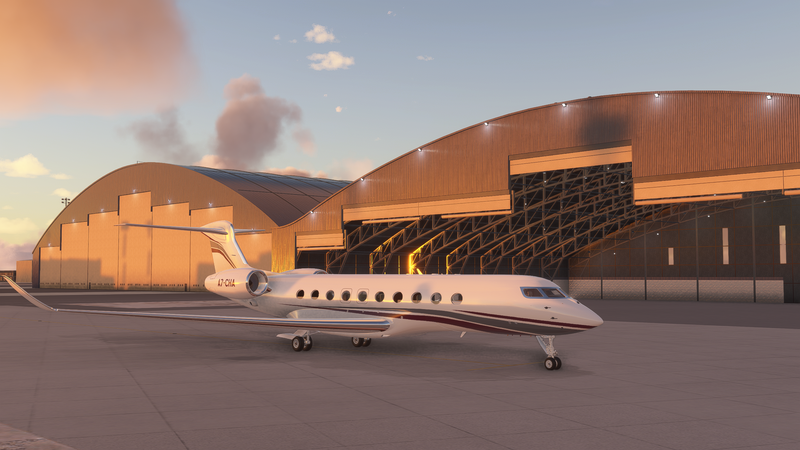
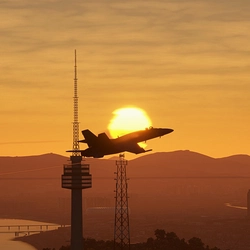
Explore a Work-in-Progress scenery of Seoul City and Seoul Air Base RKSM, meticulously crafted with handmade textures and detailed buildings like ASEM Tower, Lotte World Complex, and more. The add-on includes famous landmarks such as Namsan Tower and offers detailed information about Seoul Air Base runways, ILS frequencies, and ATC contacts. Additional updates will feature Gyeongbokgung Palace, National Museum Of Korea, and enhanced night textures.
User Reviews
4 reviews
Version History
RKSM Update 1.2 fixes: - Removed exessive amount of trees that appeared after the sim update around the Runway and Taxiways. - Minor terraforming before runway 01. - Covered the area with grass textures due to satellite imagery being blurred in bing maps.
Related
Yeosu Airport 예수공항
Explore the development of "RKJY" Yeosu Airport in Microsoft Flight Simulator, a growing project set in Jeollanam-do, Republic of Korea. This add-on features realistic ILS frequencies, various gates and parking options, and promises future enhancements such as custom 3D buildings and departure/approach legs. Discover Yeosu Airports charm and stay tuned for upcoming updates to enrich your flying experience.
by Lee Min-su
Jeju Island 제주도
Explore the stunning beauty of Jeju Island in Microsoft Flight Simulator. This add-on features beach resorts, volcanic landscapes, and iconic landmarks like Hallasan Mountain and Gwaneumsa Temple. Version 0.3.0 includes missing tree additions and terraforming improvements, with future updates to introduce handmade 3D buildings for a more immersive experience.
by Lee Min-su
"RKPD" Jeongseok Airfield 정석비행장
Jeongseok Airfield is a Korean airport situated in Jeju Island, primarily utilized by Korean Air for flight training. The add-on includes airport information such as elevation, transition levels, ATC frequencies, ILS frequencies, and parking details. Charts for RKPD Jeongseok can be accessed on the official Korea AIS website.
by Lee Min-su
Uljin Airport
Discover Uljin Airport, a detailed add-on for Microsoft Flight Simulator. Explore this new airport scenery and enhance your flying experience.
by Lee Min-su
Log in to join the discussion
Log InComments(36)
about 4 years ago
Wow! some buildings look much superior to the payware scenery (you know what that is ^^). Looking forward to the compatible version with the payware.
Anyway, It's really nice to have someone trying to improve Korea in MSFS.
Keep up the good work, bro!
12 months ago
12 months ago
almost 2 years ago
about 1 year ago
about 2 years ago
over 2 years ago
over 2 years ago
over 2 years ago
over 2 years ago
over 2 years ago
over 2 years ago
?
over 3 years ago
So after 3 years of self study my Korean is still not very good. I was wondering, does 대한민국 mean Republic of Korea and 한국 mean just (South) Korea ? I enjoy your scenery, thanks so much for this.
over 3 years ago
Yes you're right, Also thanks.
i've been trying to improve my korean but it's not improving that much,
if you want to talk more about this you can find my instagram account in my profile.
over 3 years ago
In SU12. I install this mode, the RKSM is still the default..
over 3 years ago
I had served in RKSM while in my military service as Airmen. Your work is nice and nostalgic to me. But there's one thing to be changed. Runway number 2 is wrong and it's actually 02(zero-two). Please edit this.
over 3 years ago
althought i worked for days on it but i never realized that, thanks for noticing it and i've just fixed it, and there's another problem with a lot of default 3d models in the sim so i'm making my own librarly of various objects with the korean style so it'll look more realistic and it will be available for other developers to use.
almost 4 years ago
Hello. Where can I get that awesome 747 livery, pls?
almost 4 years ago
You can download it here
https://flightsim.to/file/30772/boeing-747-8i-new-korean-air-code-one-4k-no-mirroring