
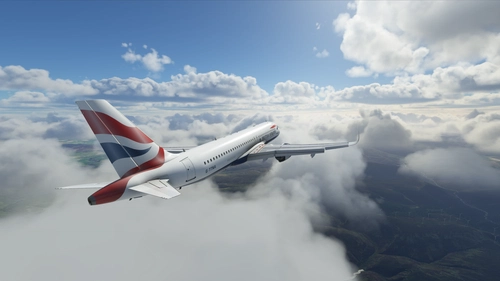
![[A32NX] FlyByWire | Airbus A320neo BRITISH AIRWAYS G-TTNB in 8k - Image 1](https://cdn.flightsim.to/images/23/flybywire-airbus-a320neo-british-airways-g-ttnb-in-8k-91s2w.jpg)
Description
FlyByWire | Airbus A320neo BRITISH AIRWAYS G-TTNB in 8k - ONLY FOR FLYBYWIRE
Notice:
- G-TTNB is a Airbus A320-251N - Image: here
- More details compared to my Livery G-TTNA
- Changes with version 1.1
- Added TNB via cockpit window (exterior).
Features:
- FlyByWire Version
- CUP with British Airways Logo and colors
- SimUpdate 9+ compatible
I wish you a lot of fun with it and let the wings dance :-))
Simple installation:
1 - Extract the ZIP
2 - open the new folder - In the folder there is another folder with the same name
3 - copy the file "FBW_A320neo_GTTNB" and paste it in you community folder.
4 - Take a deep breath and rejoice now
5 - Now you are ready to fly. Have fun
I am happy for a good rating (1 to 5 stars)
Selcuk Dikilitas
Note about livery requests:
I like to fulfill your wishes. However, I ask you to show your appreciation in the form of a coffee or a small donation. So many wishes come in that I cannot guarantee whether the wish will be fulfilled.
Please no requests for Fenix or PMDG livery. At the moment I only do liveries for the FlyByWire. Maybe possible at a later date...
All my liveries can be shown in Youtube without my permission. I'm always happy when my liveries are used.
Comments(9)
Log in to join the discussion
Log Inover 2 years ago
almost 4 years ago
You do a lot of great work on these, but I have a question, you don't fix the backwards jet blast warning on the engine cowl, is there a reason for that? I see most painters do not do this either and I always wonder why. Keep up the great work!
almost 4 years ago
Thank you for this question. You are absolutely right. That annoys me a lot too.
But some standard warnings (texts and images) have a fixed position by aircraft creators (FBW or Asobo).
I'm just a simple repainter and have only two choices here. Remove it completely or leave it as it is. Unfortunately, I cannot move or change this.
I wish you a nice flight
almost 4 years ago
Amazing TTNA/B liveries! would you be able to do G-TTNG?
almost 4 years ago
Sure. But a little later.
almost 4 years ago
Looks good, but I notice that TNB is missing from over the cockpit windows.
almost 4 years ago
Over the cockpit windows? Can you please give me a reference picture of what you mean? I don't quite understand what you mean.
I try to keep everything true to the original. However, only what is possible.
almost 4 years ago
Hi
In the meantime I've added TNG font via the cockpit window with version 1.1.
[A32NX] FlyByWire | Airbus A320neo BRITISH AIRWAYS G-TTNB in 8k
FlyByWire presents the Airbus A320neo in British Airways livery (G-TTNB) in stunning 8k resolution exclusively for FlyByWire enthusiasts. This update includes new features such as an exterior view of TNB via the cockpit window. Compatible with FlyByWire version and SimUpdate 9+, this livery is a must-have for your A320neo collection.

More Information
Version History
Changes with version 1.1 Added TNB via cockpit window (exterior).
Related
British Airways A32NX
Add a touch of British elegance to your Flight Simulator experience with this British Airways livery for the A32NX. Just unzip the file in your Community folder and take to the skies in style. For the standard A320 version, check out the link provided.
by R1NS3
![[A32NX] FBW A320neo | British Airways G-TTNK | 10k](https://cdn.flightsim.to/images/13/q4mvOgiw.png?width=500)
[A32NX] FBW A320neo | British Airways G-TTNK | 10k
Fly in style with the Airbus A320neo sporting the striking British Airways G-TTNK livery, featuring fully custom tail textures, accurate registration number and logo placements, and high-quality 10k textures. Complete with accurate door borders, registration number inside the cockpit, and even a British Airways cup for added realism.
by Frex
![[A32NX] British Airways G-TTNH](https://cdn.flightsim.to/images/13/cHOuYfzC.png?width=500)
[A32NX] British Airways G-TTNH
This is the British airway livery G-TTNH for Flybywire A320 NEO, this is to my knowledge very close to detail to the real aircraft, so please can you give me credict for my time for you all, thank you for downloading my livery, see ya....... soon from martin.
by Hards
![[A32NX] FlyByWire | Airbus A320neo BRITISH AIRWAYS G-TTNS in 8k](https://cdn.flightsim.to/images/24/flybywire-airbus-a320neo-british-airways-g-ttns-in-8k-Ply0T.jpg?width=500)
[A32NX] FlyByWire | Airbus A320neo BRITISH AIRWAYS G-TTNS in 8k
Experience the FlyByWire | Airbus A320neo BRITISH AIRWAYS G-TTNS in stunning 8k resolution with this livery pack designed specifically for FlyByWire enthusiasts. This livery features the British Airways logo and colors, and is compatible with SimUpdate 10+. Immerse yourself in this detailed livery and take to the skies with FlyByWire.
by Selcuk_Dikilitas
almost 2 years ago