

Description
Fellow simmers,
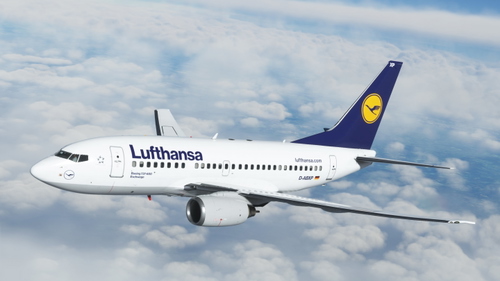
Here is my Livery of the PMDG 737 for MSFS2020.
The PMDG line of products use their custom utility called The PMDG Operations Center (OC2).
To maintain your entire PMDG fleet of aircraft (The DC-6 as well you own it), also provides you with a very easy way to install/uninstall/update your liveries. Please follow the detailed instructions below to install this paint. It may look like a lot of steps, but I made sure every step was covered from download to install.
NOTE: I will not offer this as a “Drag and Drop” livery as this method, while operational, does not ensure everything is created properly in the complex MSFS folder structure. When painters use the OC to package their paint, the installer takes care of all the items needed (json updates, aircraft .cfg edits, etc) automatically.
Also…should updates to the aircraft become available, the OC ensures all items are updated properly.
Here are the instructions:
1. Extract the PTP file from the downloaded zip file.
2. Place it anywhere your PC (typically the downloads folder).
DO NOT place it in the MSFS folder structure, including the Community folder (The OC2 will properly extract it there and update the Layout.json file automatically)
3. Press the Windows key on your keyboard
4. Type PMDG
5. Select the PMDG Operations Center and open as an Administrator
6. Follow these steps when Ops Center is open.
1. Click the Aircraft and Liveries menu
Choose Livery Utilities
2. Select the Simulator,Select the Product,Select the Variant
3. Click Install from PTP file
7. After the Open window opens, navigate to the folder you saved/extracted the PTP file to
8. Click Open.
9. Done
If you have any issues with the installation of the livery through the OC2, please contact PMDG Support at https://support.precisionmanuals.com/Main/
You an also go to their forums as many members can help with issues and the support team monitors there as well.
A special thanks goes to PMDG and the beta test crew I had the privilege to work with during the development of this fantastic plane.
Credits: All base textures included in my paints are included by permission from PMDG, as with any livery created by 3rd party painters. I would especially thank the PMDG Paint crew for the fantastic textures they gave us to work with, you guys are awesome!
PMDG 737-600 Lufthansa (D-ABIS - 2014)
PMDG 737-600 Lufthansa (D-ABIS - 2014) for MSFS2020. An intricately detailed livery requiring installation via the PMDG Operations Center. Follow step-by-step instructions provided to seamlessly integrate this paint into your sim experience. Credits to PMDG and dedicated beta test team for their contributions to this aircraft.
User Reviews
7 reviews
Version History
Fixed the capital letter "L" in lufthansa.com on the rear of the fuse.
Related
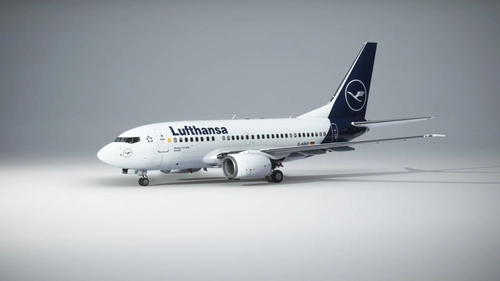
PMDG B737-600 Lufthansa D-ABIF
Explore the fictitious Lufthansa livery for the PMDG 737-600 in the new color scheme with this add-on package.
by milesa
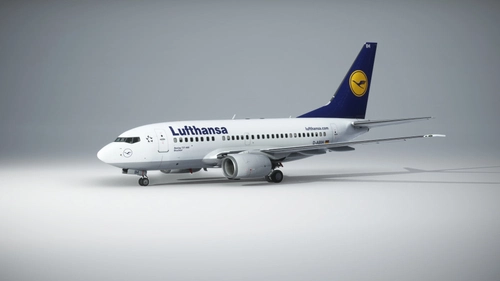
PMDG B737-600 Lufthansa D-ABIH
Explore a fictitious Lufthansa livery for the PMDG 737-600, featuring a nostalgic 90s color scheme in this add-on package.
by milesa

PMDG 737-600 w/ cabin Lufthansa Vintage (D-ABCE)
This add-on provides a fictional Lufthansa Vintage livery for the PMDG 737-600, inspired by the real 737-200QC aircraft registration D-ABCE. The package includes a custom cabin and tablet background, with minor design differences between MSFS 2020 and 2024. Installation instructions for PMDG Operations Center 3 are included. Modifications or reuploads of the livery are not permitted without permission from the author.
by alxcpt
Lufthansa 737-600 D-ABXP Eschwege
Explore the alternate reality where Lufthansa keeps the 737 with the Lufthansa 737-600 D-ABXP Eschwege mod. Reflecting the early days of the Bobby jet, this barebones configuration pays homage to the original D-ABXP 737-300. Install via PMDG OPS center and enjoy a touch of nostalgia in your flight simulator experience.
by john92
Log in to join the discussion
Log InComments(16)
about 4 years ago
Merci fonctionne parfaitement!!! :)
about 4 years ago
Great livery addition. Please, LAN Chile old colors for the 600
about 4 years ago
It would be nice to have a variant with the "500" labeling instat of the 600. :) But thanks for the fast creating of this livery!
about 4 years ago
I thought about that, but decided against it as I felt it was best to call her what she actually is. :)
I may consider just adding an additional texture to replace the one that says -600 if time allows. I'm pretty busy at the moment, and the hard/tedious part is packaging it up and getting it here with the appropriate instructions to replace the 1 file in the texture folder that would change the number to 500. Simmers, historically, are not the best at following instructions, even when painstakingly written, LOL.
Just look how many posts there are about the parking brake behavior since the -600 was released...it was clearly stated in RSR's release announcement and there were still tons of folks who didn't read it. :)
about 4 years ago
Thanks for your reply and yeah understanding your decision. For me personally it adds a bit more "realism" even though it's a 600.
Considering that i'm a small group of people that might bother you actually not worth the time. 😅
The posts about the new added parking brake procedure are both funny and just nuts clearly shows that people are lazy to read.
about 4 years ago
Steve you legend, i love this livery! You gotta make a Janet livery but dirty too!!
about 4 years ago
The "L" written for the website at the back of the fuselage is usually in small letters and not a capital L. Otherwise a nice livery!
about 4 years ago
Good catch! Will fix and update!
about 4 years ago
Fixed and updated in version 3
about 4 years ago
Awesome man!
about 4 years ago
Blitzschnelle und klasse Umsetzung. Herzlichen Dank. 👏
about 4 years ago
Nice texture. Turkish Airlines Pls :)
about 4 years ago
Beautiful! Thinking of doing any SW like a heart livery or state livery?
about 4 years ago
Not really. There are 2 great SWA painters who would blow me away with their quality and they've contributed many 737-700s to the pool already.
I'm prepping for the -800 which has 1000's of liveries as you know. Not sure how many I'll do, but a few at least.
about 4 years ago
Hey Guys,
I was just made aware of a few things I needed to add to the paint (The Star Alliance logo, the red hash square around the sensor up front, and move the tail logo down a bit.) I'm doing that now and will have an update posted shortly, so check back soon to get a better version of the paint.
I also made the IS on the tail a little larger as it is on the -500...which I'm simulating with this -600 paint.
about 4 years ago
Thx so much for this fast perfect work