
![Boeing 747-8F Cathay Pacific HK Trader 4K [No mirroring] - Image 1](https://cdn.flightsim.to/images/23/boeing-747-8f-cathay-pacific-hk-trader-4k-no-mirroring-fDAPw.jpg)
Description
My thanks to DeathActual. By your configuration files...
My credits are to DeathActual.
Boeing 747-8F Cathay Pacific HK Trader 4K [No mirroring]
Explore the highly detailed Boeing 747-8F Cathay Pacific HK Trader 4K livery without any mirroring, with credits to DeathActual for the configuration files.


User Reviews
2 reviews
Version History
No version history available.
Related
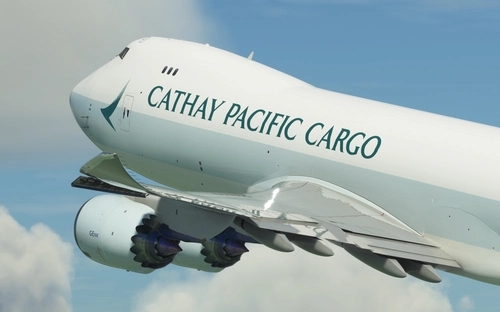
Boeing 747-8F Cathay Pacific Cargo (B-LJD)
Experience the new Cathay Pacific Cargo livery on the Boeing 747-8F with this repaint of B-LJD by Marcioart121BR. Easily install this stunning texture configuration for the freighter model in just a few simple steps. Add a touch of realism to your flight sim experience today.
by Meesj015
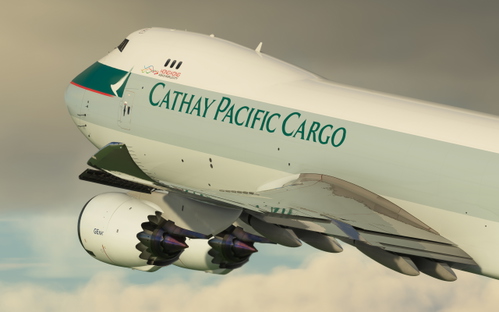
Boeing 747-8F Cathay Pacific Cargo (B-LJK)
Boeing 747-8F Cathay Pacific Cargo (B-LJK) is a repaint of the old Cathay Pacific Cargo livery for the B-LJK model. Designed by Asobo and Death Actual, with textures by Marcioart121BR. Easy installation instructions included. Optional file available to address polished wing root issue.
by Meesj015
![[Salty747] B747-8F Cathay Pacific Cargo [8K ULTRA] (No mirror)](https://cdn.flightsim.to/images/22/salty747-b747-8f-cathay-pacific-cargo-8k-ultra-no-mirror-CsOJl.jpg?width=500)
[Salty747] B747-8F Cathay Pacific Cargo [8K ULTRA] (No mirror)
Fly the iconic B747-8F Cathay Pacific Cargo in stunning 8K ultra resolution without a mirror with this mod for Microsoft Flight Simulator. Operate as the flag carrier of Hong Kong with a fleet that includes Airbus and Boeing aircraft, offering scheduled passenger and cargo services to over 190 destinations worldwide. Explore more liveries by the creator and show support for ongoing developments.
by Kurorin
![[Salty747] B747-8i Cathay Pacific [8K ULTRA] (No mirror)](https://cdn.flightsim.to/images/22/salty747-b747-8i-cathay-pacific-8k-ultra-no-mirror-gEX9_.jpg?width=500)
[Salty747] B747-8i Cathay Pacific [8K ULTRA] (No mirror)
Experience the iconic livery of Cathay Pacifics Boeing 747-8i in stunning 8K ultra resolution without the mirror feature. Dive into the world of Hong Kongs flag carrier with this meticulously crafted add-on for Microsoft Flight Simulator. Explore over 190 destinations across 60 countries with this realistic portrayal of Cathay Pacifics fleet. Check out more liveries by the creator and show support through donations.
by Kurorin
Log in to join the discussion
Log InComments(5)
about 4 years ago
Looks amazing.. ADI's version for the Std 748 was excellent aa well & I clocked up a fair few hrs in that. Do U inow if u or Death Acrual have plans for a Nippon Cargo/Polar Air DHL.. The original Dev's were Kuro_X & Frex of the Std 748 versions.
about 4 years ago
Is there a version without all the dirt?
about 4 years ago
Finally Cathay Pacific comes out. Thank you so much for making it. Apart form this special cargo repaint, is it possible to have Cathay normal new and old liveries for this 748F too?^^
over 3 years ago
Would love to have that too!
over 3 years ago
Essas pinturas foram vendidas, então não posso postar no site.