
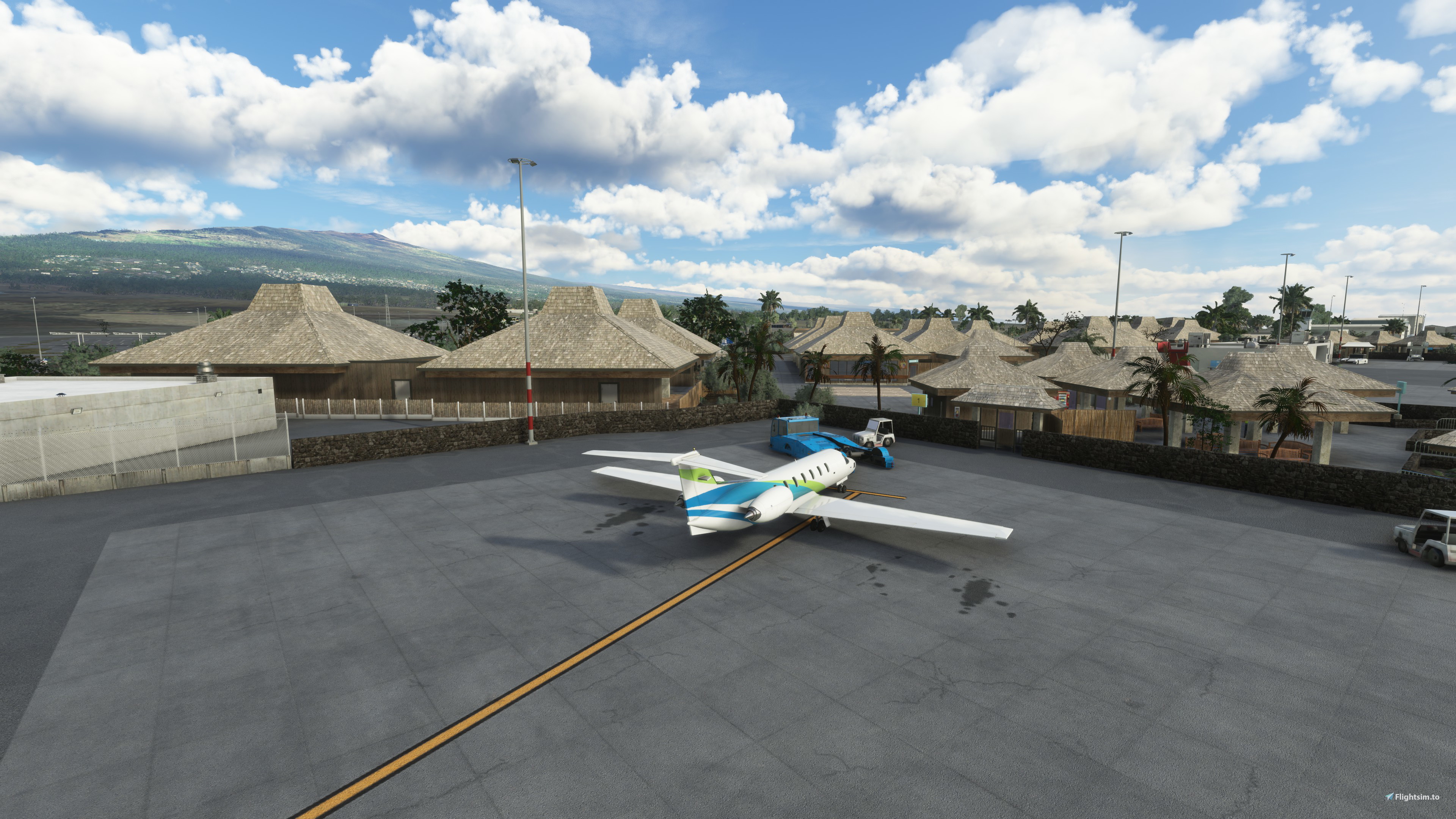
Description
I almost abandoned this project when Asobo released World Update XIII. Their version of PHKO has a lot to offer. Nevertheless, some people might like to see a different version. My latest update brings some things into alignment with the latest aerial imagery, and fixes a few shortcomings of my original release.
The airport: Ellison Onizuka Kona International Airport at Keahole (PHKO) is one of two international airports located on the island of Hawai’i. PHKO is located on the leeward side of the island, while Hilo International is located on the windward side.
The airport has gone through a number of name changes since its construction in 1970. The current name honors Kona native Ellison Onizuka, an astronaut who died in the Space Shuttle Challenger disaster of 1986. “Keahole” refers to Keahole Point, the projection of land created by the lava flow of 1801.
A modernization project began in 2017. The project included the creation of a centralized security checkpoint, the construction of a large baggage facility, and the demolition of the Onizuka museum and the old tower.
I am grateful to polyhaven.com, ambientcg.com, and pexels.com for their assortment of royalty-free textures and images.
I am also grateful to Patrick Germain for his airport2project app, which helped me create a starting point for this package.
Installation: Unzip, and place the phko-airport-kona folder in your community folder. This airport package is contained in one folder only. If you see more than one phko folder in your community folder, please remove any older versions before launching MSFS.
Next, you'll need to remove Asobo's PHKO to prevent overlapping scenery elements. Launch MSFS. From the main menu, go to "Profile." From there, go to "Content Manager." Search for Asobo's PHKO. I think the easiest way to do that is to use the search window in Content Manager. Type in PHKO, and two items should appear. One is the World Update XIII: Oceania and Antarctica file, and the other is PHKO Airport Kona by Lima Juliet. Move your cursor over the World Update XIII file, and a blue rectangle should appear to the right, with a set of dots and lines that look like a bulleted list. Left click on the blue rectangle, and the components of WU XIII will be revealed. Select the "PHKO KONA AIRPORT" entry, and then click on the "Delete" option at the bottom of the screen.
If you grow weary of my version of PHKO and want to put it back the way it was, it'll entail a two-step process similar to the one above. In addition to removing my package from your community folder, you'll need to reinstall Asobo's version. From the main menu in MSFS, go to "Profile," and then to "Content Manager." Search for Asobo's PHKO, as above. Open the World Update XIII file again, and select "PHKO KONA AIRPORT." This time, an Install option will come up at the bottom of the screen.
Location
PHKO Ellison Onizuka Kona International Airport at Keahole
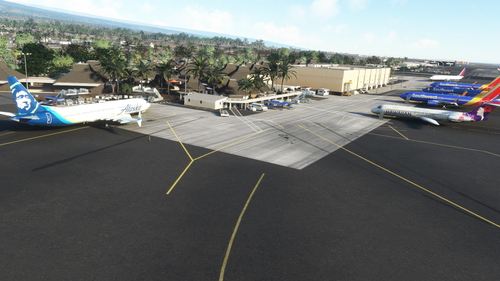
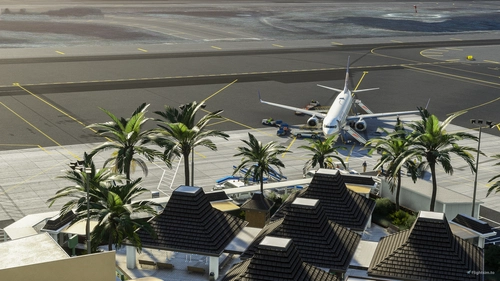
This is an airport scenery package for PHKO (Ellison Onizuka Kona International Airport at Keahole) in the state of Hawai'i, USA. It is offered as an alternative to the version included with Asobo's World Update XIII. I've updated my earlier release to bring it into better alignment with the latest aerial imagery.


User Reviews
21 reviews
Version History
Revised my scenery to align it more closely with the present aerial imagery. Added the new GA parking area. Added a few Blender models and numerous Asobo library objects to replace the auto-gen buildings. Added some additional ground markings and painted lines. Added distance-remaining signs.
Featured in Collections(1)
Related
PHKO Aerial Imagery
Aerial imagery for PHKO - Kona International Airport exracted from Google Earth. This add-on improves the resolution of the ground textures. This version of the scenery package contains a giant ground texture with georeferencing, a few polygons to cover certain areas, and ILS antenna. It is compatible with PHKO airport scenery add-ons.
by Marionettework
PHKO AIG/FSLTL Static Aircraft
Enhance your Asobo Freeware airport experience with PHKO FSLTL Static Aircraft addon by SavageSceneries. This mod includes high-quality static aircraft and additional details, designed to be used with the FBW FSLTL base package. Switching to FSLTL models offers improved visuals without notable FPS impact, making it a worthwhile upgrade from LatinVFR models. Ensure to delete the LatinVFR Static Aircraft addon before installing this scenery enhancement for optimal performance and enjoy a more immersive airport environment.
by SavageSceneries
PHKO Static Aircraft
Enhance PHKO airport with static aircraft and extra details, designed to work with the Asobo World Update. Requires Latinvfr static aircraft add-on and brings added realism with walls and ground equipment. Easy installation by drag and drop into your community folder. Feel free to donate for special requests or to show support.
by SavageSceneries
PHKO Kona - FSLTL Static Aircraft
This add-on enhances the Kona airport in Microsoft Flight Simulator using static FSLTL aircraft models for a more populated environment. It is designed to be compatible with the freeware Kona airport by Microsoft and Gaya. The aircraft are non-moving and may block some gates, but cause no performance impact. FSLTL base models are required for this add-on to function.
by bilou935
Log in to join the discussion
Log InComments(45)
3 months ago
over 2 years ago
over 2 years ago
thank you... i found problem, that's for sure same asobo airport conflict...
almost 3 years ago
Thanks a whole lot for making Kona. Very good stuff - will present it with my FS MAGAZIN's "Hawaii Special" as a free downloadable PDF. It is the only freeware which will be recommended.
May I kindly ask you to change both approach light systems for runway 17/35?
17 = please change the HIALS-II (CALVERT HIGH) with a MALSR type which would be correct due to current charts and the informations at airnav.com
35 = please delete the HIALS-II as this runway doesn't have one in real.
And also may I ask to put in an 3D model of a LOCALIZER antenna for the ILS of runway 17?
Thanks so much in advance - best regards!
Bert
FS MAGAZIN
https://fsmagazin.de
www.facebook.com/FS MAGAZIN
about 3 years ago
way better than asobo!
over 3 years ago
Looking good but I don't see any stairways servicing AI traffic.
over 3 years ago
Could you add please a "Read Me" textfile to the Zip file explaining how to delete the Asorbo version of the airport?
over 3 years ago
I miss this one it was so well done. The MSFS one has awful terrain. The Ramp is not even close to level and the terminal is 5 feet below the plane.
over 3 years ago
Truly stunning and gorgeous work. Thank you for your effort!
over 3 years ago
Any advice on what to do now that Asobo released a version of PHKO? Is it compatible? Any suggestions?
over 3 years ago
My version really isn't compatible with the Asobo version. Mine also has problems with the latest aerial imagery and changes to auto-gen airport buildings, so it doesn't really work right even with the Asobo version uninstalled. To fix it, I need to revise some aprons and also widen my building-exclusion polygons. I've been working on that, but somehow one thing's led to another in that project and I've been getting carried away with revisions and tweaks. Nevertheless, I hope to release an update before the end of this month. I'm not sure there'll be much interest in it now, but at least people will be able to choose between two slightly different flavors of PHKO.
over 3 years ago
Looking forward to your upgrade. I still believe your version is much better than Asobo's.
over 3 years ago
Spectacular!!!
about 4 years ago
I fly around all of the islands regularly and I too found it strange that Kona Airport only had GA. Considering transferring in the real world to this airport so thank you so much for creating this!
about 4 years ago
@ LimaJuliet,
Great work. Just an observation;
When you change the name of the main folder, it will leave two folders installed when updating via automatic downloaders. e.g.
phko-airport-kona-1.20phko-airport-kona-1.21The version number is dealt with in the 'manifest.json' file and doesn't need to be in the main folder name...
Alternatively, you should mention to users to remove old versions...
about 4 years ago
Ah, that makes good sense. Thanks for bringing it to my attention. I've made note of your recommendation regarding the main folder name, for future reference. For the current project, I've amended the installation instructions to emphasize the importance of removing any older versions.
about 4 years ago
Great job and now...for the love of god, someone please do Daniel K Inouye Intl (PHNL).
about 4 years ago
Agree
over 4 years ago
It looks like World Update X created some problems with some of the ground textures (and some other things). The problems are mostly the result of the unfortunate fact that I relied heavily upon the existing aprons. Many of those existing aprons have now shifted, or disappeared entirely. Drat. I think I see a lot of editing in my future. I'd better stock up on Ibuprofen and prepare some ice packs for my mouse-clicking hand!