
Description
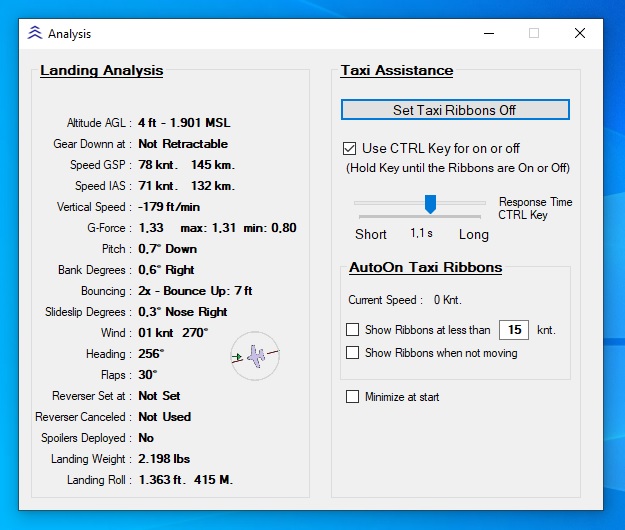
Analyze your landings with this small app.
After TakeOff the analyzer will be active above 200 feet AGL
In de update:
V1.7
Airport info added
Vertical speed at touchdown improved
V1.6
Added a logbook.
V1.5
Added centerline deviation
See also the Readme file
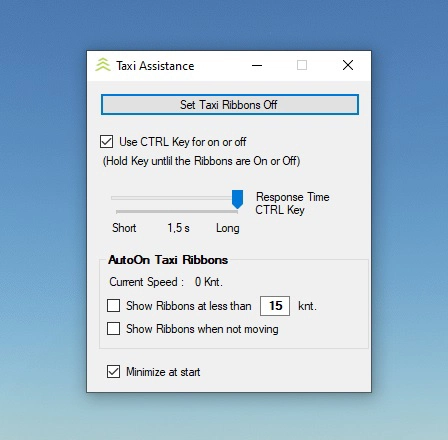
Also Included toggle Taxi Ribbons
By Evander Tholen
MSFS 2020MSFS 2024
Landing Analysis
Analyze and improve your landings with this small app, featuring updated features like airport information and improved touchdown vertical speed analysis. Track your progress with added centerline deviation and logbook functionality. Toggle Taxi Ribbons for enhanced simulation experience. - By Evander Tholen
Downloads6K
Version1.7
File Size5.60 MB
Published4 years ago
Updated4 years ago


User Reviews
5.0
4 reviews
5
100%
4
0%
3
0%
2
0%
1
0%


Log in to join the discussion
Log InComments(24)
about 1 month ago
11 months ago
9 months ago
about 1 year ago
almost 2 years ago
-Sprotty_C
about 2 years ago
over 2 years ago
BTW, I have found some missing airports (last one ZMCK). Is there any way to update airports database?
about 2 years ago
Also you must running the makerwys.exe after every update of msfs2020
about 2 years ago
Thank you very much!
over 3 years ago
Does it have to start the game from takeoff? what if i start the game from approach on final ,without a takeoff?
over 3 years ago
You can start when ever you want, but at least 500 feet before touchdown
over 3 years ago
Start from approach on final ,without a takeoff? is also good
over 4 years ago
Great little app - thanks - using version 1.5
Extract this download to any folder on your PC. Open the Readme file. The Readme file for this Analysis program gives directions on where to find the MakeRunways download.
Just to assist others who make have difficulty with the installation of Pete Dawson's MakeRunways prog.
Download and extract the MakeRunways zip file to any folder on your PC. Run the MakeRwys.exe. It will take sometime to run to extract all the required data. With SU7 this involved 39,845 airports, 82,693 runways and 11,425 BGL's which included my Navigraph Navdata. Numerous files are created but the only one you need is the Runways.xml document.
Copy the Runways.xml file into the folder where you extracted the Analysis_HCjPL and replace the existing Runways.xml.
Run the Analysis.exe -before, during or when loading MSFS 2020. Fill in your destination ICAO code and thereafter create your flight in MSFS 2020 as normal.
Hope this helps.
Love the implementation of the on/off option for the taxi ribbon.
Kind regards,
Paddy
over 4 years ago
Thank you Paddy for the additional clear Info
Evander
over 4 years ago
This app is excellent, exactly what I was looking for. 😃
However, I also had to delete the "Simconnect.cfg" in the folder first, so that I could finally connect. Thanks, Skidroq for the information.
I'm sure you can fix the problem with the "Simconnect.cfg" easily and upload a fixed version here.
I would have a few more ideas, but I just don't know if you can implement this.
How about a "log file", in which the data is recorded chronologically after each landing.
Also, a rating of each landing would be awesome. Here Vertical/Speed, Bouncing, GeForce and so on, could impact the score. It would be incredible, if the wind would be included in the ratings, so that there is a better rating for a decent crosswind than for better conditions. *dreaming* 😍But anyway, I love your app already. Thank you. :)
Daniel
over 4 years ago
That was a big mistake with the simconnect.cfg file, I'm already working on an update with more info about the flight.
The log file is of course very interesting, maybe in the future.
About the ratings that is very difficult, every plane is different, I also think that you know whether it is a good landing when you look at the result.
But maybe you have an idea to start with.