
Description
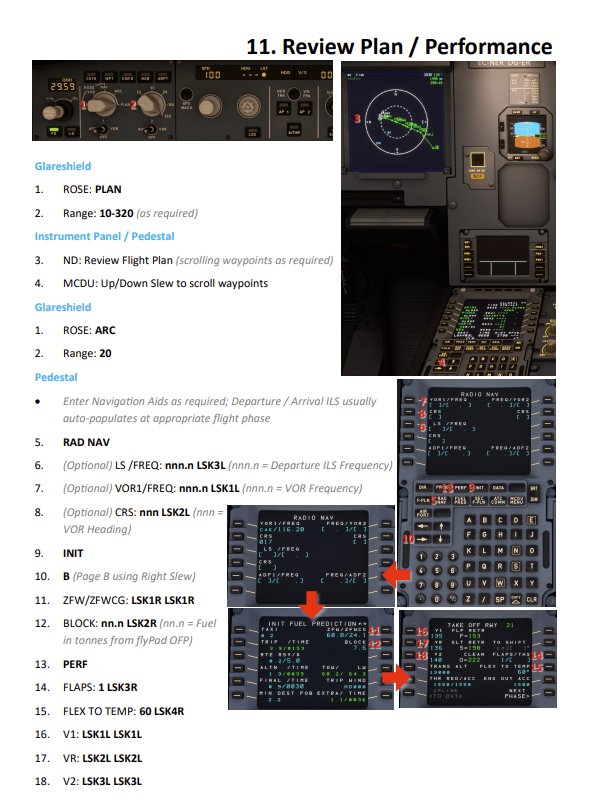
This guide provides a 30-page illustrated step-by-step guide to preparing and conducting a flight in the FBW A32NX. It is intended to help the beginner become familiar with preparing the A32NX and conducting a successful IFR flight.
It is inteded to suplement the official documentation and checklists to help the beginner identify and learn the complex systems used to operate the A32NX.
The guide assumes:
- That you will use simBrief to prepare a flight plan.
- You have airport and procedure information through a free or paid add-on.
- That you will use the development version of the FlyByWire A32NX with simBrief integration enabled.
- That you will conduct an IFR flight from and to an ILS-equipped runway using the appropriate ILS procedures and be guided by the (rather erratic) MSFS inbuilt ATC.
The guide is laid out in sequential order, and if you follow it page-by-page and step-by-step you will be instructed to conduct the correct actions in the right order and at the right time. Only steps required to successfully fly are listed. Many checks are omitted in the interests of simplicity. Omitted steps will always default to the correct settings in the simulator, whereas a real pilot would have to set or verify them.
Each page has:
- A Title (top -right) which corresponds to the preparation activity, phase of the flight, etc.
- One or more Headings which tell you which of the cockpit panels to look at to conduct the listed steps.
- Numbered and/or bulleted steps to follow. Each numbered step has the relevant control or display marked on a diagram on that page. Bulleted steps are for information or aren’t shown on a diagram for brevity.
- The action you should take is shown in BOLD and supplementary information in grey italics.
- Actions you should take in the MSFS UI are shown in brown and simBrief actions in green.
All copyrights and trademarks are acknowledged.
FlyByWire A32NX Illustrated Beginners Guide
A comprehensive 30-page illustrated beginners guide for setting up and flying the FlyByWire A32NX in Microsoft Flight Simulator. This guide helps new users navigate the complex systems of the aircraft for a successful IFR flight experience. It includes step-by-step instructions, assumes the use of simBrief for flight planning, and is designed to complement official documentation and checklists. Copyrights and trademarks are acknowledged.

User Reviews
5 reviews
Version History
No version history available.
Related

Edwards AFB to Homey: Star Wars Canyon, Vegas and Area 51
Embark on a thrilling bush trip from Edwards AFB through the iconic "Star Wars Canyon" low-level flight route in California, USA, flying the Daher TBM 930. Explore Death Valley, Las Vegas, Red Rock Canyon, and even Area 51 on this scenic adventure. Follow detailed instructions and visual references for each waypoint in the Navlog while enjoying the TBMs maneuverability at 150-230 knots. Discover military-inspired procedures, stunning landscapes, and a unique flying experience in this addon.
by amonynous
Caernarfon to Llanbedr: Learn the Mach Loop
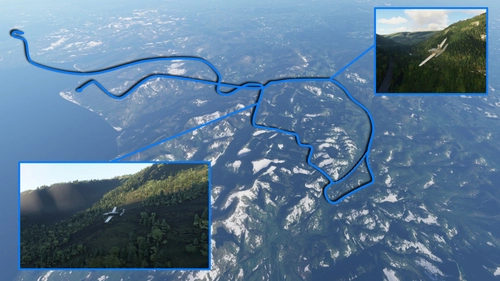
Fly through the renowned Mach Loop in North Wales, UK, a favored low-level training route for RAF, USAF, and allied aircraft. This bush trip takes you through breathtaking mountainsides in the Daher TBM 930 at 150-230 knots, offering a challenging experience emulating military flights but at a slower pace. Navigate through detailed instructions and visual cues for an exciting aviation adventure.
by amonynous
China Lake NAWS To Star Wars Canyon
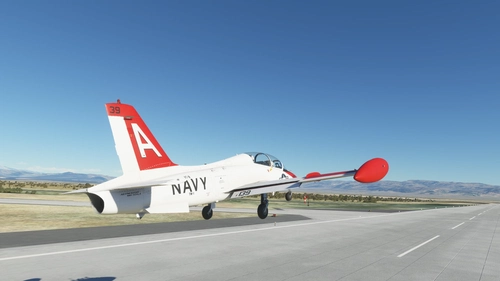
Experience the adrenaline of flying through the legendary low-level training route from China Lake NAWS to Star Wars Canyon in California. Choose between the Aermacchi MB-339A or Daher TBM 930 to navigate narrow canyons and mountain ridges at 200ft AGL and 500 knots. Follow the official Sidewinder/Jedi Transition route procedures for an authentic flight simulation challenge. Installation is straightforward - just extract the *.PLN file and load the plan from the World Map screen to begin your adventure.
by amonynous
Ascension Parish Airstrip (As owned by legendary smuggler Barry Seal)
Fly back in time to the notorious era of legendary smuggler Barry Seal with the Ascension Parish Airstrip. This Microsoft Flight Simulator add-on recreates a private airstrip in Ascension Parish, Louisiana, USA, owned by the notorious figure involved in illegal activities during the 1970s and 1980s. Explore this fictional airstrip with the ICAO code "XB01" and immerse yourself in the history of clandestine operations in the skies over Louisiana.
by amonynous
Log in to join the discussion
Log InComments(11)
over 1 year ago
over 2 years ago
almost 3 years ago
over 4 years ago
Excellent Guide, thank you.
I agree with previous comment if you could do a Fenix version would be greatly appreciated. The fact that Fenix shipped with next to none guides or manuals is almost criminal. We are not all real pilots.
over 4 years ago
any chance to do a FENIX Version? This was so helpful for me!
almost 5 years ago
Hello!
That manual is very great, but i have find a error! When you push Apu Bleed you must then make the EXT PWR to OFF! The power is then running with the APU. In your manual you make the EXT PWR OFF, when you make the power down on the end of the flight and that is wrong. Thank you for your work to make this manual! :-)
almost 5 years ago
All was good up to 10. Clearance, then no ATC option to "REQUEST IFR CLEARANCE FOR INSTRUMENT FP" - Help!
almost 5 years ago
Have you tuned Ground as that is where the option lives? Let me know if that's the problem and I'll update the guide to make it clearer?
almost 5 years ago
you have to go on the tablet and you option in the sim options of the parameters and you put the sync msfs flight plan on save have fun !!
almost 5 years ago
Thanks for clarifying, I'll make a note of that in the next update.
almost 5 years ago
PERFECT!!!