
Description
Flight Simulator First Officer (FSFO) Next is a realistic and very flexible; yet, easy-to-use virtual First Officer. It’s designed specifically for virtual pilots who value realism, but may not have the time to execute comprehensive preflight and/or post flight procedures. Despite its sophistication, it’s also coded with novice pilots in-mind; FSFO will configure every switch according to the manufacture recommendations. With FSFO, you only need to program the FMC/CDU, and even some of that can be handled by your first officer. FSFO can be as complex or simple as you want; for example, FSFO can complete the entire Pre-Flight procedure, or only those functions you chose not to accomplish. Regardless, he will check every switch to ensure it's placed in the correct position; using this methodology, you can fly complicated third-party aircraft without reading 200+ manuals. Just hit connect and fly with confidence that your First Officer is helping you fly these complicated aircraft. FSFO sets itself apart from the competition by not requiring strict adherence to scripts, reading lengthy manuals, building complex checklists, or using precise speech. Moreover, it uses real vice robotic voices.
Speech Recognition
Command the First Office to set the flaps, gear, autopilot, takeoff thrust, and execute the flows and checklists. See the Voice Command section for a full list of commands
Checklist can be controlled via voice or completely automated
Control Push Back via Voice commands
Flight Deck Announcements
Welcome Aboard (message depends on weather conditions)
Flight Attendants “Prepare for Takeoff”
10,000 ft chime
We’ve reached our cruise altitude (message depends on turbulence)
Descent Announcements (e.g., electronics off and night time landing messages)
Flight Attendants “Prepare for Landing”
Welcome to our destination (message depends on weather conditions)
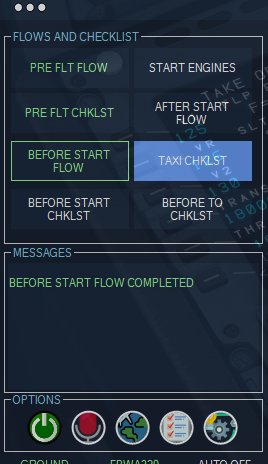
Integrated Flows and Checklists
Flows - When activated, the copilot will check each system to ensure its set correctly for a specific flight phase; if it's not set correctly, he will configure said system. Using this system, FSFO will completely configure the aircraft for you, which will spare you the need to read 300+ page manuals.
Checklist - When called, the copilot will call the checklist item
If using button mode - if the systems is set correctly, he will proceed to the next item; if it's not, he will wait for the pilot to configure the system before proceeding to the next call.
If using Voice mode – The Copilot will wait for a verbal response (e.g., checked, set, on, off, etc.…)
Speed Calls:
Copilot call Power Set
Copilot calls Speed Alive
Copilot calls 80 Knots on takeoff and 100, 80 and 60 Knots on landing
Copilot calls V1, Rotate, and V2
Copilot calls “400 ft” and “Acceleration Altitude”
Vref monitoring (i.e., copilot will advise the captain when the airspeed falls below the imputed value on landing)
Engine Callouts
Calls “Engine x Started”
Calls “Engine x Cutout
Calls “All Engines Stable”
Safety Checks
Before Takeoff - Copilot checks the flaps, trims and autobrakes; if they're incorrect, he will warn you
After Takeoff - Copilot checks the landing gear and flaps; if they're incorrect, he will warn you
Before Landing - Copilot checks the landing gear, flaps and spoilers; if they're incorrect, he will warn you
Doors – Copilot will warn you anytime the engines are running and the main door is opened
Copilot Options
Manages Autopilot – Copilot can turn on/off Vnav, Lnav, A/T, and Master Autopilot
Manages Gear – Copilot can raise/lower the gear at the designated altitudes
Manages Flaps – Copilot will raise/lower the flaps at the designated speeds
Manages Altimeters - Copilot can set altimeters based on flight parameters
Speed Warns - Copilot warns with IAS goes above 250 knots below 10K ft AGL, when Ground Speed is too high (30 mph), or when the IAS falls below VREF during landing
Manages Lights - Copilot can turn on/off ALL interior and exterior lights at the appropriate altitudes and time of day
Systems monitoring - Copilot can also callout flap changes, parking brake, landing and spoiler status. For example, if you retract the flaps from 10 to 5, the copilot will call
“Flaps 5.” If the landing gear is extended, the Copilot calls “landing gear down”
Manages Center Tanks - Copilot will turn on/off the center fuel pumps when the fuel level falls above/below 1,000 lbs.
Manages Copilot EFIS controls – Copilot will set his controls based on flight parameters (e.g., App Mode when capturing the ILS and terrain map on takeoff/landing)
Manages FMC – Copilot will set his FMC based on flight parameters (e.g., LEGS page on Takeoff, PROG page in Cruise, sets VREF on descent and aligns IRS during the
Preflight Flow)
Manages MCP – Copilot will set IAS, HDG, LNAV, VNAV, A/T, HDG SEL and FDs.
* Some settings are not possible to set on certain aircraft due to SDK limitations.
Change Copilot/Pilot accents:
Choose between English, French and German (more on the way)
Video here: https://www.youtube.com/watch?v=ykVQeXwHoxg&t=1756s&ab_channel=FlightSimulatorFirstOfficer
Website here: https://flightsimfirstofficer.com/
Comments(105)
Log in to join the discussion
Log In10 months ago
over 1 year ago
almost 2 years ago
over 2 years ago
10 months ago
over 3 years ago
Hay all it's john here from bvipilots. I think what this guy has done to give assistance in the cockpit is outstanding. We are here to sim and if you are simming with out a first officer, then that would not be simming. I think the program is great, and not only is it worth it, but he is even making it more accessible for anyone to use. Litterly a young kid could fly with first officer helping. So I would say there is no room to nag or pick and be thankful for a great program.
over 3 years ago
Great product, dont know why he's getting some negativity as this is superior to the
over 3 years ago
The only negativity is from people who think the specific aircraft profiles should also be free, regardless if they're half the price of the competition and frankly are 2x the value. Again, if you just fly default or simple aircraft, there's no reason to buy any of the specific profiles. Also, as I continue to build out the finance and pax simulations portion of FSFO, it will all be free..
over 3 years ago
THIS IS NOT FREEWARE! you have to buy a license for every plane. I dont mind this, but it should be in the description somewhere!
over 3 years ago
That's not entirely true; there's a freeware profile that includes generic flows and checklists. That's all free; FSFO now includes voice command pushback, Runway Advisory Alert System (RAAS), Pax/Cargo simulation, and other features that can be used for free. Only the custom aircraft profiles (e.g. PMDG 737,, FEN A320, etc) cost a modest fee, which is half the competition. If you fly default or freeware aircraft from here, the default profiles should work just fine.
over 3 years ago
non comprate le licenze e solo una presa in giro... è assurdo che bisogna modificare files per poi non funzionare.. PESSIMOOOOOO (NON COMPRATE LE LICENZE)
over 3 years ago
What files were you asked to modify? FSFO doesn't require you to modify a single file; if you buy the PMDG profile, you have to edit the pmdg737.ini file, which is a PMDG thing, not FSFO...and it's been that way for a decade. So, I'm not entirely sure what you're talking about.
10 months ago
over 3 years ago
Does it play nicely with GSX by chance? Particularly the upcoming passenger features of FSFO... Thanks!
almost 4 years ago
I have the PMDG 737...when it asks for the planes license it will only allow me to put about half of the numbers in...then nothing else...what am i doing wrong?
almost 4 years ago
Hi I would like to ask if anyone try this add-on with FenixSim A320 version Aircraft in MFS2020 Would it be compatible? And also if is compatible would I be able to use Pilot2atc at the same time?
Flight Simulator First Officer Next
Enhance your Flight Simulator experience with Flight Simulator First Officer Next, a realistic and flexible virtual First Officer designed for pilots who value realism but may not have time to execute comprehensive procedures. FSFO can be as simple or complex as you want, configuring switches according to manufacturer recommendations and assisting with FMC/CDU programming. Enjoy speech recognition, integrated flows and checklists, flight deck announcements, engine callouts, safety checks, copilot options, and customizable accents to elevate your flight simulation immersion.

User Reviews
14 reviews
More Information
Version History
1.2.4.0 ALL - [Compressed] Reduced installer size 70% ALL - [CHANGED] Links to audio files PMDG737 - [FIXED] Crash when calling out MCP settings 1.2.3.0 [*REQUIRES FSUIPC 7.3.10!] ALL - [UPDATED] FSUIPC.dll to work with MSFS SU10 ALL - [UPDATED] WAPID.dll to work with MSFS SU10 ALL - [ADDED] SOP Option to define what speed to start the After Landing Flow ALL - [ADDED] Adv Option "CALLV2"; if set to 0, you're first officer will not call V2 ALL - [ADDED] Adv Option "useLowBoardingSound"; if set to 1, a lower volume cabin boarding will be played ALL - [ADDED] You can now preset your comm freq and simply say "Contact Ground, Contact Tower, Contact Departure, get the weather, ETC); your copilot tunes-in the designated freq...useful to VATSIM users ALL - [ADDED] Pax/cargo boarding simulations; this is the beginning of a more robust pax simulation ALL - [ADDED] Advance option overRideMngFlapsOnAppr to prevent the copilot from setting the flaps on approach when MngFlaps is selected [user request] ALL - [ADDED] SOP option to turn off/on seatbelt signs ALL - [ADDED] Adv option callOutFlaps; if set to 0, the first officer will NOT call flap settings...this is useful for users who control flaps with hardware ALL - [ADDED] "Tune Nav Radios" voice command; when called, the copilot will set your nav freq and course. ALL - [ADDED] English 3 region (Voice Pack)...thank you Mr. Ferguson for your recording your voice! ALL - [ADDED] German 2 region (Voice Pack)...thank you Toby for your recording your voice! ALL - [FIXED] Copilot entering wrong ILS and Crse Freq ALL - [FIXED] Links to Region (sound packs) ALL - [FIXED] Altitude height was always registering 18,000 feet RAAS - [FIXED] errors for Swedish and French OS user FBWA320 - [FIXED] Copilot will now run a different preflight flow when he detects the APU is running; he assumes a turnaround state. FBWA320 - [FIXED] Copilot was not inputting the correct flaps setting during After Start Flow FBWA320 - [FIXED] Flight control check to work with FBW changes FBWA320 - [ADDED] Copilot now performs a battery test during the Pre Flight Flow FBWA320 - [CHANGED] MCDU programming to eliminate W/B as that feature was moved to the EFB FBWA320 - [CHANGED] LNAV and VNAV Autopilot Calls to Managed Mode and Manage Climb FBWA320 - [CHANGED] MCDU Approach programming is now completed during the descent checklist FENA320 - [FIXED] Was not registering full left/right rudder deflection during the flight control test FENA320 - [ADDED] Copilot will now set the PFD, ND, and ECAMs Brightness FENA320 - [ADDED] Copilot will now run a different preflight flow when he detects the APU is running; he assumes a turnaround state. CAPT777 - [ADDED] Support for the Capt Sim 777 (FREE) PMDG737 - [FIXED] Flap callouts are now much more timely and accurate PMDG737 - [FIXED] HDG, SPD, CRS, and ALT are now set, correctly 100% of the time! PMDG737 - [ADDED] Copilot will now run a different preflight flow when he detects the APU is running; he assumes a turnaround state. PMDG737 - [ADDED] Copilot will now program your HGS data for takeoff and landing CRJ700 - [ADDED] Copilot will now run a different preflight flow when he detects the APU is running; he assumes a turnaround state. 1.2.2.0 [*REQUIRES FULL UNINSTALL...SEE BELOW] PMDG737 - [FIXED*] Setting the right Altitude on the MCP [*this has been improved, but still falters about 10% of the time] PMDG737 - [FIXED] FSFO was not saving Vref speed when entered into the FMC PMDG737 - [FIXED] Copilot was not inputting the correct ZFW PMDG737 - [FIXED] If using APU as your Pwr Up Src, your copilot will no longer perform the Apu and cargo smoke tests; this will prevent the APU from stopping during the preflight flow. PMDG737 - [CHANGED] Reduced time for copilot to click a FMC button (.5 seconds faster) FENA320 - [FIXED] Copilot was not inputting the correct ZFW FENA320 - [FIXED] ECAM buttons staying pressed FENA320 - [FIXED] TO Config button staying pressed, which caused an alarm on landing FENA320 - [FIXED] ECAM buttons staying pressed (pressed position) FENA320 - [FIXED] LS and FD buttons staying pressed (pressed position) FENA320 - [FIXED] Battery and APU Fire Test removed from Pre Flight Flow when using using APU as your Pwr Up Src; this will prevent faults with power loss. MSFS787 - [FIXED] Not Displaying the correct takeoff flaps on the FSFO performance screen FEN/PMDG - [ADDED] Advance options captPrgmInBandPrefData; when set to 1, the FO will program everything but the performance data (init A, Perf, and approach data) ALL - [CHANGED] Separated Manage Flaps and Manage Gears ALL - [FIXED] Center runways not showing on the FSFO Pref screen ALL - [ADDED] Generic Runway Awareness and Advisory System (RAAS) you can use with any aircraft (free) ALL - [ADDED] Log Book; FSFO will now track and save all your flights ALL - [ADDED] Flight Scoring; FSFO now monitors 23 flight parameters to generate a post flight score ALL - [ADDED] Ability to save the aircrafts last location ALL - [ADDED] FSFO now has the ability to move your aircraft to it's last location; if you want to start from the gate you terminated at, you can. Go to Operations > Ground Services > Move Acft To Last Loc * Go to the FSFO Directory > Find acft.dat > Copy to a safe place * Uninstall FSFO via Windows Add and Remove Programs option or Uninstaller in the FSFO directory * Delete the remaining FSFO directory * Run the new installer * Paste your acft.dat in FSFO Directory > Data folder 1.2.1.0 PMDG737 - [FIXED] PM's FMC is set to LEGS and PF is set to PREF during the After Start Flow PMDG737 - [FIXED] FO Blanks-out lower DU screen during Before Takeoff Flow PMDG737 - [FIXED] Copilot can now read the MCP setting 100% of the time PMDG737 - [FIXED] Error when Copilot was setting CRS PMDG737 - [FIXED] Copilot can now Set MCP setting (e.g. heading, speed, and altitude) 100% of the time PMDG737 - [FIXED] Copilot can now read Vspeeds directly from the FMC PMDG737 - [FIXED] Copilot was not removing the Chocks when Startup Power Source was set to GPU PMDG737 - [FIXED] Copilot was not setting APU, Fuel or Hyd pumps during the Before Start Flow PMDG737 - [CHANGED] APU Fire test happens before APU start now AEROCRJ - [FIXED] AFTER START Flow was not executing correctly when using the Auto Flow Option ALL - [CHANGED] DEBUGGING ALL - [CHANGED] FSUIPC Check is no longer mandatory; you can check via support page ALL - [ADDED] Configurable button to skip actions (hold button vice ctrl + alt) ALL - [ADDED] Configurable option for the FSFO screen to be restored it's last location ALL - [CHANGED] Landing gear up/down sound file changed to gear up/down ALL - [CHANGED] Flaps zero sound file changed to Flaps up ALL - [CHANGED] Data presented on the FSFO performance Page is now based on your aircraft ALL - [FIXED] Copilot was setting Flaps to full during approach, regardless of the setting on the FSFO performance page. ALL - [FIXED] VSPEEDS disappearing on FSFO PREF Screen ALL - [FIXED] 100 knots was not being called during the Takeoff roll, despite being set on the SOPs page ALL - [ADDED] Advance option captPrgmInitBPrefData; if set to 1, your copilot will program the FMC/MCDU but you will be responsible for inputting the Init-B (Airbus), PERF, and landing performance data. ALL - [ADDED] Advance option use100KnotsForAirbusRegardlessOfSOPs; if set to 1, 100 vs 80 knots will be called for the FENIX and FBW Airbuses regardless of the SOPs setting. ALL - [CHANGED] MNG FLAPS AND GEAR is now a configurable option and NOT an advance option; when set to on, your copilot will manipulate the gears/flaps during the After Start Flow while using button mode
9 months ago