
Description
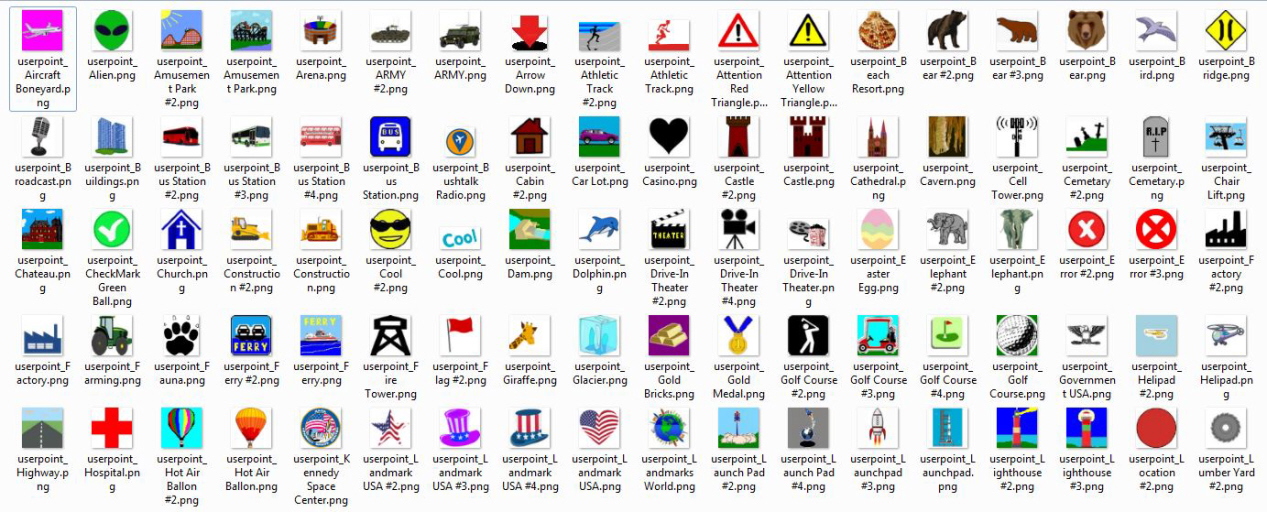
Working with the LittleNavMap developer Alexander Barthel I helped to develop these additional Userpoint Icons for use in LNM. You can find LNM at: https://albar965.github.io/
These will allow you to categorize and mark a wide variety of POIs (points-of-interest) found in the MSFS scenery. MSFS opens the door to view the earth as seen in real-life from a top-down satellite view and this collection of icons will provide a way to catalog unique and interesting things to explore while flying. Some categories of icons provide multiple choices.
Be sure to read the README and VERSION files in the package for details about installing and maintaining your icons.
This zip file is also available exclusively at the developers website here: https://www.littlenavmap.org/downloads/Userdata/
---
Additional information about working with LNM Userpoint icons can be found in the Online Manual at these links:
---
Userpoint Icons -
https://www.littlenavmap.org/manuals/littlenavmap/release/2.6/en/USERPOINT.html?highlight=icons
---
Icon Types -
https://www.littlenavmap.org/manuals/littlenavmap/release/2.6/en/USERPOINT.html?highlight=icons#types
---
Customizing Userpoint Icons -
https://www.littlenavmap.org/manuals/littlenavmap/release/2.6/en/CUSTOMIZE.html#customize-userpoint-icons
---
If you share this zip please distribute it intact with the README and VERSION files.
Enjoy,
NCHawk5018
LittleNavMap 'Userpoint Icons'
Additional icons for for marking your favorite places and things in LittleNavMap. Create unique groups of userpoints such as stadiums, famous locations, and things easily identified in low level VFR flights then export these to share with others in the community..

User Reviews
1 reviews
Version History
*Version 10.454 Note: As always, first delete all the old icons (except those from other addons and LNM default icons), then drop in the desired icons. Be aware it is not recommended to load unnecessary icons to maintain LNM performance. Open LNM and the Userpoints window (F6) and review the listed icons for broken links (you’ll see a question mark instead of the actual icon). Update as necessary. Reference the README for detailed information. The following is a detailed list of changes… New: userpoint_Ampitheater and userpoint Ampitheater_#2 userpoint_Closseum userpoint_Coast Guard and userpoint_Coast Guard_#2 (USA) userpoint_Concert Site and userpoint_Concert Site_#2 & #3 userpoint_Dragstrip and userpoint_Dragstrip_#2, #3, & #4 userpoint_Horse Track and userpoint_Horse Track_#2 & #3 userpoint_Power Lines and userpoint_Power Lines_#2 & #3 userpoint_Power Station and userpoint_Power Station_#2 & #3 (previous Power Station renamed as Power Line icon) userpoint_Power Substation and userpoint_Power Substation_#2, #3, & #4 userpoint_Race Track_#2 & #3 (old #2 & #3 renamed to #4 & #5 respectively) userpoint_Ship Coast Guard and userpoint_Ship Coast Guard_#2 (USA) userpoint_Smoke Stack and userpoint_Smoke Stack_#2 & #3 userpoint_Theater Improved: userpoint_Castle (filled in background) userpoint_Fort (colored and filled in background) userpoint_Train Station and userpoint_Train Station_#2 (colored and filled in background)
Log in to join the discussion
Log InComments(3)
over 2 years ago
This archive seems not to be a drag and drop then use type of thing but rather a keep somewhere on your drive and pick from it one icon in one particular flight plan sometimes type of thing. How? It will forever remain a mystery I think. :D
almost 5 years ago
Thanks for the comments.
...and opened my eyes to the possibilities for creating new icons and userpoint categories in LNM.For those that wish to create their own icons be aware all the icons in this zip are sized 64x64 pixels. These provide adequate resolution for use in LNM and give the icon a small footprint (size). You can use an app to create icons 256x256 pixels for better accuracy/detail when creating your image but use a conversion app to bring it back to 64x64. You’ll not notice any real difference in the icon as used in LNM and keep the file size small as possible.
almost 5 years ago
This is a nice collection of icons and opened my eyes to the possibilities for creating new icons and userpoint categories in LNM. I had a great time sorting the imported World Update POIs available elsewhere on this site into appropriate categories (they all come in as "buildings" no matter what they really are). You can choose which of these icons you want, and create your own icons/categories once you see how this author has done it. Makes LNM much more useful as a VFR sightseeing tool.