
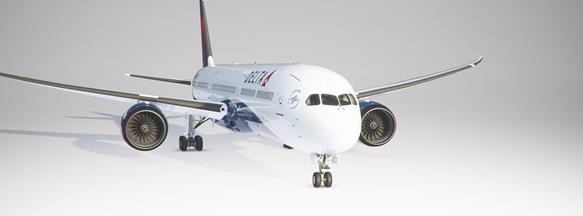
Description
Fix texture file for SU5. Will remove pink textures as caused by SU5.
Texture Files for:
- 787
- 747
- A320
- FBW A32NX
- CJ4 *Added*
Replace texture file in each livery folder.
Locate layout.json file in the liveries folder and drag it to the MSFS Layout Generator. This will regenerate and save a new one. Your livery is now fixed.
MSFS 2020MSFS 2024
Texture fix for SU5. 747/787/A320/A32NX/CJ4
A texture fix add-on for MSFS SU5, specifically for the 747, 787, A320, A32NX, and CJ4 aircraft. The fix addresses pink textures issue caused by SU5 update. Simply replace texture files in each livery folder and regenerate the layout.json file to resolve the problem.
Downloads Stopped
The creator has temporarily stopped downloads for this addon. Please check back later.
Downloads5K
Version1.0
File Size312.39 KB
Published5 years ago
Updated5 years ago


User Reviews
4.7
3 reviews
5
67%
4
33%
3
0%
2
0%
1
0%
Version History
No version history available.
Log in to join the discussion
Log InComments(22)
over 4 years ago
PS Is an update possible to include the King Air 350, TBM 930 and Caravan 208. I think a lot of the smaller aircraft are facing similar pink liveries issues. Thanks.
over 4 years ago
I am presuming and dreading that this solution means you must go folder by folder for each individual livery to fix one at a time? Is a program solution that would go thru a folder filed with liveries and fix them all. Say a folder 'B747_8i_USA' filled with American airlines liveries and fix them. I have a lot of liveries but they are well organized. Thanks.
almost 5 years ago
Checked Boeing 787-10 Liveries on Sim Update 7 and it's also fixing problems with pink wings.
almost 5 years ago
Hi, would this be able to work with the working title mod of the cj4?
about 5 years ago
Hang on... did I miss something? I've been flying since SU5 and WU6, and I didn't even know there's a pink wing problem that requires a texture.cfg update.
Comparing the two Texture.cfg files from what I have with the one in this mod. I can see there are differences, but while it's obvious my current texture .cfg is still using an old fallback path, how come I never get a pink wing issue? This is an example for my FBW A32NX livery which I structured it to refer to the livery texture files that I put in the Asobo A320 instead. That way I can just download the same livery texture files but used in both Asobo A320 for Live traffic purposes, and the FBW A32NX for myself to fly without having duplicate texture files which takes up redundant spaces.
[fltsim]
fallback.1=..\..\Asobo_A320_NEO-LIVERY-KLM\texture.KLM
fallback.2=..\..\FlyByWire_A320_NEO\texture
fallback.3=..\..\..\..\texture\DetailMap
fallback.4=..\..\..\..\texture\Glass
fallback.5=..\..\..\..\texture\Interiors
fallback.6=..\..\..\..\texture
fallback.7=..\texture
about 5 years ago
When I load the layout generator it doesn't have any function. I can't drag any of my layout.json files into it and the generator just says "press any key to exit" so I can't edit anything. Anyone have a work around for this?
about 5 years ago
Don't open the actual generator. Just drag the file on top of the generator.
about 5 years ago
Hi there just drag and drop on the layout generator icon , dont open the EXE file . hope this helps you :)
about 5 years ago
Any chances to work it with A330?:)
about 5 years ago
This is great. Would not be great to write the tools to go recursive on all liveries. ?
Saying this because of Vatsim as we have lot of liveries....It is difficult to update one by one.
Thanks
about 5 years ago
i still getting pinkish wing on 787 how to fix it
about 4 years ago
Are you using a different livery than the default ones especially if it came out before this was released?
If so, modify the texture.CFG file in those exactly the same way as this one for the aircraft.
about 5 years ago
I have lots of liveries. Is there a quick way to do this?
about 5 years ago
I haven't written a code yet to swap the texture files out. But as for the layout.json file. I just go to my livery folder and search layout.json. Drag and drop all of them at once to the generator.
about 5 years ago
Hi, there love the fix but it now working for me the livery that has the issue is Britsh Avgeek 787 livery for MEMBERS only and the wings are purple and checker and did everything that it says still nothing! PLS help!
about 5 years ago
fixed ;)
about 5 years ago
Thanks bro!
about 5 years ago
kind of works for the wings on the 787 but now I'm getting pink wireframe around the fuselage and pink patches.
Did as instructed,
replaced the texture file in E:...\Boeing 787\Asobo_b787_Qatar\SimObjects\Airplanes\Asobo_B787_10-qatar\TEXTURE.Qatar
then dragged the layout.json file from
E:\...\Boeing 787\Asobo_b787_Qatar to the MSFS Layout generator
If i did something wrong then let me know.
about 5 years ago
I did it with the 787 El Al livery. The wings were fixed but pink wireframe around the fuselage and pink patches.
about 5 years ago
I have the same problem on the 787 vanilla Air France about pink's texture on wireframe