
Description
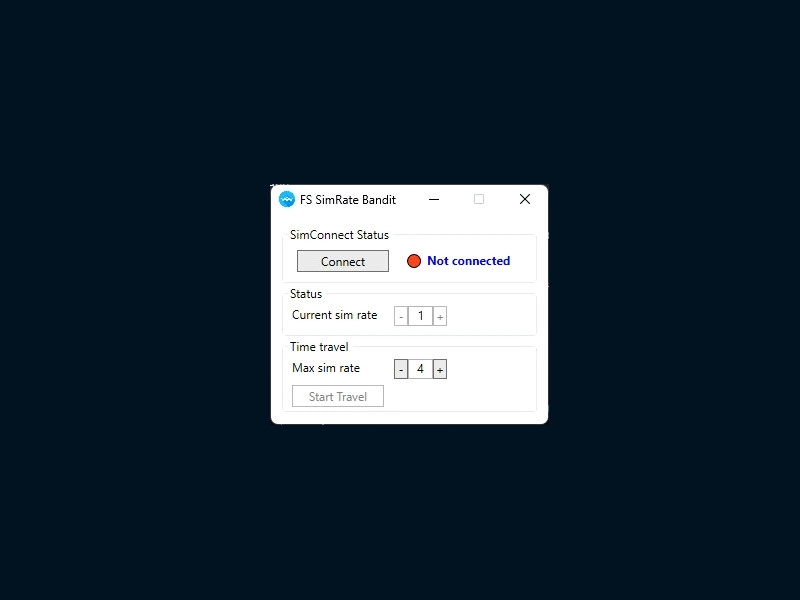
This tool will help you with controlling and indicating current SimRate in Microsoft FlightSimulator 2020 via SimConnect.
It can display and announce the current SimRate via voice. Another feature is the automatic increase and decrease of SimRate along your flight plan.
Features
- Display current SimRate and distance to next waypoint in app
- Announce current SimRate via voice on change
- Automatic SimRate increase/decrease until final waypoint of flight plan is reached (description below)
- ...
Automatic SimRate
When you click the "Start Travel" button the SimRate will automatically increase and decrease when the final waypoint is reached
Best use this when you departed and autopilot and speeds are set.
The button will only be enabled if gps variables show a flightplan.
The conditions for auto travel to automatically stop are currently:
- 15nm before final waypoint in flight plan (before approach)
25nm before final waypoint on direct flights
Approach activated
Depending on cross track error and distance to the next waypoint, the SimRate will decrease to allow the autopilot to properly adjust heading. SimRate will increase after the waypoint again.
This tool will only work properly if the plane/avionics feed the GPS SimVars properly.
FS SimRate Bandit
Easily control and track your SimRate in Microsoft Flight Simulator 2020 with FS SimRate Bandit. This tool displays current SimRate, distance to next waypoint, and announces changes via voice. Experience automatic SimRate adjustments along your flight plan for a smoother journey. Ensure proper GPS SimVars feed for optimal performance.


User Reviews
33 reviews
Version History
Did some slight tweaks after it sitting around for three years. Will put source on Github when time allows. - Slow down during travel now based on cross track error and distance for better results - Changed the layout slightly - Buttons to manually increase/decrease SimRate - SimConnect SDK update
Log in to join the discussion
Log InComments(82)
7 months ago
9 months ago
9 months ago
Otherwise deserves five stars...
Update: OK, I created my own plugin without crashing during a longer flight session. :)
https://flightsim.to/file/102489/sim-rate-announcer-for-msfs-2024
11 months ago
10 months ago
over 1 year ago
over 1 year ago
over 1 year ago
about 1 year ago
almost 2 years ago
almost 2 years ago
The only issue I have is that it randomly closes/crashes without warning. Not sure whats causing it. Can sometimes happen several times per flight. I'm using it on MSFS2024 and Win 10.
almost 2 years ago
The flight is still going fine no issues, but it does make it a bit wobbly to look at and not enjoyable to watch the sim as its progressing to the destination. Any suggestions on this?
almost 2 years ago
almost 2 years ago
over 1 year ago
almost 2 years ago
Would it be possible to add an option to keep the window on top of other windows?
Also, a keyboard shortcut to enable/disable travel would be useful.
almost 2 years ago
almost 2 years ago
almost 2 years ago
about 2 years ago