
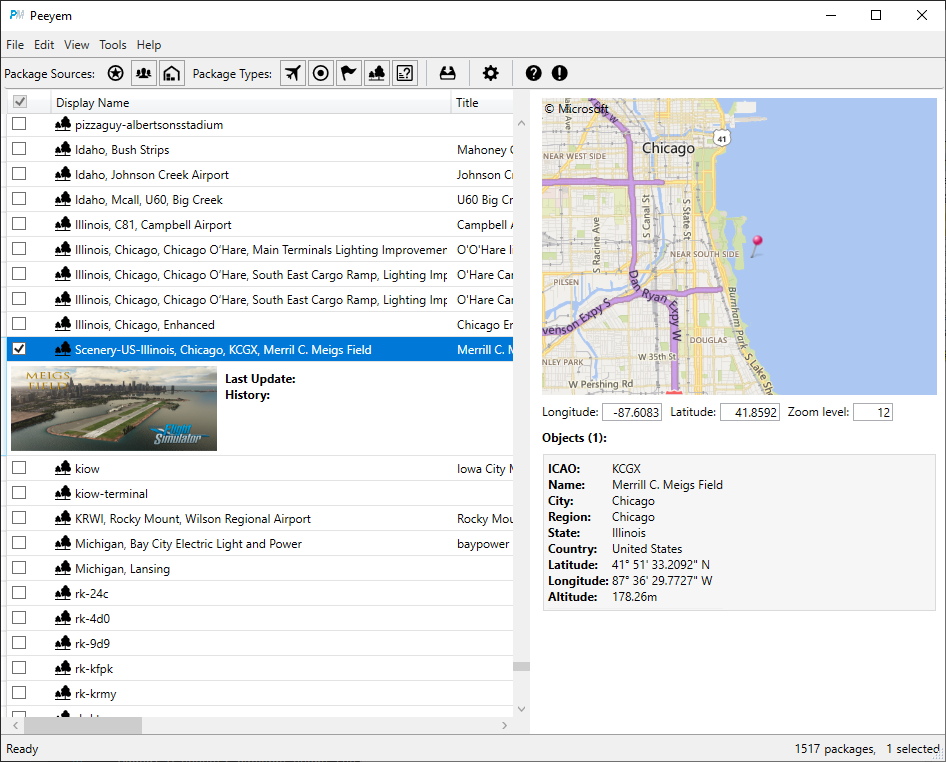
Description
Peeyem is a simple to use package manager for Microsoft Flight Simulator. It allows you to view all the official and community packages available on your system. Community packages can be enabled or disabled between game sessions to minimize the game’s memory foot print.
It works by creating soft links or junctions to the enabled packages. No directories or files are moved when enabling or disabling packages.
Requirements
.NET Core 3.1 is required to run the application. You can download it here.
Change Log
v0.6.0, “Flying a plane is no different than riding a bicycle, just a lot harder to put baseball cards in the spokes.”, 2020-12-06
- Added: “Enable Selected” and “Disable Selected” menu items to the package context menu.
- Added: The set of enabled packages can be saved to and loaded from a file.
- Added: The waypoints of the flight plan of a mission package are displayed on a map.
- Improved: Points of Interests are displayed in the Objects list of the package details panel.
- Improved: Peeyem tries extra hard to determine the real package type of packages of types Core and Unknown.
- Improved: Installing packages with the option “Required files only” takes into account packages with an invalid layout.json file.
- Bug Fix: Failed to correctly read a small category of directory names containing non-ANSI characters.
- Bug Fix: The “Select All from” context menu item did not allow you to select all packages in Official, Community or Warehouse package directory.
- Known Problem: On one configuration Peeyem is be unable to recognize the junctions it creates resulting in an inconsistent view of the Community directory. Thanks to fredm@FlightSim.to for helping me to find the cause of this issue but so far no success.
v0.5.0, “I feel the need… the need for speed.”, 2020-11-02
- Added: The package detail panel has been moved to the right side of the window to be able to show more information about a package.
- The airports of a scenery package are shown on a map.
- The scenery objects of a scenery package are shown on a map.
- The aircraft configurations are shown with more detail.
- The package detail panel can be enabled or disabled in the View / Details menu.
- Added: An option to delete the content cache file when you enable or disable a package. You can enable the option in the Environment category of the Options dialog.
- Improved: Various little performance improvements to better cope with large package libraries.
- Improved: Reading aircraft configurations.
- Improved: The airports and SimObjects of a scenery package are read on demand and in the background. This should reduce the performance hit when working with large package collections.
- Bug Fix: Changed the value used to show the name of the liveries.
…
v0.1.0, “Scratchin' the itch”, 2020-10-01
- Initial release
Acknowledgements / Credits
- Various icons from Online Web Fonts.
- Pin icon from Vista Map Markers demo icons Icons Land.
- 7-Zip, Copyright © 1999-2020 Igor Pavlov.
Peeyem
Peeyem is a package manager for Microsoft Flight Simulator, allowing users to easily browse and manage both official and community packages. It utilizes soft links to enable and disable packages without moving any directories or files. Requirements include .NET Core 3.1, and recent updates have introduced new features like waypoint display on maps and improved package type recognition.


User Reviews
19 reviews
Version History
v0.6.0, “Flying a plane is no different than riding a bicycle, just a lot harder to put baseball cards in the spokes.”, 2020-12-06 Added: “Enable Selected” and “Disable Selected” menu items to the package context menu. Added: The set of enabled packages can be saved to and loaded from a file. Added: The waypoints of the flight plan of a mission package are displayed on a map. Improved: Points of Interests are displayed in the Objects list of the package details panel. Improved: Peeyem tries extra hard to determine the real package type of packages of types Core and Unknown. Improved: Installing packages with the option “Required files only” takes into account packages with an invalid layout.json file. Bug Fix: Failed to correctly read a small category of directory names containing non-ANSI characters. Bug Fix: The “Select All from” context menu item did not allow you to select all packages in Official, Community or Warehouse package directory. Known Problem: On one configuration Peeyem is be unable to recognize the junctions it creates resulting in an inconsistent view of the Community directory. Thanks to fredm@FlightSim.to for helping me to find the cause of this issue but so far no success.
Log in to join the discussion
Log InComments(60)
over 5 years ago
over 5 years ago
over 5 years ago
Thunder7
almost 6 years ago
almost 6 years ago
over 5 years ago
Sorry if this is late. In the quick start section of the manual it is said that you have to move everything in your community folder to a separate folder and set that folder as the mod warehouse for the tool to work. And others who was frustrated like you and me please read the manual throughly (yeah I made this mistake too lol)
Edit: btw im not associated with the author and the project in any way and i just want to point this out to anyone that might need this information
almost 6 years ago
almost 6 years ago
almost 6 years ago
Software provide good response time.
Unfortunately, I cannot use it for the moment.
I have to much addons for sceneries and planes.
If you could sort sceneries per country/region, it would be great. I am using directories and subdirectories in the warehouse directory.
The same should apply for planes sorting all addons for a given plane.
For the moment, I use MSFS Addons linker.
If you could sort all addons depending of directories then you will become "Le phenix des hôtes de ces bois" like in "Le corbeau et le renard" from Jean de Lafontaine
almost 6 years ago
almost 6 years ago
I found "Location" in the column header.
This allow to sort them per directory/subdirectory.
When you have a long list, this is not convinient.
almost 6 years ago
almost 6 years ago
almost 6 years ago
almost 6 years ago
almost 6 years ago
almost 6 years ago
Just a suggestion, I dont know if it is difficult to concretise or not... It should be great to have a complete map with all the pins representing the mods we have downloaded.....and even better to have a possibility to select a region circle with a radiun for example which will automatically select all the mods acting on that zone with manually the posibility to desactivate some....Must be great and unique. Thanks again for your work so far
almost 6 years ago
almost 6 years ago