
Flightsim.to
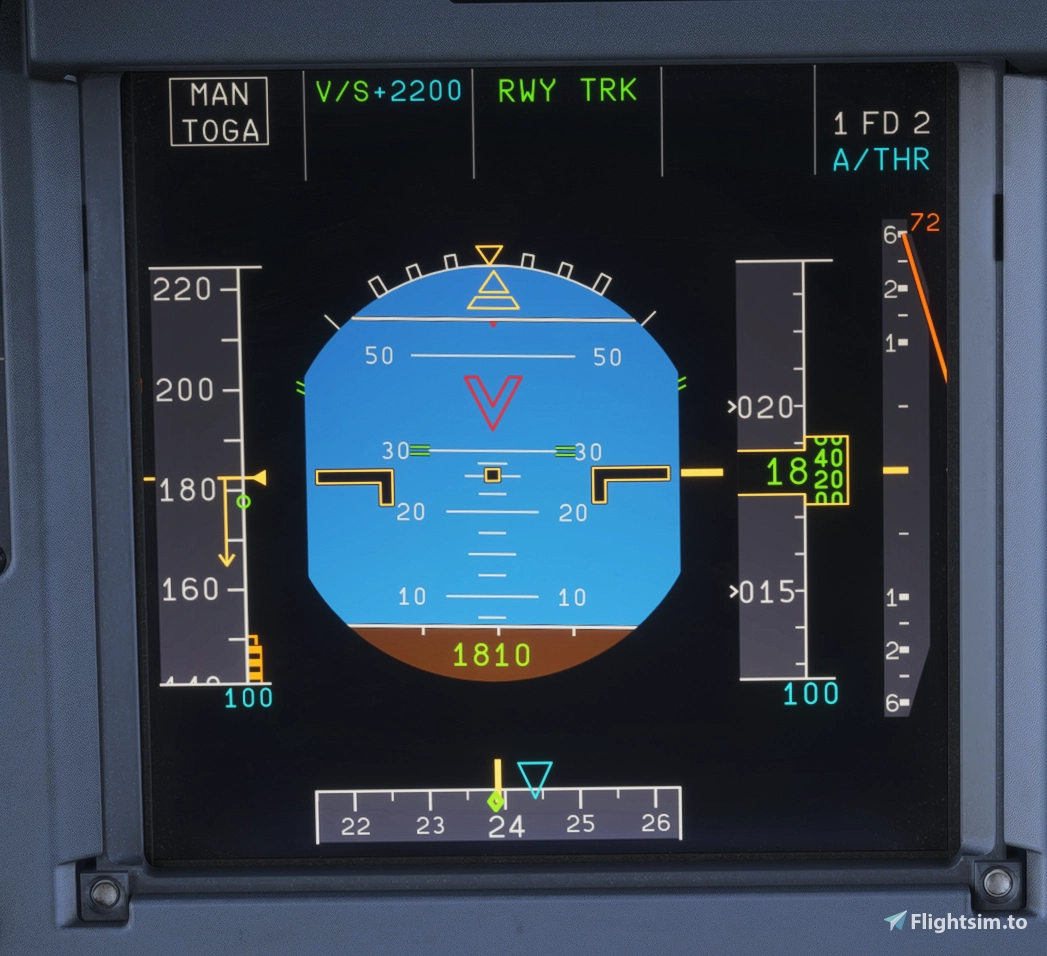
    [Discontinued] Glass Cockpit DLSS/FSR Fix – No ReShade Required - Image 1

    Description

    Project Discontinued

    The original Glass Cockpit DLSS/FSR Fix by IFreemz now includes an official standalone version that works without ReShade.

    Since the original project now offers the same functionality, along with additional improvements and ongoing updates, I've decided to discontinue this unofficial adaptation.

    I recommend switching to the official version:

    https://flightsim.to/addon/116678/glass-cockpit-dlss-fix-no-more-dlss-ghosting-on-pfd-nd

    This page will remain available for archival purposes, but no further updates or compatibility fixes are planned.

    Huge thanks to IFreemz for the original work and to everyone who downloaded and supported this adaptation!

    Log in to join the discussion

    Log In

    Comments(37)

    I

    about 12 hours ago

    Thank you for your effort!
    P

    about 13 hours ago

    Is it possible to add the compatibility for DLSS5 shader addons? like OptiShade for instance?
    Fantastic addon, thank you very much!
    G

    1 day ago

    Works great on my 5070, just wondering if VR compatibility is planned? as it stands it will crash the game as soon as VR is enabled. Thank you for this!
    A

    1 day ago

    Hello, I want to know if this will be supported with MSFS2020?
    J

    2 days ago

    not working, and each of something doing something with shaders in msfs2024 has a substantial risk of getting drivers (and as a result MSFS) crashed. if it would work, i would try some flights, but so i removed it, cause of the risk of drivers fault.
    j

    2 days ago

    Thanks a lot! Really big help for my 2060!
    D

    3 days ago

    Unfortunately, the dxgi.dll is causing CTDs after a few minutes of flying in MSFS 2024 :(
    M

    3 days ago

    It doesn't work with DLAA.
    M

    3 days ago

    nice mod
    C

    3 days ago

    Very good mod, make my eyes clear
    I

    4 days ago

    Hey, thanks for crediting me, appreciate it. A few things though:

    This is your own build rather than an official release, so please mark it clearly as unofficial on the page, and say that support for it goes through you. Otherwise people will report its bugs to me

    The zip has no licence file. The code is MIT, which only asks that the LICENSE comes with every copy, so please add it from the repo.
    It’d help to link your source too, so people can see what’s changed.
    s

    4 days ago

    Hey, thanks for pointing these things out!

    Absolutely fair requests. I'll clearly mark the release as unofficial, clarify that I'm responsible for supporting this version, and include the original MIT license in the ZIP.

    I'll also make the modified source code available on GitHub

    Thanks again for your original work!
    M
    You know there's already another standalone solution that offers full control over the various parameters of the mod and you don't even have to manipulate any files? https://wesimglide.org/otherdata/tools/Standalone-DLSS-Glass-Cockpit-Refresh.html
    D

    3 days ago

    it uses the reshade, it install it automatic, but its not stand alone like this
    G

    4 days ago

    Thanks :)
    c

    4 days ago

    Does it work with DLAA configuration?
    b

    4 days ago

    affirm
    k

    3 days ago

    In my opinion, DLAA is no longer needed for anything. Just use the Quality, Balanced, or even Performance settings in DLSS... The cockpit remains clear in all DLSS modes, and the FPS is better than with DLAA.
    m

    4 days ago

    Thank you for your work! “Flying” in VR — the clarity effect appears only if you get close to the PFD. If you’re in a normal position, there’s blurring. I didn’t notice any FPS drops.
    MSFS 2020MSFS 2024

    [Discontinued] Glass Cockpit DLSS/FSR Fix – No ReShade Required

    This add-on addresses ghosting and smearing issues on glass cockpit displays when using DLSS or FSR in Microsoft Flight Simulator. It provides a fix that does not require ReShade, resulting in clearer and sharper primary flight and navigation displays. The solution is based on the original code by IFreemz and is intended for users seeking an easy installation without additional post-processing tools. The mod is installed by placing the provided files next to the FlightSimulator2024 executable.

    Downloads1K
    Version1.0
    File Size201.3 KB
    Published4 days ago
    Updated4 days ago
    Classification
    Utilities5.0 (11)

    User Reviews

    5.0

    11 reviews

    5
    100%
    4
    0%
    3
    0%
    2
    0%
    1
    0%

    Version History

    No version history available.
    Related