
Flightsim.toFlightsim.to
    Mod Selector 0.9 + Online mods DB - Image 1

    Description

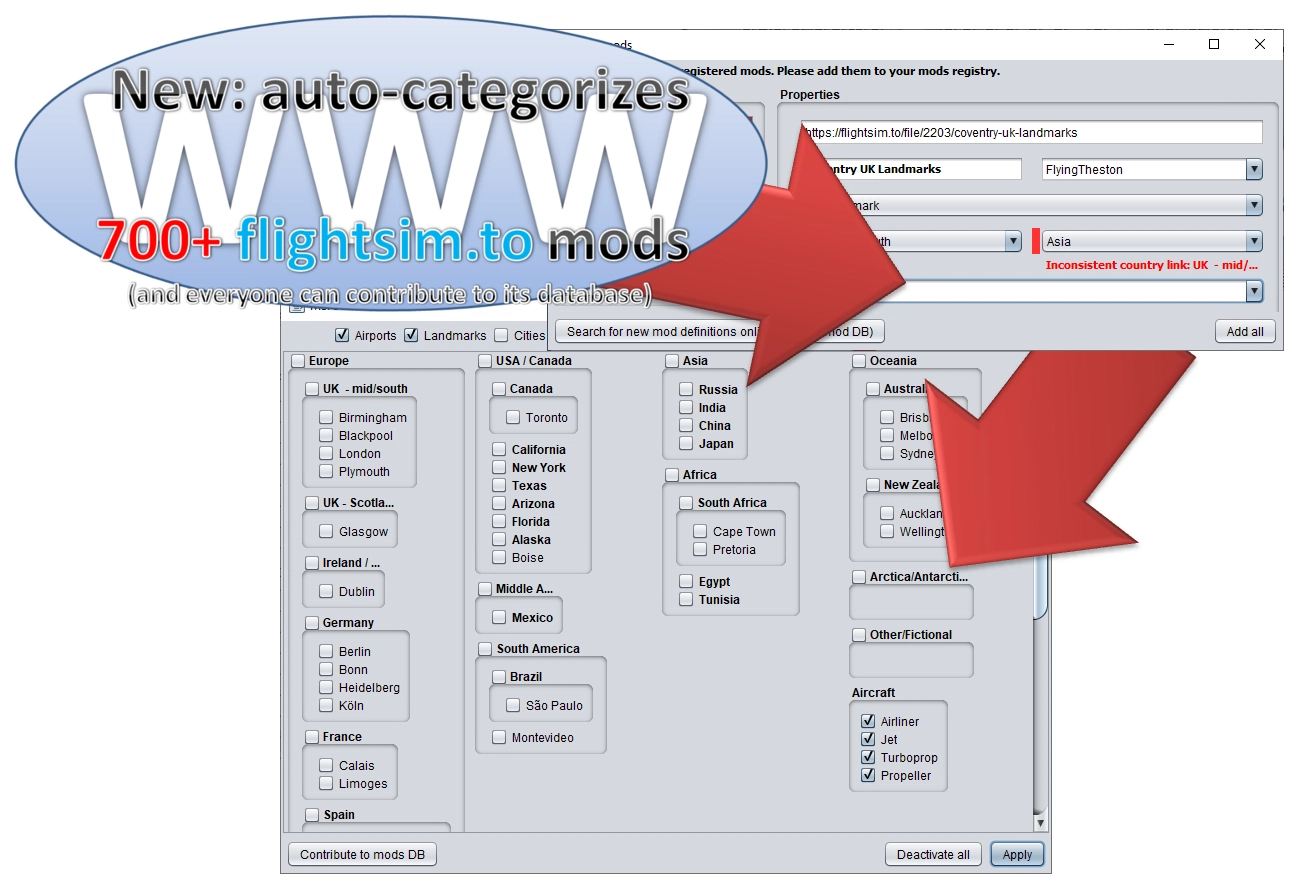
    Mod Selector 0.9 – categorize mods by geography and mod-type and decrease MSFS startup time.

    With the new version 0.9, it’s as simple as 1, 2, 3 (see also the attached screenshots)

    • 1. Add new mods to your Community folder
    • 2. Register each mod with Mod Selector
      • Note! More than 700 flightsim.to mods will be auto-registered and categorized! Mod Selector uses its own online mods meta-information database to which everyone can contribute!
    • 3. Select / deselect mods by geography and enjoy a significantly decreased MSFS startup time.


    Note that this program is open source – meaning it belongs to the community forever!
    Source code / support: https://github.com/captn-nick/MSFS-Mod-Selector


    For detailed instructions, please read the readme at https://github.com/captn-nick/MSFS-Mod-Selector.


    Usage warning

    This program is still early beta. USE AT YOUR OWN RISK! It is highly recommended that you create a backup of your mods (MSFS Community folder) before using this program.

    As soon as V. 1.0 is out, support for previous 0.x versions will end.


    Comments(49)

    Log in to join the discussion

    Log In

    almost 5 years ago

    Well, that was a waste of time, Don't waste your time Downloading this.. there's much better Mod Manager downloads Available that actually work, Sadly this ain't one of them.

    over 5 years ago

    Tool not working for me. I have unzipped the Main Folder MsfsModSelector 0.9_lfc2N in the MSFS 2020 Package Folder. I have some mods who are not listed on flightsim.to. and the tool crashed

    over 5 years ago

    Hi. I have problems with MsfsMod Selector. I didn't understand if add-ons need to be placed in the community folder. For example, if I want to use only an ad-onn from Italy, what should I do? Another thing I didn't understand is how add-ons register.
    If anyone can help me thank you very much.

    over 5 years ago

    I have problem with MsfsModSelector

    over 5 years ago

    I don't know how to use the program because I couldn't understand the explanations given by the creator of the file.
    Could anyone help me?
    Thanks.

    over 5 years ago

    Hi there.

    Tried this earlier, Looks like its in the right place, I had to create a community folder in the 'packages' folder when I found it.

    Its not a straight forward install. I wonder if its possible to add a feature that will allow the selection of custom locations to store the mods as opposed to them being copied into a sub folder on the 'C:' drive? I Have my MSFS folder on my Games HDD drive E: I use a relatively small NVMe drive for the C: as system drive so don't really want to archive all my inactive mods on it. Unless I'm missing something?

    Also having to manually install into the appdata folder is not Ideal.

    Unfortunately I'm not a programmer so I cant help otherwise.

    Regards

    James

    over 5 years ago

    When starting up, it does the scan. Then gives me error of corrupted file structures. I took those mods out, like 5 or so. Then the next time I load it (as it then forces a quit) it brings up a huge list of almost every mod saying found unregistered mods. The mods.txt file is full and the mods-db file is also, although they dont match.
    Anyway when I get to that point, the only button available to me is Quit which ends the program, I am still to see it start properly and show me the UI. What am I doing wrong?
    QuickNickAuthor

    over 5 years ago

    Thanks for your feedback. And well, it depends. Do you have an entry in your mods.txt file for every single mod that is listed as "unregistered"? If not, you need to add one line per mod definition as explained here: https://github.com/captn-nick/MSFS-Mod-Selector#manually-adding-a-mod Note that upcoming v. 0.9 will finally feature a neat UI for adding mods, no more fiddling with mods.txt, in case you can still wait for a few days. If you need more detailed help, please open an issue at https://github.com/captn-nick/MSFS-Mod-Selector/issues and shrare a mods.txt line that doesn't work.

    over 5 years ago

    I was wondering with these programs if it's possible for a mod manager (or for the FS program itself) to do a quick scan of the scenery files and locate within some .bgl file the anchor coordinates for the addition. There has to be some geo-coded data in the actual scenery to tell it where to put its overlay of images and objects. If there are multiple ones, simply use the first lat/long you find. At least then the program could automatically link that mod to a continent/country/state/etc. Anyone know where to find that info in compiled scenery files?
    QuickNickAuthor

    over 5 years ago

    I would very much like to read that data as well, but I have no idea how to read that in its compiled / obfuscated form. Therefore, currently, this project concentrates on building its own mod database - plus, possibly reading data from other sources like flightsim.to in the near future.

    over 5 years ago

    Hi
    I cannot get it to work properly, I get these errors

    java.io.FileNotFoundException: C:\Users\charl\AppData\Local\Packages\Microsoft.FlightSimulator_8wekyb3d8bbwe\LocalCache\Packages\MsfsModSelector 0.7_8HfMd\Community
    at org.codehaus.groovy.runtime.ResourceGroovyMethods.checkDir(ResourceGroovyMethods.java:1043)
    at org.codehaus.groovy.runtime.ResourceGroovyMethods.eachFile(ResourceGroovyMethods.java:1062)
    at msfsmodmanager.state.Mods.findAllMods(Mods.groovy:103)
    at msfsmodmanager.Main.init(Main.groovy:58)
    at msfsmodmanager.Main.restart(Main.groovy:35)
    at msfsmodmanager.Main.start(Main.groovy:31)
    at msfsmodmanager.Main.main(Main.groovy:19)

    any suggestions would be appreciated
    Also does this program have to be used and it it does how

    Regards
    Charles

    QuickNickAuthor

    over 5 years ago

    Hi. Did you unzip the file in your "C:\Users\charl\AppData\Local\Packages\Microsoft.FlightSimulator_8wekyb3d8bbwe\LocalCache\Packages\" folder? If you need more detailed help, consider opening an issue at https://github.com/captn-nick/MSFS-Mod-Selector/issues. (It's easier to write there because in this comment section, text formatting gets lost.)

    over 5 years ago

    Hi
    Yes I did unzip it there
    Your link for Github doesn't work it gives a 404 error?
    Charles

    QuickNickAuthor

    over 5 years ago

    I replied to your issue on GitHub.

    over 5 years ago

    II solved the problem by creating a directory called Community in C: \ Users \ charl \ AppData \ Local \ Packages \ Microsoft.FlightSimulator_8wekyb3d8bbwe \ LocalCache \ Packages \ MsfsModSelector 0.7_8HfMd \.
    Now my problem is that I don't know how to use the program because I can't understand the explanations of the creator of the file.

    over 5 years ago

    its just too difficulty to setup!? I get error, "can not read mod name.."
    AP\tEU\tDEU\taerosoft-paderborn\tEDLP ## Airport Paderborn
    QuickNickAuthor

    over 5 years ago

    Hi, thanks, I replied to the issue you opened at GitHub. You need to replace "\t" with actual tab spaces. Let me know if it helped!

    over 5 years ago

    The installation procedure is a gas plant.
    QuickNickAuthor

    over 5 years ago

    I am sorry you are disappointed. The program is, even in this early beta stage, literally installation free though. It's as simple as double-clicking the program file to start. Can you specify what your are struggling with?
    MSFS 2020MSFS 2024

    Mod Selector 0.9 + Online mods DB

    Manage and categorize your Microsoft Flight Simulator mods easily with Mod Selector 0.9. Quickly register and organize over 700 flightsim.to mods using an online mods meta-information database. Save time by selecting and deselecting mods by geography to optimize your MSFS startup.


    Downloads2K
    Version0.9
    File Size6.30 MB
    Published5 years ago
    Updated5 years ago

    User Reviews

    2.8

    5 reviews

    5
    20%
    4
    0%
    3
    20%
    2
    20%
    1
    0%

    More Information

    Simulator
    MSFS2020
    CategoryUtilities
    Sub-CategoryApplications

    Version History

    - Added “Add mods” UI, including input validation; - added global UI exception feedback (prevent exception swallowing in the UI); - fixed UTF-8 encoding for default labels.