
Description
Enhance your experience at SimWings EDDH Hamburg Airport for MSFS2024 with this add-on, which features improvements to parking spots.
The mod includes new parking assignments aligned with the Aerodrome Chart
I'll never understand why some developers don't bother to make something possible that is possible. Instead, they simply omit stands, which can be annoying on VATSIM...
To get it work: Simwings EDDH Scenery is required, to use the new Stands properly you need to use GSX.
This Scenery package adds missing Stands/Gates for Simwings Hamburg Scenery
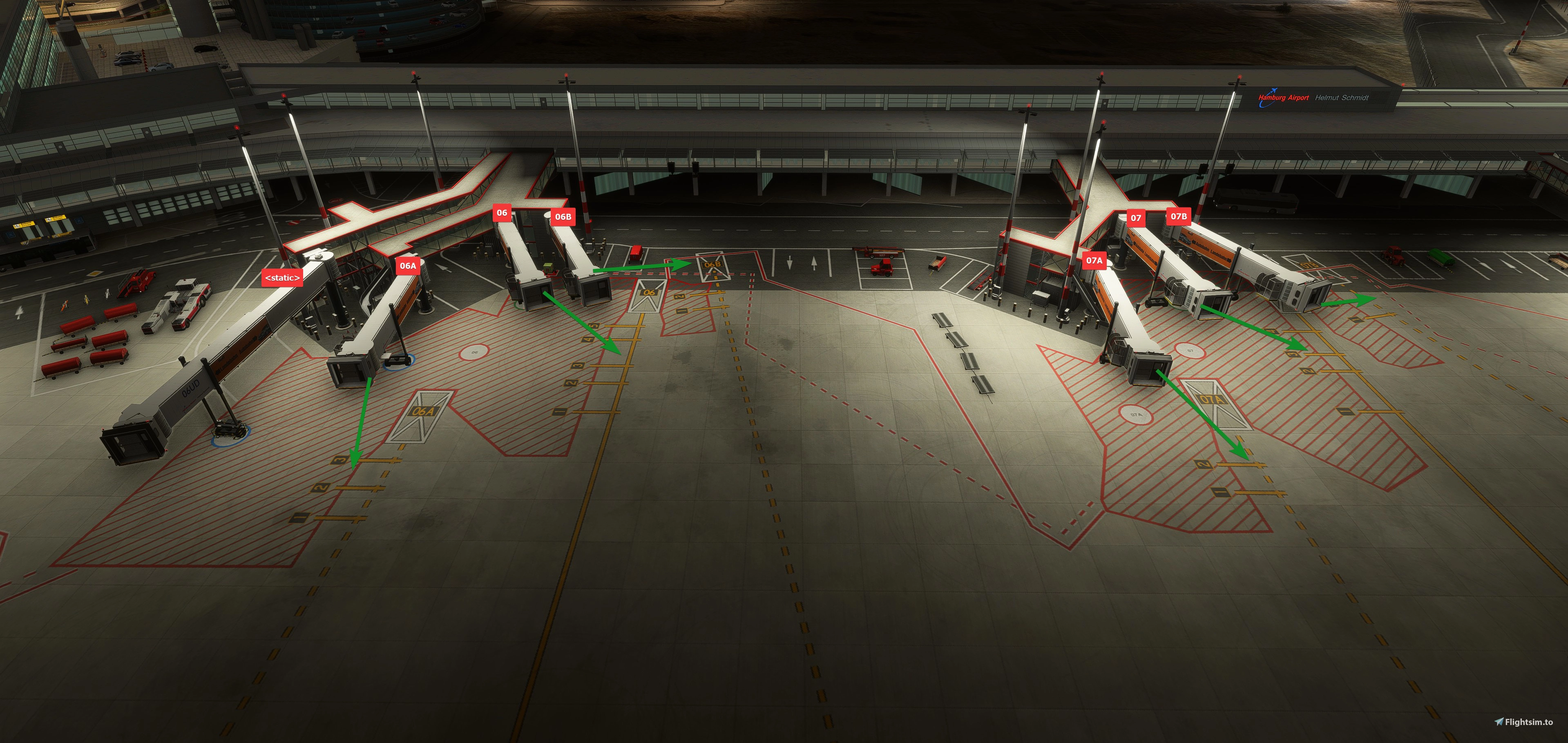
- Gates 6A, 6B incl. Jetways*
- Gates 7A, 7B incl. Jetways*
- Apron 1 | Minor Corrections 64, 65, 65A
- Apron South 1 | All missing L/R added/corrected
- Apron 2 | All A/B Stands added/corrected
- Added 2 Random parking Stands on Apron 5/6 (Lufthansa Technik)
* I adjusted the original scenery and its stands in terms of position and orientation, and replaced the static Jetways at gates 6A, 6B, 7A, and 7B with working ones. Since all Jetways have their position numbers on the outside, and I didn't want to adjust the models as well, I simply took the existing Jetway objects from the scenery and added them for the removed static Jetways. This is why there are "incorrect" labels on the outside of the jetways (purely cosmetic). Also, due to SDK limitations, it wasn't possible to add a 100% realistic and error-free appearance (Jetway Gate 6B). A GSX Profile is included (and need to be moved into the GSX Profile Folder).
SimWing's EDDH Hamburg: Airport Enhancement: Parking Enhancements
This add-on updates SimWing's EDDH Hamburg Airport for MSFS2024 with enhanced parking spot assignments reflecting the current Aerodrome Chart. It adds missing gates and stands, including fully functional jetways at select gates, and corrects several apron configurations. The mod requires the Simwings EDDH Scenery and GSX for optimal use. A GSX profile is included for improved stand functionality.


User Reviews
2 reviews
Version History
- Fine alignment of Stands Terminal, 52-59, 62-65A and connected (underlaying) Taxiwaylayout (Nodes & Paths) - Re-worked strange (underlaying) Taxiwaylayout (Nodes & Paths) - Started to replace wrong static stand numbers at stands 91A-93B
Related

EDDH - Hamburg Airport Intl
Hamburg Airport (IATA: HAM, ICAO: EDDH), known in German as Flughafen Hamburg, is a major international airport in Hamburg, the second-largest city in Germany. Since November 2016 the airport has been christened after the former German chancellor Helmut Schmidt. It is located 8.5 km (5.3 mi) north[2] of the city centre in the Fuhlsbüttel quarter and serves as a hub for Eurowings and focus city for Condor. It was formerly named Hamburg-Fuhlsbüttel Airport, a name still sometimes used.
by Chak991

EDDH brighter LED
Enhance the lighting at Simwings EDDH airport with this LED Enhancement add-on, making it brighter and more realistic in Microsoft Flight Simulator. Simply extract the files into your Community folder and enjoy the improved visuals. Make sure to remove any older versions before installing the latest update.
by Segelflieger98

EDDH Hamburg FSLTL Static Aircraft
Enhance the freeware Hamburg airport with this add-on using FSLTL models for static aircraft, provided by StaticSceneries. These models bring life to the airport without the need for FSLTL Injector, ensuring no FPS loss. Simply install by dropping the folder into your community folder and enjoy a more realistic airport environment.
by StaticSceneries

EDDH AIG Static Aircraft (sim-wings)
This add-on places static aircraft at Hamburg Airport EDDH in Microsoft Flight Simulator 2024 using AIG models. It requires the installation of AIG AI Manager models. No FSLTL models are used in this scenery. The mod aims to add visual variety and realism to the airport environment.
by octopushadow
Log in to join the discussion
Log InComments(19)
6 months ago
6 months ago
6 months ago
6 months ago
6 months ago
6 months ago
My EDDH airport is located here: AppData\Roaming\Microsoft Flight Simulator 2024\Packages\Official2020\Steam\aerosoft-airport-eddh-hamburg and your folder is located here: AppData\Roaming\Microsoft Flight Simulator 2024\Packages\zparking-airport-eddh-hamburg_mJvth\zparking-airport-eddh-hamburg.
What am I doing wrong?
6 months ago
My swimwings-airport-eddh-hamburg is located in my Communityfolder H:\MSFS2024\Community and my modification as well .... i dont use any "Offical" Folders for Addons
6 months ago
Upon placing your folder into this directory, the add-on gates were opted in the selectables, including the GSX options! Thank you, great work!!
7 months ago
7 months ago
7 months ago
I Installed it to use proper stands 91/92/93 together with GSX but unfortunately it's not possible:
- Stand 91 is incorrectly listed in the GSX menu (as a "Gate", not in the menu of the 8x-9x positions)
- Stop point for 91 is too far, ends up parked inside of the parked vehicles
- Stand 92, 92A, 92B are all listed as 92 - impossible to select the correct one
- When parking on 91 or 92, GSX thinks you are on the 91B or 92A and spawns vehicles inside your aircraft.
Maybe you can improve the situation there but currently using these stands with GSX and the provided profile is unfortunately a total mess. The new MARS gate feature in GSX may help setting them up so GSX recognizes the correct parking you're on.
7 months ago
7 months ago
7 months ago
7 months ago
Jetways now.
7 months ago
Taxiways: I have not done anything on the taxiways.
7 months ago
7 months ago
7 months ago