
Description
GA ownership, with real consequences
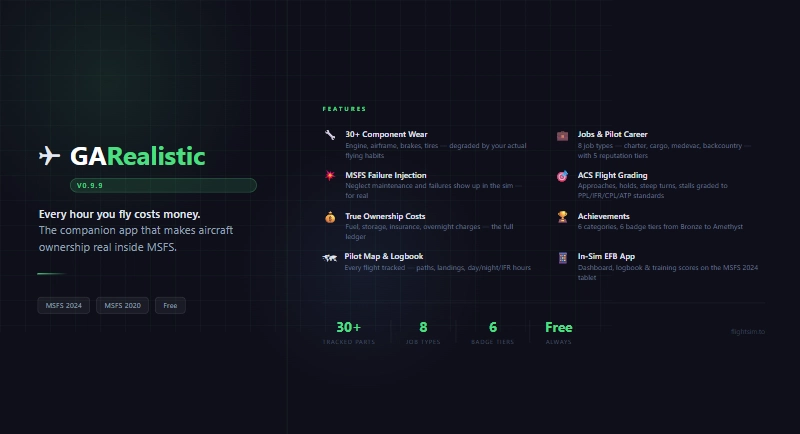
GARealistic is a companion app that turns general aviation flying in MSFS into an aircraft ownership and pilot training simulation. It tracks the costs a real GA owner carries — fuel, oil, tires, brakes, engine time, insurance, storage — and it tracks the damage a real owner causes: hard landings crack struts, brake abuse wears pads thin, and busting a V-speed limit costs you an aileron, not just a warning tone.
Park the aircraft, quit the sim, come back next week: it is where you left it, with the same fuel, the same switches and the same radios.
FIVE WAYS TO USE IT
- Own & fly — register your aircraft (or a fleet of them), fly wet or dry rentals, and watch 30+ components wear down from your actual flying, not a timer. Component MTBF, failure injection, and repair costs are all driven by how you handle the airplane.
- Share ownership — found or join a per-airport aero club and split the cost of a shared aircraft instead of owning or renting alone. Choose a dues-only Club or an equity Syndicate, vote on how it's run, and check the aircraft out and fly it with the same wear and billing rules as your own.
- Run a company — found a cargo or charter operation, hire AI pilots who fly your schedule while you're offline, and grow into a multi-hub airline. Trade raw materials and manufactured goods in a shared commodity market, build facilities at any airport, haul freight by hand or by AI, and buy or sell aircraft on a live weekly Aircraft Market.
- Train toward a certificate — get graded in real time against ACS standards for Private, Instrument, Commercial, and ATP: approaches, holds, steep turns, slow flight, stalls, and more, with a post-flight debrief and a shareable report card.
- Stay current and legal — endorsement checks at engine start, personal minimums gates, IFR currency tracking, and Part 61 certification progress, so the app tells you when you're not supposed to be flying before the FAA does.
OWNERSHIP & COSTS
- Full cost tracking: fuel, oil, tires, brakes, storage, insurance, away-from-base charges
- 30+ component wear system driven by real flying behavior, not elapsed time
- V-speed-aware wear — busted limits cost real airframe components
- Sustained abuse (overtemp, over-torque, high G, hard landings) raises your sudden-failure odds, even on a low-hour engine
- Preflight walkaround: fuel water, oil, tires and brakes feed straight into the failure system
- MSFS failure injection: brakes, vacuum pump, alternator, pitot, partial panel
- Landing quality scoring (sink rate, G-force, bank, crab angle)
- Maintenance only where there is a mechanic who can do the work; preferred mechanic call-outs, airframe-hours MTBF, turbine wear tracking
- Wet/dry rental billing, multi-base fleet management
- Personal account with credit cards: limits, monthly interest, minimum payments and late fees
- Four Difficulty Presets (Easy/Normal/Hard/Brutal) scale costs and job availability to match how forgiving you want the economy to be
AIRCRAFT STATE PERSISTENCE
- Position, fuel, oil, switches and controls come back when you reload an aircraft
- Works with third-party add-ons: built-in sets for the COWS DA42, A2A Comanche and Aerostar, Black Square Baron, Bonanza, Commander, Caravan and Duke, SWS Kodiak and Airvan, GotFriends gliders, the Taylorcraft and more
- Radios, transponder code and autopilot targets restore too
- A Persistence tab lets you list or disable controls, paste a developer's variable list, scan an aircraft's installed package, learn a switch by flipping it, and run a self-test that shows what the sim actually honours
- Can be turned off in Settings
PLANNING & DATA
- Flight Planning: type-to-suggest fixes, airways, VORs or direct routing, runway and SID/STAR/approach advice, cruise-altitude advice and a terrain-based minimum safe altitude
- Winds aloft with the source shown (Active Sky, NWS, Open-Meteo), and weather for a time other than now
- Fuel planning with contingency and taxi fuel, alternates with their own fuel, map and frequencies, and ICAO equipment codes
- Trip Planner with refuel optimization, trip notes and fixed stops; SimBrief integration for briefing comparisons
- Bush trips: save off-airport landing spots, see them in Destinations and planning, and share them with the community
- Destinations tab: runways, approaches, fuel pricing, and FBO data for every airport
- Live weather strip (VFR/MVFR/IMC) and MSFS 2024 weather radar integration
- Logbook with day/night/IFR hours and airborne-vs-Hobbs tracking
- Multi-currency financial summaries (USD, EUR, GBP, CAD, AUD, CHF, NZD)
- Google Earth KML export, local streaming/OBS overlay with live instruments
COMPANY & WORLD ECONOMY
- Found a GA airline: independent fleet, finances, and staff from your personal flying
- Route generation from real population/catchment data; AI pilot hiring with offline earnings
- Weekly scheduling and timetable with legal duty-hour limits and conflict detection
- A full production economy: raw materials → manufactured goods → components, priced by each airport's own industry and isolation
- Build facilities (sawmills, depots, hangars, maintenance shops) and service businesses at any airport
- Freight Runs — physical, multi-hop haulage you plan for profit and fly yourself or dispatch to AI
- Live Aircraft Market — browse new and used aircraft for sale near you, financed the same way as a normal purchase
- Co-ownership with equity splits, company officers, multi-hub expansion
AERO CLUBS & SYNDICATES
- Found a dues-only Club or an equity Syndicate — chosen once, split the cost of a shared aircraft with other pilots
- Vote on proposals: dues changes, special assessments, expelling a member, buying a shared aircraft
- Separate General and Reserve funds, with repairs paid from reserve first
- Check out a shared aircraft with a real endorsement gate, fly it, and check it back in — wear, fuel, and billing all handled automatically
- A squawk log can ground an aircraft until a defect is resolved; a booking calendar avoids checkout conflicts
- Full financial transparency — hourly rate breakdown, reserve fund forecast, and member debt tracking, all visible before you join
- Browse and apply to clubs on the community web platform, and see them on the Live Map
TRAINING & GRADING
- In-flight ACS evaluation across Private, Instrument, Commercial, and ATP standards
- Eight job types (Charter, Cargo, Ferry, Training, Medevac, Sightseeing, Backcountry, Supplies) with a five-tier reputation system
- SayIntentions.AI integration — ATC comms and frequency-management scoring feed straight into checkride readiness
- Post-flight debrief, flight replay with time scrubbing, and shareable PNG report cards
- Digital go/no-go checklists that auto-check against aircraft state
OPTIONAL INTEGRATIONS
- FSEconomy — import an FSEconomy-financed aircraft and fly it with GARealistic's full wear simulation, while its billing stays entirely on FSEconomy's own side
- VATSIM — detects a flight flown while connected to the network and whether real ATC was working the field, logged to your notes and a dedicated achievement band
- Active Sky FS — live turbulence and active SIGMET/AIRMET data on the Dashboard weather panel, logged to your notes and a dedicated achievement band
COMMUNITY PLATFORM (OPTIONAL)
- Live map of active GARealistic pilots in real time
- Shared, votable checklists and POH specs per aircraft type
- Crowdsourced fuel pricing and airport amenity data
ALSO INCLUDED
- Working EFB app for MSFS 2024's in-sim tablet
- Deep integration with A2A Comanche and Black Square aircraft wear data
- Silent background updates with an in-app Update & Restart prompt
- Compatible with MSFS 2024 and MSFS 2020
GA Realistic
Every hour you fly costs money. GARealistic adds the full weight of aircraft ownership to MSFS. Real fuel bills, preflight walkaround, component wear from how you actually fly, and in-sim failures when you skip maintenance. Park it and it stays exactly as you left it, down to the switches. Join or create an Aeroclub or Syndicates with fiends. Perform quick jobs for money, or build an airline on top, competing for cargo and passengers in a shared world economy.


User Reviews
23 reviews
Version History
GARealistic 1.32.0 Update Notes: - Helicopter training: rotorcraft certificates, hover, autorotation and low-rotor-RPM grading, and Training Log / Checkride Prep split by aircraft category - Stricter landing scoring with a "Why this score" breakdown for each deduction - Parked fleet in the sim; restore can be Auto, Ask or Off; the sim's default spawn no longer overwrites saved parking spots - Two aircraft of the same type no longer swap saved locations - Refuel from the EFB, Status page and Top Off now fills centre, tip and external tanks; parked centre-tank fuel is topped up; Job Planning uses the fuel actually parked - Payload and fuel write verification, CG readout, balanced cargo loading - Optional real-time repairs (Settings > Gameplay > Repairs); on Hard and Brutal an aircraft with parts in the repair shop is grounded and no flight is logged - Finances > Summary: Import and Export buttons to back up and restore all finance data - Club-paid fuel shows in every member's expense ledger; club checkouts ask about overnight hotel costs - Used airframes no longer start with phantom oil-age engine damage; Black Square aircraft keep their own oil gauges; per-aircraft opt-out of the oil gauge override - Built-in Mil Mi-2 reference data; "Save as My Reference" and "Submit to Web" explain why they refused - Freight runs can be edited in place; passenger routes and charters earn Standing; company switcher in the header - EFB end-flight button and flight result card; Aircraft Status add-fuel slider; Jobs Planner map stays put when scrolling Installation: Extract zip. Copy GARealistic-1.32.0\ folder to your preferred location and run GARealistic.exe. Copy garealistic-efb\ folder to your MSFS Community folder.
Log in to join the discussion
Log InComments(167)
about 23 hours ago
You can use this on a number of different levels either with full immersive involvement or casually without getting too involved in the nitty gritty stuff or maybe something in between.
I have to wonder, though, if my landing scores are a little bit generous. I seem to be getting a lot of '100' scores which is fantastic for the ego but I don't think I'm really that good. Maybe 99% would be more accurate here (only kidding). Perhaps the scores could be toned down a bit?
This is a very small point in an otherwise great App and it is free. I have seen payware Apps on various third party sites which are nothing like as good. Credit and kudos to the developer here.
The App also has regular updates which signposts to me enthusiasm and a wish to keep on improving it.
A great job.
Thank you.
about 12 hours ago
10 days ago
I also really like Neofly 4.
Do I wish they would have a child? Absolutely!
What do I wish would be added to GARealistic?
The main features present in NeoFly 4 that I miss are:
1. Unique & Specialized Mission Types (must have)
GARealistic focuses on freight runs, passengers, and commodity trading. NeoFly 4 offers a much broader array of specialized mission profiles:
Search and Rescue (SAR): Fly to specific coordinates using search grids, locate missing persons or downed aircraft, and perform precision landings or hovering.
Drop Missions: Fly at specific altitudes and ground speeds to drop cargo or skydivers over designated drop zones.
Emergency/Medevac Flights: Urgent, time-sensitive medical transports that penalize delay or rough flying.
VIP Escort & Secret Cargo: High-paying missions that come with specific constraints (such as avoiding sharp bank angles, strict g-force limits, or flying under certain radar ceilings).
Photogrammetry & Reconnaissance: Flying photo passes over target coordinates.
2. Interactive Cabin & Passenger Events (must have)
Dynamic Passengers: Passengers react in real-time to your piloting quality (e.g., hard landings, steep banking, or turbulence), giving live audio/text feedback and affecting your final flight payout.
Mid-Flight Incidents: Procedural events can trigger mid-flight during missions (e.g., passenger medical emergencies forcing a detour to an alternate airport).
3. In-App Audio & Soundscape Integrations (must have)
Interactive Passenger Sounds: NeoFly includes ambient passenger sounds (screams during severe turbulence, applause upon smooth landing, chatter, boarding/deboarding audio).
Dispatcher & Audio Briefings: Voice lines for flight dispatchers giving mission updates over the radio.
about 12 hours ago
11 days ago
11 days ago
11 days ago
11 days ago
13 days ago
17 days ago
17 days ago
18 days ago
17 days ago
20 days ago
I've tested the trip planner and job systems recently.
Testing on 1.29.1. I'm not sure if my interactions are wrong, but some notes.
1. Navigation database. I was unable to build it. Not using Navigraph. Got this message on the first try https://i.vgy.me/DproQ3.jpg Upon trying adding the LNM database https://i.vgy.me/4F1V1l.jpg , message still appears
2. Topping up the oil doesn't seem to be saved. Tested the preflight window a couple of times. https://i.vgy.me/XM70k2.jpg
3. The Persistence tab. Managed to find it with sim not running. Closed the app and restarted with sim running. Unable to find it anymore. I'm probably blind, but where was it again?
4. Job planner doesn't return a route if "Round trip" is deselected.
5. EFB connection test reports older version. Wrong number is indeed in the manifest file.
6. Planner attempted give a 700 footer strip for the TurbineDuke. I'm sure there is a reason for not including a minimum length/whatever. The GUI could have a warning with a/c specific minimum lenghth.
19 days ago
Feel free to drop by discord and discuss in detail or provide any additional ideas, I would appreciate it.
The app has a method to send log reports in the settings. So if you're getting weird results, please do send through a report.
1. I have fixed some things, however I need some more clues... is this for msfs2020 or 2024?
2. This make me think perhaps 2020? I cannot recreate this issue. Which airplane?
3. Sorry, still in a features first then esthetics mode... Aircraft Config > Variables > Persistence.
4. Fixed, thank you... It now plans a one-way route that ends wherever the last leg lands, and the box will say so.
5. Fixed, again thank you!
6. Great idea! I have put a helper in for the time being based on the aircraft's stall speed. I will look to improve this further in the aircraft's POH settings.
Again, it is good to heard from you! I apreciate the feedback and suggestions. Thank you. Please look for the next available beta update, through the app, or I usually upload incremental versions every weekend now on flightsim.to.
19 days ago
>2. Turbine duke. This behaviour may be result of duplicate registrations, see below. Or not.
Some new notes:
7. Piston Duke template missing from Configuration variables
8. I don't know if this matters, but the Fuel Tank configuration could match, automatically/by default, what is actually in sim.
9. Possible model variation / livery detection issue. The tail numbers on the aircraft list were same because I've had them since initial release.
Now that app forces an unique tail, I saved some new profiles.
Duke Turbine with "Razor" livery was done first. After loading the dynamic livery - separate aircraft variant in game's menu - N626N is detected as Razor. https://i.vgy.me/BrNsiF.jpg https://i.vgy.me/kvwdnb.jpg
Same thing happened with the piston https://i.vgy.me/QzC8Oo.jpg https://i.vgy.me/BN5rYJ.jpg
What was noteworthy that N33WF and N440CM were able to be saved as their separate registrations. App detected N440CM as a unique aircraft upon loading it after creating the N440CM registration.
17 days ago
7. Yes, the Duke was being read as a Baron due to lack of input. I have fixed this now, thanks!
8. Yes! Thanks, I have explored this and implemented. Options are still available in settings for now.
9. Yes, there have been many improvements and old database entries may carry hangovers.
The airplane (including liverys) are read from the sim from what the developer has saved them as. You can change these in the settings after discovery to what you would like, they will still be discovered correctly for your chosen registration.
You can also chose to turn off the registration requirement in the settings as well if you wish.