
Description
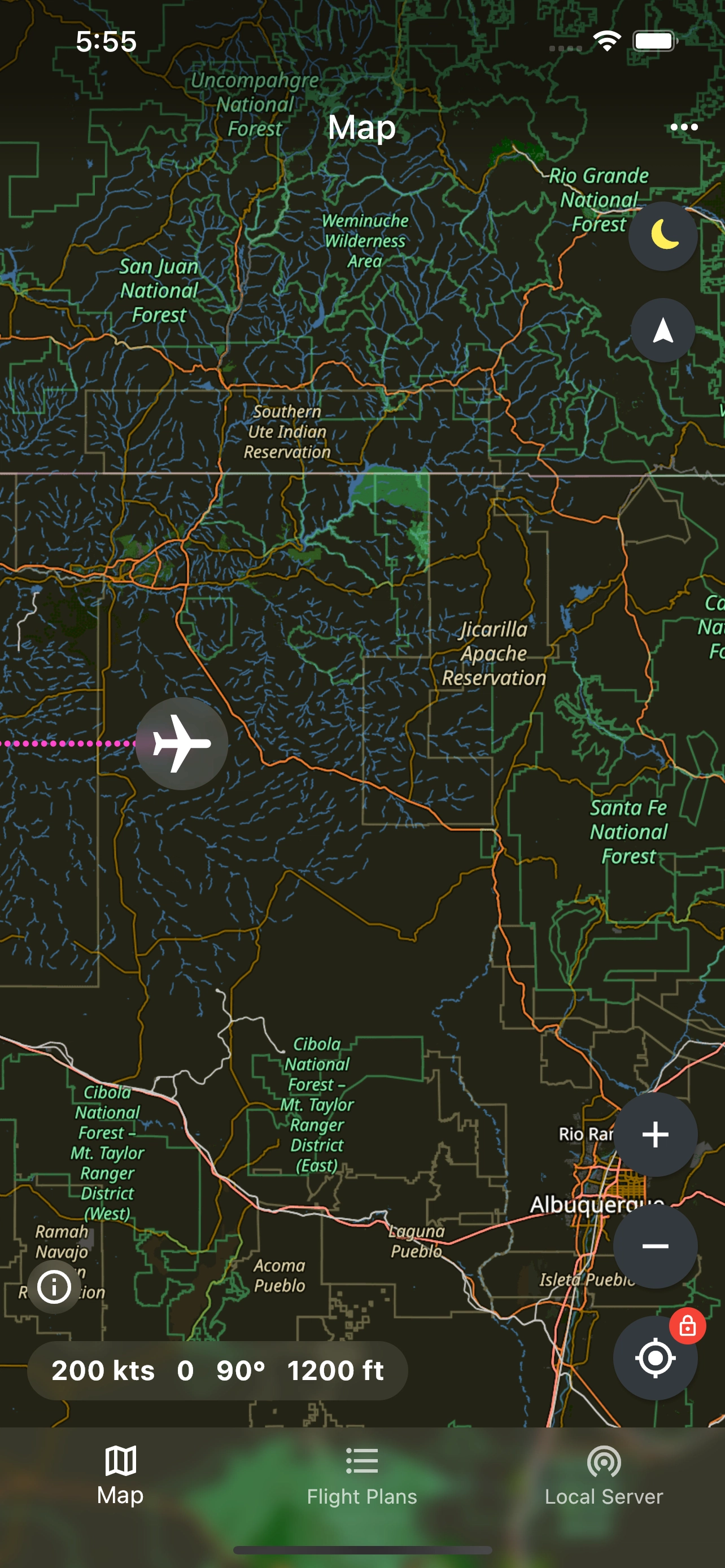
With this lightweight app you can see your current plane position and teleport anywhere in the world while flying. Easy to use flight planner which features 8209 airports all over the world allows you to plan your flights and follow a route in dedicated GPS like navigation mode.
Supported simulator: Microsoft Flight Simulator 2020 (MSFS)
Android
For Android version head to the Play Store
iOS
Currently not available
Features include:
- high resolution map with easy on eyes dark style,
- automatically updated plane position with a tail of flown route,
- teleport with a custom altitude (long press the desired place),
- easy to use flight planner with GPS like navigation mode,
- custom waypoints.
All that and more for free, forever.
Installation Instructions
- Whitelist the app in your antivirus and open, no installation is required.
- The first time you connect, Windows Firewall will probably pop-up asking for your permission to create a connection. You must allow it.
- Make sure your PC and mobile device are both connected to the same local Wi-Fi network.
- Enter given IP address in the mobile app.
- Run Microsoft Flight Simulator.
- The mobile app will connect automatically soon after the simulator starts up.
App is under active development and more features yet to come!
If you have any questions or suggestions, don't hesitate to post a comment, thanks :)
FS Pilot - Moving Map with Teleport - Android client
A lightweight Android app, FS Pilot - Moving Map with Teleport, offers a high-resolution map to track your planes position and teleport to any location globally while flying in Microsoft Flight Simulator 2020. It includes an easy-to-use flight planner with 8209 airports, GPS-like navigation mode, and custom waypoints. Simply connect your device to the simulator via Wi-Fi and start exploring the skies for free with continuous updates and upcoming features.


User Reviews
16 reviews
Version History
- bug fixes
Log in to join the discussion
Log InComments(101)
about 1 year ago
It would be even better if the VFR route could be imported from MSFS.
However, when I try to delete a flight plan in the app, nothing happens.
over 1 year ago
over 1 year ago
over 1 year ago
over 1 year ago
almost 2 years ago
almost 2 years ago
almost 2 years ago
over 2 years ago
over 2 years ago
almost 3 years ago
almost 4 years ago
What happened to the iOS app? Can't find it on the App Store. I've got this on my mini iPad and wanted to install on my full iPad, but cannot since it's not in the app store. :(
almost 4 years ago
I love the app. Having just got a new tablet this is perfect for what I want.
A couple of things I've noticed are (and they're probably related):
A. On the PC Pilot Server Client the reports start with New Client Connected but that's followed a few minutes later by Client Disconnected. It soon re-establishes itself though but then continues to go through this cycle.
B. On the map on my tablet grey squares suddenly appear and sometimes fill in but usually not.
Any ideas why this might be happening?
Thanks!
almost 4 years ago
I love it! Thanks so much! cheers, henry.
almost 4 years ago
Is this no longer for ios?
about 4 years ago
Hi! can i use these as reference for my flight route like holding patter or VOR training? MFS2020 don't have a moving map like i do in Microsoft flight sumulator X
over 4 years ago
hello. Has there been a change in the Apple appstore? The app seems to be currently "region" limited. Other then this, this is the BEST add on to FS2020. Thank you!!!
over 4 years ago
Great app. Are you planning to get rid of dotted flight path in a new version?
Regards.