
Flightsim.to
    PERFLIGHT Addon Manager, Pre-Flight Checklist & Service Launcher - Image 2

    Description

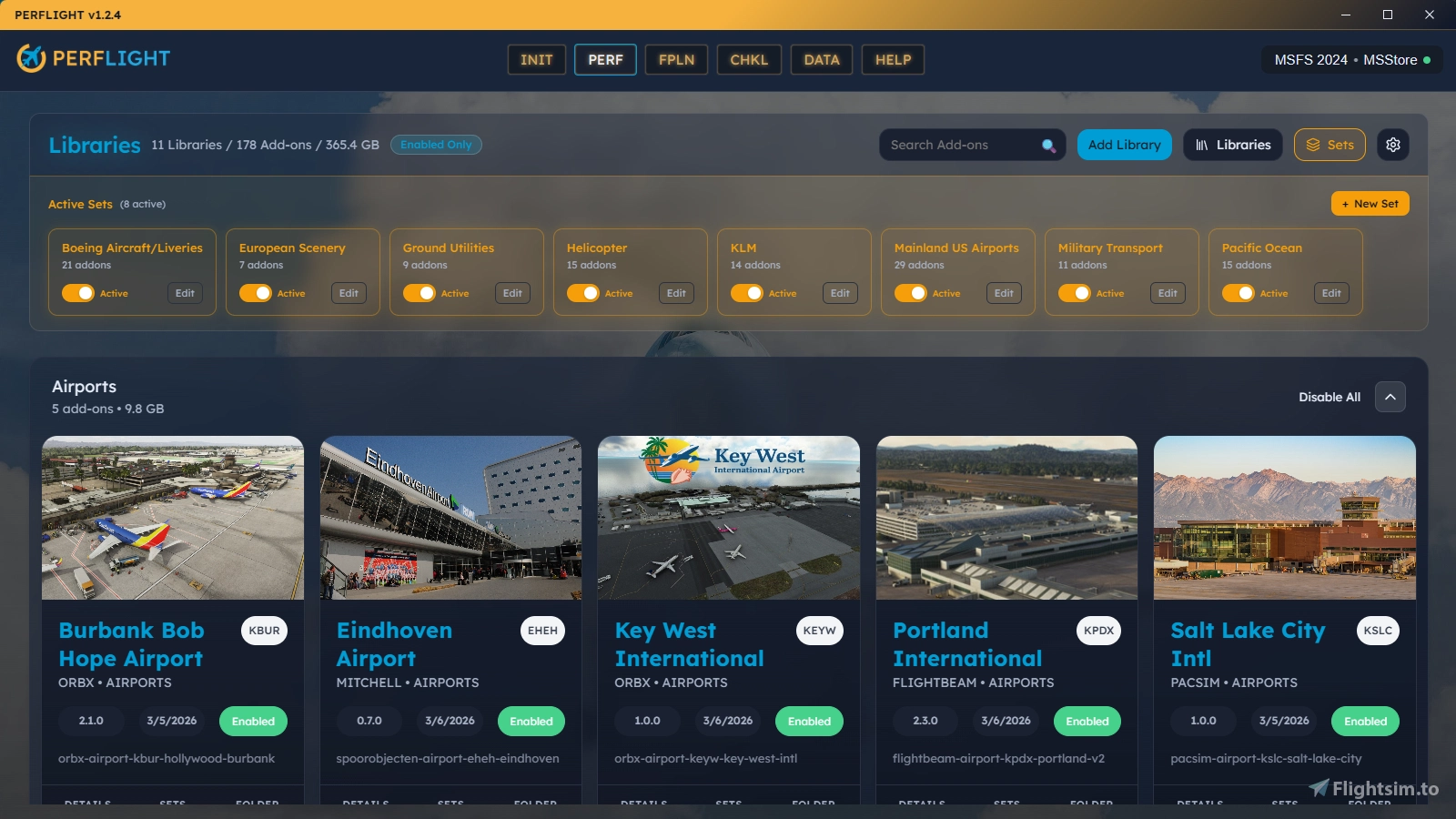
    PERFLIGHT is a companion app that brings all your pre-flight preparation into one place. Manage your addon library, launch your flight services, sync your SimBrief flight plan, and work through a customizable pre-flight checklist — all before you ever open the simulator.

    Flight Services
    One-click launchers for Navigraph Hub, Charts, SimBrief, VATSIM, IVAO, PMDG, and more. Add your own custom services — local applications or web URLs — with custom colors and labels.

    Addon Library Management 
    Store addons in your own library folders outside the Community folder. Enable or disable them with a click (creates/removes directory junctions). Browse by category, developer, card view, or table view. Group addons into reusable Sets for quick batch activation. Quickly edit addon metadata and replace thumbnails with custom images.

    Pre-Flight Checklist
    Build your own step-by-step checklist modeled after real aviation checklists. Six step types: Sync Flight Plan, Launch Service, Open URL, Manual Reminder, Activate Addons, and Launch Simulator. Drag-and-drop to reorder. Steps execute their action when checked — sync your flight plan, launch Navigraph, activate addons, all inline.

    Smart Actions
    When you sync a SimBrief flight plan, PERFLIGHT detects which aircraft and airport scenery your route needs and prompts you to activate them. One click to enable, or search Flightsim.to, iniBuilds, and Contrail if you're missing something.

    Additional Features

    • Supports MSFS 2024 and MSFS 2020 (Store and Steam editions)
    • One-click migration from MSFS Addon Linker (imports folders, presets, and geolocation data)
    • Pilot profiles with SimBrief and VATSIM ID validation
    • Auto-detects Community folder location including custom install paths
    • File watcher monitors library folders for addon changes
    • Built with Tauri (Rust + React) for a fast, lightweight native experience

    PERFLIGHT is by built pilots for pilots! Join our Discord to share ideas and help shape what comes next.

    Frequently Asked Questions

    Comments(48)

    Log in to join the discussion

    Log In
    J

    about 18 hours ago

    In celebration of all things FSExpo this weekend, I am happy to release version 1.3.0 today (over a month late). Thanks for your patience! Changelog and new installer coming shortly.
    H

    9 days ago

    Hi Any way to have fenix not moved ?
    the instaler thinks its not instaled so hard to know when you need to update
    J

    about 18 hours ago

    Sadly I don't own Fenix so I am not familar with its install process. Could you pop over to Discord and we can chat about it in the #product-support channel? I am not even sure what you mean by "not moved" as our app doesn't actually move anything. Users will move their addons into other folders, then PERFLIGHT just enables and disables hard links to them?
    C

    about 1 month ago

    i like :)
    J

    27 days ago

    Appreciate it! Would love a review if you don't mind
    a

    about 1 month ago

    great programe many thanx
    J

    27 days ago

    Appreciate it! Would love a review if you don't mind
    S

    about 2 months ago

    hi im building an app something like this so i was wonddering if we could colab?
    J

    about 2 months ago

    Not sure what you mean by collab but you can email me jim@perflight.com
    H

    2 months ago

    I'm still messing and configuring around but I found some problems. When I launch the FS24 via Perflight, it's launching the FS2020, that's not even configured.
    Other problem is, even the liveries are showing enabled, it's not showing up inside the simulator. It was working fine on Addon Linker.
    J

    about 2 months ago

    With upcoming version 1.25 you can override the EXE even when the app thinks it knows which one. Will try to publish it this weekend. Installer is also in the Discord beta channel.
    J

    about 2 months ago

    I finally released 1.2.5 with that override feature. Give it a try and let me know if it helps?
    l

    2 months ago

    Hey guys,
    I can’t add my VATSIM ID. When I click save and validate, something goes wrong.
    J

    about 2 months ago

    I will look into it. Windows 10 or 11?
    l

    about 2 months ago

    Windows 11 25H2
    J

    about 2 months ago

    Sorry for the delay. Can you try again? I think it is because VATSIM Id check was down.
    l

    about 2 months ago

    Sorry for taking a while to reply too. I just tested it again and I’m still getting the same error. Not sure if it’s a one-off issue or if it’s happening to everyone. Are you able to log in with your VATSIM account?
    C

    2 months ago

    This is really exciting. I do have some immediate thoughts while using it for the first time:

    - "Aircraft & Liveries" means that if I want to just look at my aircraft, I have to wade through potentially hundreds of liveries. Could these potentially be separated? EDIT: I see it's possible to create custom categories! Nice.
    - Bulk editing: I have a TON of stuff from flightsim.to as many do, and having to go into each one of them just to say that's where I got them is tedious. It would be nice to be able to do some kind of bulk edit. EDIT: Added this to the wishlist on featurebase.
    J

    2 months ago

    Hello, thanks for trying out the app. Yes with verison 1.2 you can create additional "custom categories" so you can separate Aircraft from Liveries. Watch the version update video for a complete guide at https://www.youtube.com/watch?v=u1cV0Z0XDKE. And also I have added a feature to the roadmap if you would like to vote on BULK addon editing https://perflight.featurebase.app/p/bulk-addon-editing
    MSFS 2020MSFS 2024

    PERFLIGHT Addon Manager, Pre-Flight Checklist & Service Launcher

    PERFLIGHT is a comprehensive simulator companion application designed to streamline pre-flight preparations for Microsoft Flight Simulator users. It allows for the management of addon libraries, quick access to flight services, and supports customizable pre-flight checklists. With features like smart actions for syncing flight plans and one-click launching of essential tools, PERFLIGHT enhances the organization and efficiency of flight setup. Supports both MSFS 2024 and 2020.


    Downloads1K
    Version1.3.0
    File Size49.0 MB
    Published3 months ago
    Updated17 hours ago

    User Reviews

    5.0

    2 reviews

    5
    100%
    4
    0%
    3
    0%
    2
    0%
    1
    0%

    More Information

    Simulator
    MSFS2020/24
    CategoryUtilities
    Sub-CategoryApplications

    Version History

    PERFLIGHT v1.3.0 Patch Notes What's New Community Folder Management - PERFLIGHT now scans your MSFS Community folder and shows everything installed there, not just the addons it manages. Directly-installed addons appear right alongside your libraries with a clear badge, so you always know what's system-managed and always active. Works with both Community and Community2024 (MSFS 2024). Edit Community Addons - Addons living in your Community folder can now be fully edited - rename them, set a developer or ICAO, change the category, or add a hero image - and they appear in search, sorting, and grouping just like your managed addons. Other Tools Detected - Junctions created by other tools like GSX and Addon Linker are now recognized and remembered between scans. You get a complete picture of your Community folder without being nagged about links you've already seen. Save Your Own Install Sources - Type a custom addon source once via the "Other" field and it's saved for every addon afterward. No more retyping your favorite store or installer for each addon you tag. What's Fixed Automatic Junction Cleanup - Broken or orphaned links in your Community folder are now removed automatically during a scan. Only the dead link is cleaned up - your actual addon folders are never touched, so nothing of yours is ever at risk. Reinstalled Addon Duplicates - Moving an addon to a different library after it had already gone missing no longer creates a duplicate entry. PERFLIGHT now recognizes the relocated addon and carries your custom name, image, and category across to its new home, instead of leaving a stale ghost behind and a blank new copy. Source Selection No Longer Resets - The installer source you pick now sticks permanently instead of silently reverting to "Unknown" on the next rescan. This affected most of the non-default sources, so any custom or less-common store you chose would quietly lose your selection - now it persists exactly as entered. Duplicate Flight Service Prevention - Selecting a flight service you've already set up from the INIT page no longer adds a second copy of it. The existing one is recognized and the click is simply ignored.