
Description
GSXComms
What is GSXComms?
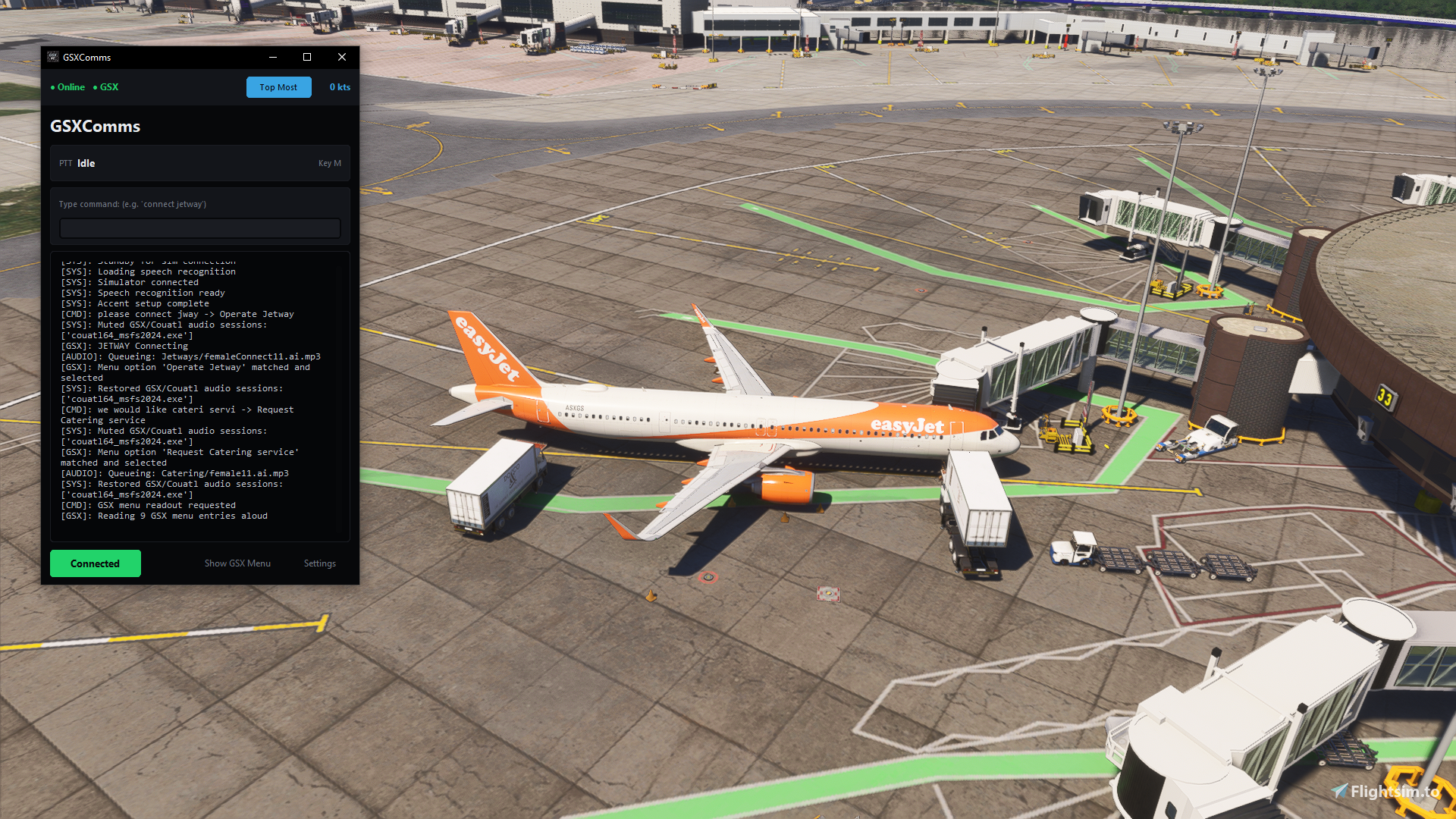
Talk to GSX ground crew with your voice instead of clicking through the menu. GSXComms is a Windows application that adds Ground Crew and life to GSX and MSFS airports.
Key Features:
- Supports both MSFS2024 and MSFS2020
- Speak with YOUR voice: You handle the Ground Comms, no copilot or AI doing things for you
- Fully FREE: 100% free, free of charge :)
- Fully offline: The app works perfectly fully offline (except the Mistral API option)
- The app has many accents, each one with a female and male version. The supported output accents are: American, Arabic, Australian, British, Chinese, Croatian, Filipino, Finnish, French, German, Greek, Indian, Irish, Italian, Japanese, Korean, Malay, Nigerian, Portuguese, Romanian, Russian, Scottish, Singaporean, Spanish, Swedish and Turkish
- GSXComms automatically locks your speech if your Ground Speed is above 15kts to prevent accidental commands during flight
- Multi language input: With the Mistral provider, you can speak in any language, and GSXComms will understand it. Note: The response will be in english
- Full GSX menu interaction: You can interact with all options in the GSX menu, for full interaction
- Presets: Set a codeword, and actions will be executed in sequence, one at a time (Set in settings)
- Match Speech to a GSX option: If your input is 75% (or more) similar to any GSX option, it will be automatically matched to a menu entry, to avoid typos or the voice recognition software just being weird (You can change this in settings)
- Top Most: Put GSXComms above any other window
- Show GSX Menu: See the GSX Menu without leaving GSXComms
- Static audio: For a realistic headset simulation, aiming at more immersion
- Auto-select operator: Automatically selects the best operator for your action
- Keyboard typing: Type the command you want to execute it, instead of speaking
& Much more!
All audio files were generated using ElevenLabs
Installation:
- Extract the downloaded zip to anywhere on your PC
- Run GSXComms.exe
- The launcher will automatically set up the necessary environment and download the dependencies.
- Once the window opens, bind your Push-to-Talk (PTT) key in the settings, and you are ready to fly!
Requirements:
- Microsoft Flight Simulator (2020 or 2024)
- GSX (FSDreamTeam).
- Python, 3.12.15 or newer, up to any 3.14.x (3.15 is not supported)
Update Instructions:
- Backup your settings (user_settings.json and Accents folder)
- Delete your old GSXComms folder
- Replace it with the new folder
- Re-add the user_settings.json and the Accents folder
Notes:
When using GSXComms, make sure that the GSX icon in the toolbar is NOT selected. If it is, the menu might keep popping up in the screen
Python 3.12.15 or newer, up to any 3.14.x (3.15 is not supported)
Big thanks to Aviationist101 for making the icon
Thanks to ilanoboy for helping me with the testing stage
You might also want to check out sblink:
https://flightsim.to/addon/108777/sblink
Or BorderlessFS:
https://flightsim.to/addon/114819/borderlessfs
Licensed under MIT License with Commons Clause v1.0. Free for personal use and modification. Selling, monetizing, or commercial distribution is strictly prohibited. See LICENSE.txt in the download for more information
Frequently Asked Questions
GSXComms (Ground Crew for GSX)
GSXComms is an utility designed to enhance the use of GSX in Microsoft Flight Simulator by enabling natural voice control. It processes voice commands to interact with the simulator, allowing for a streamlined experience without the need for manual navigation through the GSX panel. The application operates completely offline, ensuring privacy and efficiency, while automatically adapting the ground crews accent to match the airport location.


User Reviews
7 reviews
Version History
Fixed a bug with the Read GSX Menu feature
Related

BorderlessFS
BorderlessFS is an application that allows users to run Microsoft Flight Simulator 2024 in Borderless Windowed, Fullscreen, or Windowed modes. It is designed to simplify mode selection, especially since Borderless Windowed is not natively available in MSFS 2024 settings. The tool ensures smoother interaction with other applications while maintaining in-game performance. Distributed under the MIT with Commons Clause license, modification is allowed but commercial use is prohibited.
by ziul510

sblink
sblink is an external application that manages Microsoft Flight Simulator addons by linking only those required for your current SimBrief flight plan to the Community folder. It helps reduce performance loss caused by numerous inactive addons. Key features include automatic addon linking, addon mapping, and background operation. Requires Python 3.14 and is not intended to be used alongside MSFS Addon Linker.
by ziul1010
Log in to join the discussion
Log InComments(168)
3 months ago
about 22 hours ago
about 2 hours ago
Please try switching between orukeet, parakeet and Mistral
21 days ago
20 days ago
Could you please install a software called "HWiNFO 64", open it in sensors-only mode, start a log, reproduce the issue, and send me a DM with your log?
Thanks :)
20 days ago
how do i play around with it? changing the keybind for ptt / voices etc? I installed all the voice packs with the options given on first launch, but i hear american accents everywhere. Otherwise, it's absolutely phenomenal. (the default keybind M mutes the rest of gsx audios until i press m again lol)
19 days ago
You can change these things in settings, its a button on the main ui on the left bottom corner
While you are there, please enable debug mode And reproduce your issue with the accents, then send the command terminal output here so I can take a look
Thanks for your kind words 🙏
22 days ago
22 days ago
What does "each step" mean?
:)
Thai version (AI-translated, I dont speak thai):
เวอร์ชันภาษาไทย (แปลด้วย AI พูดไทยไม่ได้)
ไม่เข้าใจคอมเมนต์ของคุณ
คำว่า "แต่ละขั้นตอน" หมายถึงอะไร?
:)
22 days ago
22 days ago
22 days ago
21 days ago
:)
26 days ago
26 days ago
If you want, you can have a look at the source code inside GSXCommsFiles, and if the issue is with the launcher itself, I can send you an alternative, source available launcher
25 days ago
25 days ago
27 days ago
26 days ago
Also, I am quite occupied this week, so it might take some time :)
If you really want to use the app now, I can send you some instructions to launch it without the launcher