
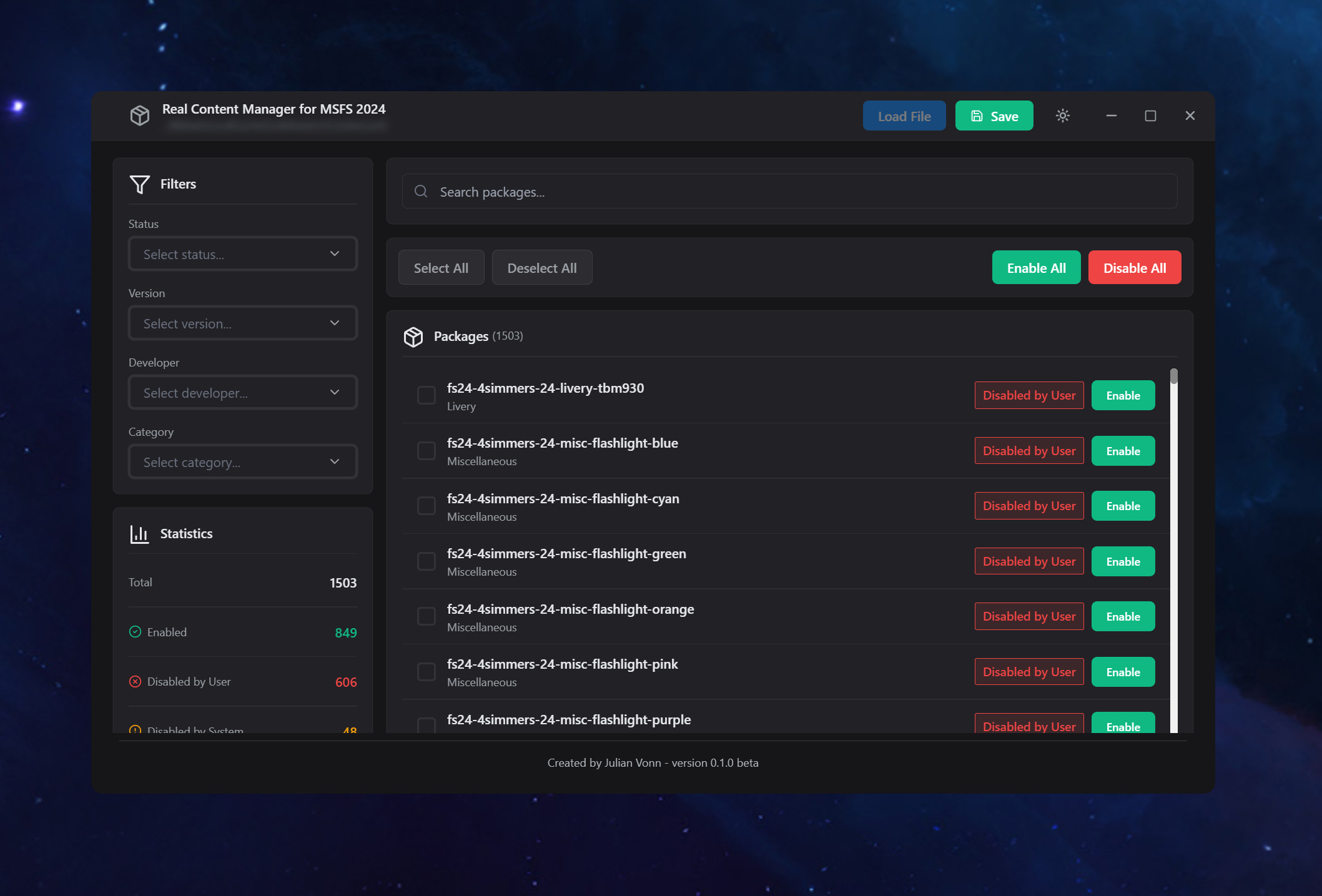
Description
An update is planned for January 2026. I’m currently working on some new features, but my personal life has been quite busy. The app is working fine, and based on the feedback I’ve received, additional features will be released soon
The Problem
MSFS 2024 includes tons of default Asobo packages (especially aircraft) that you can't disable in-game. This tool gives you full control over your Content.xml file.
What It Does
- Automatically finds your Content.xml file
- Shows all your packages in a clean interface
- Enable or disable any package with one click
- Works with default Asobo content that the game won't let you disable
Key Features
Smart Filtering
- Search by name
- Filter by category, status, developer, or version
- Combine multiple filters
Bulk Actions
- Select multiple packages (Shift+Click for ranges)
- Enable/Disable selected packages at once
- Enable/Disable all with confirmation
- Real-time statistics
User Experience
- Light & Dark modes (follows system preference)
- Clean, modern interface
- Safe backup warnings
- Fast and responsive
Important Notes
- Always backup your Content.xml before making changes
- System-disabled packages are marked - don't re-enable them since can cause conflict
- Changes take effect the next time you launch MSFS 2024.
Real Content Manager
The Real Content Manager is a tool for Microsoft Flight Simulator 2024 that allows users to manage their Content.xml file effectively. It provides a user-friendly interface to enable or disable default Asobo packages, including aircraft that cannot be modified in-game. Features include smart filtering options, bulk actions for managing multiple packages, and a clean modern design. This tool enhances the organization of content and helps improve game performance by allowing users to remove unnecessary packages.
Downloads Stopped
The creator has temporarily stopped downloads for this addon. Please check back later.


User Reviews
6 reviews
Version History
Based on feedback, the application must now search for and replace the files in the correct location.

Log in to join the discussion
Log InComments(12)
10 months ago
1.I filtered to select just challenges and it said they were 50 and then I hit the disable all button and it said it would disable 50 but then I noticed that it had disabled 977. I repeated this a couple of times after re-enabling the 977 but it didn’t seem to apply to the filtered list.
2.Could you include something that makes it really obvious like a Settings Cog or even a permanently displayed line of text at the top that shows where context.XML is. I didn’t know and after searching for it, I found it, made a back up but then discovered I backed up the wrong one so I don’t have a backup. The one I had backed up was in the folder above my username. So I was thinking if it displayed the address of the content.XML folder and even had a little icon to take a user into that folder to facilitate back up it would be helpful
3. When I next ran MSFS24 after doing the disabling it took forever to launch. It stuck on 12% for about 10 mins then stuck again later to the point I thought it had crashed so killed it from task manager. I launched again and it was quicker and eventually did start up ok. Is that normal? It seemed like it was reloading a ton of stuff.
Thanks again
Phil
10 months ago
10 months ago
Question: Will a Sim Update rebuild this file and delete the copy if it is in the same directory? And will this tool remember everything if it does?
10 months ago
10 months ago
. looks like its time to get my excel vba management retire.... i was to lazy to program something like yours as my excel did this as well .... im miss a filter "Offical" / Community Content ... so that there is a combination of "default airports" & offical Packages (package starting with fsxx / communityxx" ... or i thing the filter "Default Airports" is not working as intended as there are packages visible starting with "communityfsxx" https://ibb.co/5WyxKfMB
I started to sort offical content (mandatory, WU packages etc by reading the respective json files of the publishing groups)... the publishing group files can be found in the main msfs2024 folder, i have a custom location, its the folder where dlss etc files are stored ...the XBoxFolder H:\XBoxGames\Microsoft Flight Simulator 2024\Content\PublishingGroups
10 months ago
Now it works perfectly!
Great add-on!
Thank you.
10 months ago
10 months ago
10 months ago
after save i saw the content.xml in C:\Users\user\AppData\Roaming\Microsoft Flight Simulator 2024 instead the right one in C:\Users\Klaus\AppData\Roaming\Microsoft Flight Simulator 2024\username\ is saved
thats the reason why i think
10 months ago
Thank you for this add-on.
But, I don't know what happens, because I disable an airport and when I launch MSFS 2024 the airport stills there.
Greetings
10 months ago
Yes, I clicked the save button.
I've tried with ASOBO KSFO airport in order to install the one of payment I have. Firsst I just disable d it and launch the sim. I thought the default airport had disappeared, but no, it was there. So I didn't install the other airport.
I did it twice, with the same result. That was all.
Greetings
10 months ago