About this addon
Control your aircraft's autopilot systems with a push, tap and twist.
With the Flight Panels Autopilot Panel for the FSS E-Jets ERJ 170-195 Series, you can manage your aircraft's autopilot systems using the physical buttons, LCD touchscreen and rotary dials on your Stream Deck Plus (+) to create a truly immersive experience.
EFIS
Button Controls: Circle Bearing Source, Diamond Bearing Source, HSI Mode (HSI), PFD Weather Radar (WX), FMS Source (FMS), Preview Mode (PREV), SRN Source (V/L), Flight Path Reference (FPR).
Rotary Dials & LCD Screen: BARO (IN), BARO (HPA), Minimums Value (FT), Minimums Source (BARO/RADIO). Rotate the rotary dials to increase or decrease values or to cycle between options. Tapping on the LCD screen or pressing the rotary dial will transition in/out of STD mode and change minimums source.
Flight Control Panel (FCP)
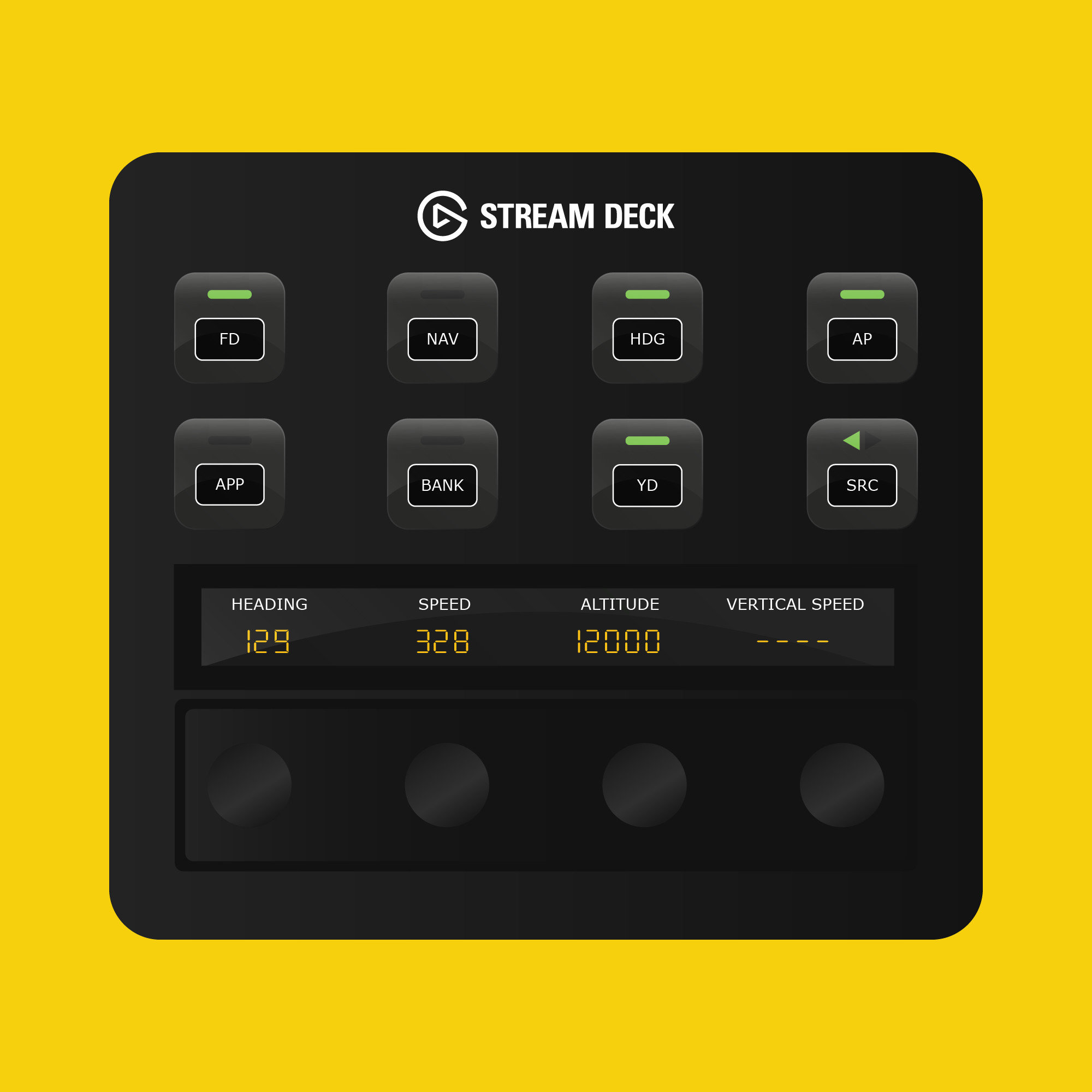
Button Controls: Left Flight Director (FD), NAV Mode (NAV), Approach Mode (APP), Bank Angle Limit (BANK), Heading Mode (HDG), Yaw Damper (YD), Autopilot (AP), AP Source (SRC).
Rotary Dials & LCD Screen: Real-time values for speed, heading, altitude & vertical speed. Rotate the rotary dials left or right to increase or decrease values. Tapping on the LCD screen or pressing the rotary dial will enable Heading, Speed, Vertical Speed and Altitude Hold modes.
Radios & Communications
Button Controls: Autothrottle (A/T), Altitude Hold (ALT), Flight Path Angle (FPA), Flight Level Change (FLCH), Vertical Speed (VS), Right Flight Director (FD).
Rotary Dials & LCD Screen: Real-time frequency values for COM1/COM2 (Active and Standby). Rotate rotary dials 1 and 2 to change the standby frequency for COM1 and dials 3 & 4 for COM2. Tap the screen or press a standby rotary dial to swap between Standby and Active.
XPDNR/TCAS
Rotary Dials & LCD Screen: Rotate the rotary dials to increase or decrease each of the transponder digits.
About Flight Panels
Our mission is to become an integral part of any Microsoft Flight Simulator setup, through the creation of professional, highly detailed, modern and consistency designed Stream Deck profiles, which maximise the immersive experience of Microsoft Flight Simulator. Our focus on user design, user experience and product research, backed by regular product updates and dedicated industry leading support - is there to provide our community with the confidence that a key part of their Flight Simulator setup will be regularly updated and supported.
Frequently Asked Questions
Q: Do you provide regular product updates?
We regularly update our Stream Deck Profiles to include new features, functionality and bug fixes and we're delighted to provide these free of cost, for the duration of the products lifespan. Announcements are also published on our Discord server and Release Notes are available on our product updates blog.
Q: What if I need support?
We provide free industry leading support by email (support[at]flightpanels.io), Discord and Live Chat (available on the bottom right hand corner of each webpage). On average, we respond to support requests in less than 15 minutes!
Q: How are your products installed?
Installation is performed through the Flight Panels All-In-One Installer, which automatically installs and configures third party applications (FSUIPC7, PilotsDeck, .NET Runtimes etc.) to make installation a breeze.
Q: How is the product licensed?
This product is for personal and home use. For commercial use and/or where used to generate revenue (directly or indirectly) a commercial license is required. Please contact support[at]flightpanels.io for further information.
Q: How can I keep up to date with the latest news?
Blog: https://flightpanels.io/blog/news
Product Updates: https://flightpanels.io/blog/product-updates
Support Portal: https://support.flightpanels.io
Instagram: https://instagram.com/flightpanels
Threads: https://threads.net/flightpanels
Discord: https://flightpanels.io/discord
Changelog
Release Notes: https://flightpanels.io/blogs/product-updates/multi-product-updates-july-26-1
Release Notes: https://flightpanels.io/blogs/product-updates/code-signing-certificate-updates-2026
Release Notes: https://flightpanels.io/blogs/product-updates/multi-product-updates-01-26-2
Release Notes: https://flightpanels.io/blogs/product-updates/multi-product-updates-01-26-1
Release Notes: https://flightpanels.io/blogs/product-updates/multi-product-updates-september-2025
User Reviews
No reviews yet. Be the first to share your experience!
FSS E-Jets ERJ 170-195 Stream Deck + Autopilot Panel
Enhance your aircraft control experience with the Flight Panels Autopilot Panel for FSS E-Jets ERJ 170-195 Series. Utilize physical buttons, LCD touchscreen, and rotary dials on your Stream Deck Plus to manage autopilot systems seamlessly. Enjoy real-time values for speed, heading, altitude, and vertical speed, along with radio and communication controls. Stay updated with regular product updates, free industry-leading support, and easy installation through the Flight Panels All-In-One Installer.

Instant digital delivery • Secure payment
Requirements
Additional Requirements
Stream Deck +
Microsoft Flight Simulator 2020/2024 (Steam or Microsoft Store)
The aircraft referenced in the product description
More by this publisher
SF50 Cirrus Vision Jet G2 Stream Deck + Autopilot Panel
Miscellaneous
20,88 €
Stream Deck Series: 787 Dreamliner
Miscellaneous
27,48 €
Stream Deck Series: iniBuilds Airbus A300-600R (15 Key Version)
Miscellaneous
35,16 €
Phenom 300E Stream Deck Profile
Miscellaneous
32,97 €
AeroLens Pro - FlyByWire A380X - Stream Deck Profile
Miscellaneous
20,88 €
Details
- Category
- Miscellaneous
- Release Date
- Jun 23, 2024
- Last Updated
- Jul 9, 2026
- Compatibility
- MSFS2020/24