
Description
Note: The September 25, 2025 WORLD UPDATE:20 JAPAN update includes a highly detailed, handcrafted Kitakyushu Airport from our Microsoft partner.
It's amazing!
The scenery distributed here is not compatible with WORLD UPDATE:20 JAPAN.
-----------------------------------------------------------
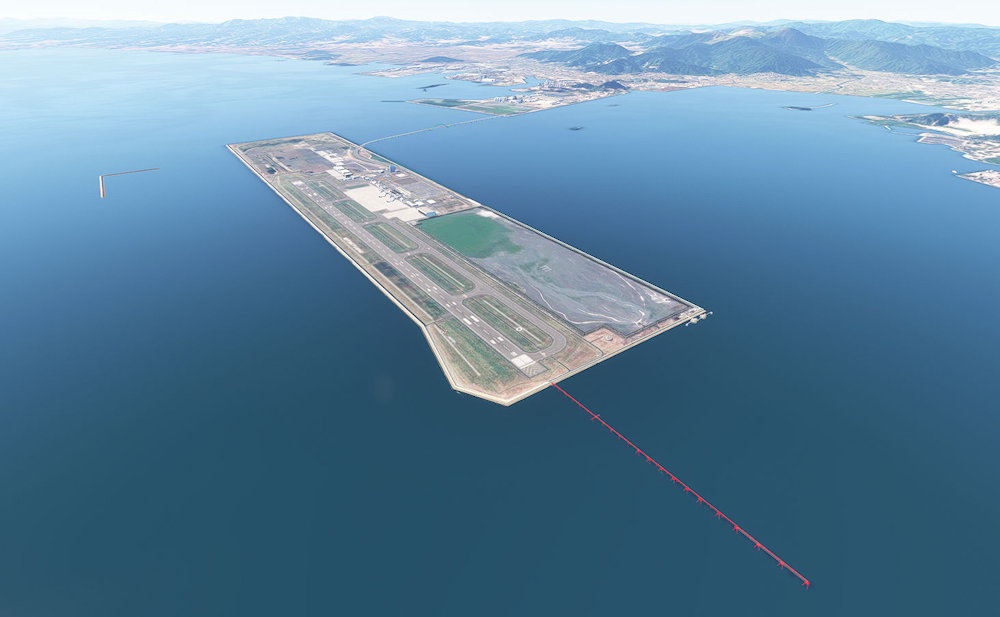
This is Kitakyushu Airport in Japan.
JAL and SFJ passenger planes travel to and from Tokyo, and cargo planes also fly in here.
The SFJ hangar doors can be opened and closed by hiding the yoke or turning the Strobe Light on and off.
I hope you enjoy the atmosphere of this offshore airport.
https://gege.main.jp/ (Japanese only)
-----------------------------------------------------------
注意:2025 年 9 月 25 日の WORLD UPDATE:20 JAPAN アップデートには、Microsoft パートナーによる非常に詳細な手作りの北九州空港が含まれています。
素晴らしいです。
ここで配布するシナリーは、WORLD UPDATE:20 JAPAN には未対応です。
-----------------------------------------------------------
日本の北九州空港です。
JALやSFJの旅客機が東京との間を往復し、貨物機も飛来しています。
SFJの格納庫の扉は、ヨークの非表示もしくは Strobe Lightのオン/オフで開閉できます。
海上空港の雰囲気を楽しんでいただければ、幸いです。
ホームページはこちら https://gege.main.jp/
Location
RJFR Kitakyushu Airport
RJFR Kitakyushu Airport is a detailed representation of the airport located in Japan. It facilitates passenger flights by JAL and SFJ to Tokyo, as well as cargo operations. The add-on includes interactive features, such as the ability to open and close SFJ hangar doors using controls like the yoke or strobe light. Designed to capture the unique atmosphere of this offshore airport, it enhances the flight simulation experience.


User Reviews
3 reviews
Version History
------------------------------------------------------------ Version 2.5.2 Update 1. Jetways have been separated from terminal buildings and saved as a separate file (fixedJetway2-5-2.bgl). 2. Recently, there have been some unusual issues with terminal buildings not displaying, so I've updated the data. 1 ターミナルビルからジェットウェイを切り離し、別ファイル(fixedJetway2-5-2.bgl)としました 2 最近、ターミナルビル等が非表示となる珍事が発生したので、とりあえず、データ更新してみました ------------------------------------------------------------
Related
RJFR Kitakyushu Airport enhance (WORLD UPDATE:20 JAPAN)
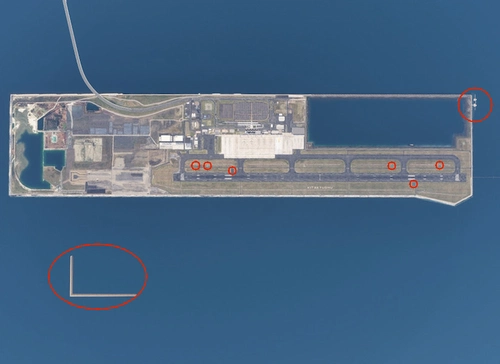
The RJFR Kitakyushu Airport enhance add-on introduces new elements to Kitakyushu Airport as part of WORLD UPDATE:20 JAPAN. This scenery modification includes features such as an automatic mooring system, PAPI light housing, red and white towers, and a seawall under construction for airport reclamation. Please note that installation of WORLD UPDATE:20 JAPAN is required for proper functionality.
by gege3
kitakyushu-landmarks-scenery
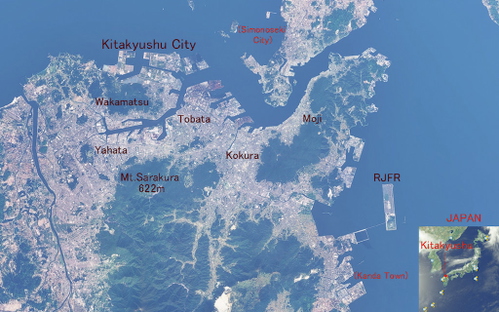
This add-on provides detailed scenery for Kitakyushu City, Japan, including parts of Shimonoseki City and Kanda Town. It features two main folders: one containing significant buildings, factories, and structures, and another that adds approximately 1,700 tall buildings over 30 meters in height. Users can explore the enhanced atmosphere of Kitakyushu City through this comprehensive scenery pack.
by gege3
Log in to join the discussion
Log InComments(12)
about 1 year ago
about 1 year ago
8/22に北九州ランドマークシナリーを公開しました
ゆっくりしようと思ってましたが、こそこそと作りつづけています。
about 1 year ago
about 1 year ago
ご教示いただき、ありがとうございます。
楽しんでいただければ幸いです。
over 1 year ago
Edit: never mind, it seems that GSX can't replace jetways on third-party sceneries...
over 1 year ago
追伸:flightsim.toからDLしたファイルを試したらILSはちゃんと直ってました。ありがとうございます。貴殿作の他のファイルも最新版に改定されているのでしょうか?
再追伸:他のファイルについては貴殿の新しいホームページで確認できました。何度もすみませんでした。今後ともよろしくお願いいたします。
over 1 year ago
ここらで一区切りつけて、あちこち飛んでみたいです。
over 1 year ago
over 1 year ago
It seems that NezNok will be able to make a JETWEY version later.
Therefore, we would like to update the compatible version at a later date.
==========================================
April 17, 2025
Sorry. I was wrong.
The update for NezNok was a misunderstanding on my part.
I apologize to Steran and NezNok.
over 1 year ago
FSコミュニティ黎明期より長きに渡るご貢献、感謝申し上げます。
一点、長年お願いしたくお伝えできなかったことがございます。
現在に至るまでターミナルと一体化した固定式PBB(jetway)が設置されているため、
・可動モデル或いはMSFS標準のPBBに変更いただく
または
・GSX ProのProfileでPBB自体を後付けできるよう、固定式PBB撤去バージョンを上げていただく
これらのいずれかを施していただけますでしょうか。何卒よろしくお願いいたします。
※MSFS2024(SU1)上の動作は当方で確かめました。
離発着には問題ありませんがSU2のリリースを待って再度確認します。
over 1 year ago
高齢のため、SDKを読み込む気力がありません。
後付けで本物らしい可動式のPBBを作っていただけたら、うれしいです。
=================================================
2025.4.17
Jetwayの後付けは出来ませんでした。
NezNok様、不勉強で申し訳ありません。
over 1 year ago
少し齟齬が出ているようなのでご説明をば…
GSX Proは直接シーナリーファイルに何か書き込むわけではなく、Profileで指定した情報/或いは設定メニューから好みのPBBをGSX Pro内部から呼び出して配置するものとなります。
今あるのと似たガラスタイプもストックがあったと記憶しています。
https://www.fsdreamteam.com/products_gsxpro.html
(↑ Global Jetways Replacementの項を参照)
ターミナルと固定式PBBを切り離す方向性は合っています。
[GeGe様側でしていただきたいこと]
・BGLファイル単位でターミナルと固定式PBBを分離
(固定式PBB側をsceneryフォルダ内「fixedjetways.bgl」と仮定します)
[ユーザー側が好みでやること]
1.固定式PBBのBGLファイルだけ削除
2.Layout.jsonをMSFSLayoutGenerator.exeに投下(上記削除の反映)
3.シムを起こして北九州空港に出現、GSX Proのメニューを弄って
似たようなガラス張りPBBを設置
という整理にすれば問題ないと思います。
GSX Pro の北九州空港用Profileとして作って公開してしまいたいですが、
専門に作られているGSJPチームがありますのでまずそちらに連絡を取ってみます。
追加する説明文は、以上の方針で行く限り以下丸コピで構いません。
同内容を含めたReadme.txtも足してしまいましょう。
______________________________
[EN] -READ BELOW BEFORE COMMENTING ABOUT PBBs-
This scenery has been developed since FS98.
SDKs are difficult for me, so Its jetways are still untouched and remaining fixed.
However, now you can use GSX Pro's jetways with following steps.
①Extract "japan-rjfr-kitakyushu.zip" to your Community folder.
②Locate \japan-rjfr-kitakyushu\scenery .
③Delete "fixedjetways.bgl" , go back to \japan-rjfr-kitakyushu
and put layout.json onto MSFSLayoutGenerator.exe.
→ github.com/HughesMDflyer4/MSFSLayoutGenerator/releases
④Launch your sim, and set your favorite PBB from GSX Pro menu when you arrive at RJFR.
[JP] -動かないPBBの件をコメントされる前にご一読ください-
本作は、FS98時代より徐々に発展させてきたものとなります。
近年のSDKは難解そして自身の高齢ゆえに、今まで固定タイプのPBBは触らないままでいました。しかしGSX Proという便利なアドオンがある現代、そのPBBを使いたい方向けにファイルを分離し、以下の手順を辿っていただくことで組み合わせられるようにしました。
①"japan-rjfr-kitakyushu.zip"をCommunityフォルダに展開します
②\japan-rjfr-kitakyushu\scenery フォルダまで入ります
③"fixedjetways.bgl"を削除し、一つ上の階層に戻ってLayout.jsonを
MSFSLayoutGenerator.exeに投げます
→ github.com/HughesMDflyer4/MSFSLayoutGenerator/releases
④シミュレータを起動し、北九州空港でGSX Proの設定から
お好みのPBBを配置してください
______________________________