
![Get rid of those white boxes [FIX] - Image 1](https://cdn.flightsim.to/images/24/get-rid-of-fix-_dEU7.jpg)
Description
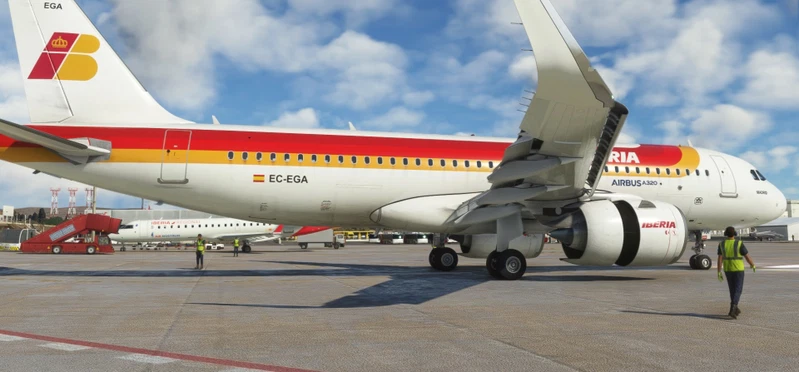
This mod makes invisible the registration number box of AI aircraft and other players aircraft. Compatible with sim version 1.37.18.0.
Aircraft surroundings while, taxi, flying in formation, completing the checklist... It's a very important feature for those who love simulators. And a very ugly and unimmersive detail, are the empty registration number boxes from the surrounding aircrafts (and now much worse with the new aircrafts and liveries without white fuselage). All the beauty created by the 3D artists vanishes with those white stickers, looks like the kitchen fridge xD
I readed about it on other threads and I don't belive Asobo hasn't fixed it yet. 4 years of updates and this still hasn't been solved. Tired of waiting and wasting hope every update to see this solved, I decided to investigate why this happen. Found a really simple trick to hide the white box on AI/multiplayer airplanes. Editing the visibility of the registration number inside the .gltf files. Only the LODs higger than 00, because the 00 is for your own aircraft.
-Installation:
Place it in the community folder. If you change the foldername, be sure prefix with ZZZ to ensure those files are loaded after the official ones.
-Aircraft included:
Asobo_208B_GRAND_CARAVAN_EX
Asobo_208B_GRAND_CARAVAN_EX_Livery_Emerald
Asobo_208B_GRAND_CARAVAN_EX_Livery_Kenmore
Asobo_A320_NEO
Asobo_A320_NEO_Livery_S7
Asobo_B747_8i
Asobo_Baron_G58
Asobo_Bonanza_G36
Asobo_Bonanza_G36_Livery_Kenmore
Asobo_C152
Asobo_C152_Aerobat
Asobo_C152_Livery_Kenmore
Asobo_C172sp_AS1000
Asobo_C172sp_AS1000_Floaters
Asobo_C172SP_AS1000_Livery_01
Asobo_C172SP_AS1000_Livery_Kenmore
Asobo_C172sp_AS1000_Skis
Asobo_C172sp_AS1000_TowPlane
Asobo_C172sp_classic
Asobo_C172SP_Classic_Floats
Asobo_C172SP_Classic_Skis
Asobo_Cabri_G2
Asobo_Cap10C
Asobo_Cap10C_Livery_Kenmore
Asobo_CJ4
Asobo_DA40_NG
Asobo_DA40_NG_Livery_Kenmore
Asobo_DA40_TDI
Asobo_DA62
Asobo_DG1001E_Neo
Asobo_DR400
Asobo_DR400_Livery_Kenmore
Asobo_DV20
Asobo_E330
Asobo_E330_Livery_01
Asobo_FlightDesignCT
Asobo_Icon
Asobo_Icon_Livery_01
Asobo_KingAir350
Asobo_KingAir350_Livery_01
Asobo_KingAir350_Livery_Emerald
Asobo_LS8
Asobo_NXCub
Asobo_SR22 (WT)
Asobo_Pitts
Asobo_Pitts_S2_Livery_Kenmore
Asobo_Savage_Cub
Asobo_Savage_Cub_Livery_01
Asobo_Savage_Cub_Livery_Kenmore
Asobo_TBM930
Asobo_VL3
Asobo_VL3_Livery_01
Asobo_XCub
Asobo_XCub_Floats
Asobo_XCub_Livery_01
Asobo_XCub_Skis
douglas-dc3
douglas-dc3-livery-bluestripe
douglas-dc3-livery-dcdirect
douglas-dc3-livery-emerald
douglas-dc3-livery-oledusty
douglas-dc3-livery-PLmetal
douglas-dc3-livery-worldtravel
microsoft-aircraft-bell407
microsoft-aircraft-g-21
Microsoft_Pilatus_PC6_G950_Floats
Microsoft_Pilatus_PC6_G950_Wheels
Microsoft_Pilatus_PC6_G950_Wheels_Livery_01
Microsoft_Pilatus_PC6_Gauge_Skis
Microsoft_Pilatus_PC6_Gauge_Wheels
Microsoft_Pilatus_PC6_Gauge_Wheels_Livery_01
Microsoft_Pilatus_PC6_Gauge_Wheels_Livery_02
Microsoft_Volocity
I opened a thread at the official forums with the hope we are listen. https://forums.flightsimulator.com/t/finally-a-fix-for-registration-white-boxes-for-ai-mp/565426
Hope you like it. Best regards.
Get rid of those white boxes [FIX]
Let's get rid of those ugly registration boxes for the AI/multiplayer aircrafts once and for all!!

User Reviews
13 reviews
Version History
You need install this if you have installed the microsoft-aircraft-pilatus-pc6, if not, you don't need to download this if you don't look very close to those aircraft, they are hardly noticeable changes: Asobo_A320_NEO - Doors decals are now visible in other LODs. Asobo_A320_NEO_Livery_S7 - Doors decals are now visible in other LODs. Asobo_B747_8i - Doors decals are now visible in other LODs. Asobo_Bonanza_G36_Livery_Kenmore - Eliminated unneeded modded files. Asobo_C172sp_AS1000_TowPlane - Included the LOD00 because it isn't flyable by the user (requested by hugojans). microsoft-aircraft-pilatus-pc6 - Official reworked/renamed model.
Log in to join the discussion
Log InComments(68)
about 1 year ago
about 1 year ago
Cheers
over 1 year ago
over 1 year ago
[VPainting02]
size_mm=0,0
texture=$RegistrationNumber
location=exterior painting00=Registration/Registration.html?display=none
Where $RegistrationNumber is the name of the node inside the model .gltf files (you can open with notepad). If your model has another nodename, the call never will find it.
And Registration/Registration.html also must be the same name that you have in this folder.
over 1 year ago
White boxes seem to appear when I get close to the model and disappear when I'm slightly away from the model. When I go a little more far out, models with custom liveries revert back to the default livery. This is with the WT SR22. It would be great if I could be provided with some insight on how these gltfs work, or would be even more greater if you could fix this issue.
Anyways, thanks for this addon!
over 1 year ago
Yes, it's normal when you get close to the model to see again the white box. As I mention in the description, we musn't mod the LOD00 ( the most detailed one) because is the same that we use when we pilot the plane, and we would miss the registration number from our piloted plane.
Some liveries have only textures up to LOD03, what means when you move away the camera and the engine loads LOD04, it loads the defaul livery for LOD04. We can try to repair it, send me the livery and the WT SR22 files by private, only the .gltf files for the exterior model.
Best regards
almost 2 years ago
almost 2 years ago
almost 2 years ago
almost 2 years ago
almost 2 years ago
about 2 years ago
https://de.flightsim.to/file/38076/asobo-aviat-husky-a-1-d-egay
I placed the Husky as a static plane.
That would be great!
Thanks!
about 2 years ago
about 2 years ago
over 2 years ago
over 2 years ago
over 2 years ago
A Game Changer!
So brilliant!!!
Thank you so much!
over 2 years ago
Regards :)
over 2 years ago
over 2 years ago
Regards