

Description
Hello,
And thanks for taking a quick look !
To sum up, I didn't like the look of the untweaked MSFS, everything looks so plastic and I'm sure I'm not the only one who thinks so. So I sat down at Reshade and the Nvidia filters to give the MSFS a completely new atmosphere.
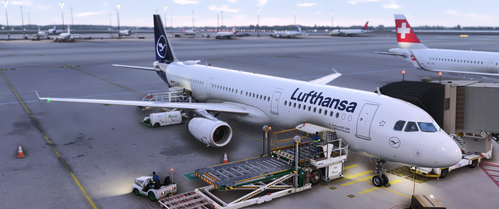
In the following pictures you can get an impression for yourself.
Make sure to install reshade ( 4.9.1 ) and all effects - here you can find an instruction on how to get 4.9.1 -
https://www.reddit.com/r/ReShade/comments/sj5cno/can_i_still_download_491_somewhere/
if you are experiencing a very high amount of fog, please disable one of the Depthhaze effects and (or) adjust the Fogfactor
!! Make sure to read the Changelog !!
This project is implemented in our free time and all addons are available to you free of charge. But if you like our projects, we would be extremely happy about a small donation, so that we can let this project grow in the future. Thank you for stopping by and I wish you a lot of fun with the preset. :D
Major update !
It's been a long time since I last updated the preset. In the meantime I worked on improving my skills and therefore created a whole new preset ! With the new additional knowledge I was able to decide wether an effect is important or not.
I tried to remove as many effects as I could to improve the performance and to do some troubleshooting, especially the bluriness has been a major issue for a long long time.
This preset features new colors as well as 3 different presets - two for flying during daytime and 1 night preset !
Additionally Nvidia Filters are no longer needed ! I managed to remove them, so that also AMD users have the opportunity to try out my preset.
As always, please don't hesitate to leave some feedback. It's important to let you know that this preset has not been in beta so far, which means that issues are almost guaranteed - would of course be nice, if there won't be any issues with this preset :D
That makes it even more important that you leave feedback and optionally a picture, which helps me troubleshooting the problems.
I hope that you enjoy my preset and as always - always happy landings !
Quality Reshade preset
To sum up, I didn't like the look of the untweaked MSFS, everything looks so plastic and I'm sure I'm not the only one who thinks so. So I sat down at Reshade and the Nvidia filters to give the MSFS a completely new atmosphere. What this Preset changes ? Well, it's more than you think......my idols were edited spotting pictures from different perspectives, so please be aware that this preset will not correspond to real life conditions, but to edited spotting pictures. As MSFS is still a sim, the preset may look bad or better in one place or another.
Downloads Stopped
The creator has temporarily stopped downloads for this addon. Please check back later.

User Reviews
9 reviews
Log in to join the discussion
Log InComments(120)
about 3 years ago
almost 4 years ago
you removed the nvidia preset because everyone was using that instead of your shitty reshade didn't you
almost 4 years ago
Woah man any need of shitting the creator?
almost 4 years ago
You know what ? I've had enough, first you're pissing me off because the preset doesn't look the way you wanted and now because I want to offer people without an Nvidia graphics card the opportunity to use this preset as well.
I can't respect you if you don't respect me.
I have nothing against bad feedback, on the contrary - but the way you phrase it, is just disgusting !
over 3 years ago
wth is you problem. Be happy for what he makes!!!!
almost 4 years ago
For those wondering. The poster is kind of scamming us. To actually get it how it's displayed, completely don't use reshade! It's so much nicer with the Nvidia filters, no reshade.
almost 4 years ago
Sorry, but how dare you to say it's a scam ? The pictures were taken with reshade and the Nvidia Filters in combination. If you experience issues, downgrade to 4.9.1 as mentioned in the readme.
almost 4 years ago
I am on 4.9.1
almost 4 years ago
Then make sure to download all shaders - because there were people that didn't have any issues yet. For further support you can join the Discord
almost 4 years ago
I can't get this to work at all using Reshade 4.9.1 using MS store version. When I try to install Reshade and run the batch file my game launches then crashes instantly. If I install the Reshade files that are included in the FinalLight Reshade preset (https://flightsim.to/file/20557/finallight-reshade-preset-realistic-colors-and-tone-fixes) the game launches fine but then using your preset I get the same problems others have of the very blurry corners.
almost 4 years ago
reshade looks far from the pictures u've posted, please revise..its so blurry and warm while ur pics looks perfectly neutral white and clean
almost 4 years ago
Please use Reshade Version 4.9.1
about 4 years ago
looks like crap https://i.imgur.com/uTv4uft.png why is there even a black and white filter
about 4 years ago
That's not how it's supposed to look like. As I said, if you experience offsets, then do a fresh reshade reinstall and select my preset.
almost 4 years ago
we are not idiots you know
almost 4 years ago
If you experience issues while other people's sim look quite identical to mine you'd think about it. Please make sure to fulfill all the requirements in the readme - Install all shaders, version 4.9.1 and make sure that all effects like in the pcitures I uploaded are selected.
I can and will not help you if you act unfriendly in my present.
over 3 years ago
This comment has been deleted
about 4 years ago
This preset is having this blur effect on the corners of the screen. What exactly is causing that and how do I turn that off?
about 4 years ago
Hey,
Would you mind sending me a picture via DM's ? ;)
about 4 years ago
This is a very good realistic preset and i enjoyed it and it produces good colors