
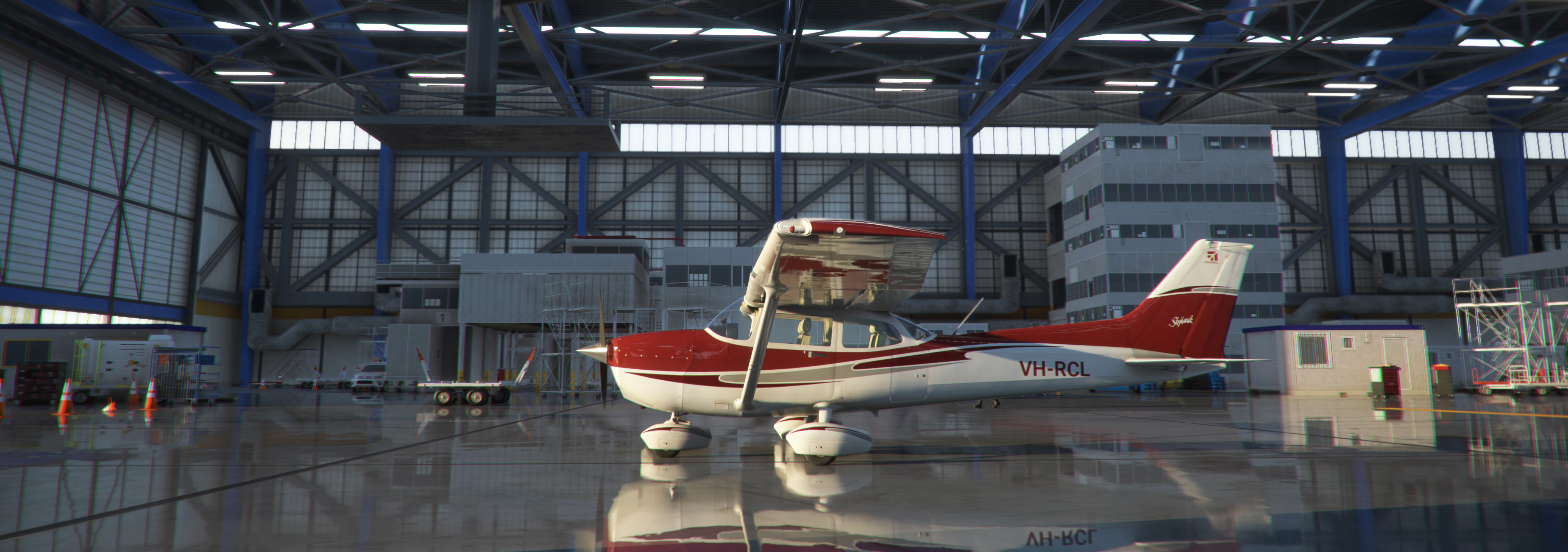
Description
If you have any of our early liveries for the C172, you will want to replace them and update to our two new packages!
*** UPDATE v3.5 FIX FOR CLASSIC RADIO/NAV DISPLAYS ***
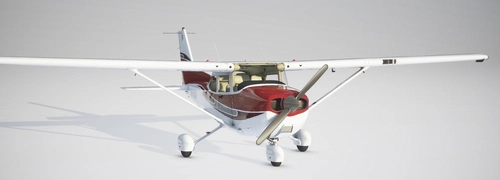
We have completely re-painted these liveries from scratch, processed them in 4K resolution via Blender, and completed them in Photoshop for a much sharper and more accurate livery set.
One package includes all of the following:
1. The following colours: blue, burgundy, gold, green and purple;
2. Each colour has been applied to every default C172 variant: Classic or G1000 for wheels, floats or skis;
3. It is also available for the JT-A add-on if you have it installed (it will be ignored if you don't have it installed).
Drag and drop the top folder in this package directly into your Community folder. That's it! Enjoy!
A second package is also now available in a separate download location with the same colours in a metallic sheen (see the final image):
https://flightsim.to/file/27730/update-brand-new-c172-livery-package-five-metallic-colours-packaged-for-every-model
Comments(14)
Log in to join the discussion
Log Inabout 2 years ago
about 4 years ago
You are mentionning you have fix NAV. But still can't adjust individually NAV 1 and NAV 2
about 4 years ago
I have no problems tuning my NAV radios on either the Classic or the G1000. Try completely uninstalling all C172 liveries and resinstalling them.
about 4 years ago
Before installing v3.5 I uninstalled all liveries. I can try again.
about 4 years ago
No change, can't useNav 1 and 2 independantly. Doesn't matter, it's okay, I don't really use VOR.
about 4 years ago
Oh my friend, it's the only livery I was flying it few minutes ago and discovered the NAV 2 was not working. You can't imagine how happy am I to find a new version. Thank you so much. The green one is my favorite.
over 4 years ago
Are the registration numbers customizable or no?
over 4 years ago
I am asking about both this file and the metallic file lol
over 4 years ago
Yes - in World Map use the Customisation tab to enter your preferred registration number.
over 4 years ago
okie dokie, thank you!
over 4 years ago
Yes and yes - in World Map use the Customisation tab to enter your preferred registration number.
UPDATE v3.5 - Brand new C172 Livery Package - five colours, packaged for every model
Brand new C172 livery package featuring five colors meticulously re-painted in 4K resolution via Blender and Photoshop. Each color applied to every default C172 variant with an optional JT-A add-on compatibility. Simply drag and drop the package into your Community folder for an enhanced visual experience. Additional metallic sheen package available for download.

More Information
Version History
v3.5 FIX - Classic radio/nav displays now function correctly.
Related
MSFS C172 Classic Package - UPDATE 2.5
Revamp your C172 experience with the MSFS C172 Classic Package - UPDATE 2.5! Discover new 4K liveries meticulously crafted in Blender and Photoshop, available in two packages with metallic sheen options. Perfect for all variants of the C172, including Classic, G1000, wheeled, floats, and skis. Simply unzip the files to your Community folder and enjoy the upgraded visuals!
by ozzieblr
UPDATE v3.5 - Brand new C172 Livery Package - five metallic colours, packaged for every model
Discover the latest C172 Livery Package update featuring five new metallic color options for every model variant. Experience a sharper and more accurate livery set with 4K resolution textures, now including a sheen of blue, burgundy, gold, green, and purple. Update your collection and enhance your flying experience with these refreshed liveries.
by ozzieblr / Robina Custom Liveries
MSFS C172 Classic Burgundy
Discover a collection of new 4K resolution liveries for the classic C172 aircraft in MSFS. These meticulously crafted designs have been applied using Blender and Photoshop, resulting in a sharp and high-resolution finish. Choose from a variety of color options for all default variants, including Classic, G1000, wheeled, floats, and skis versions. Simply unzip the files into your Community folder and elevate your flight simulation experience!
by ozzieblr
MSFS C172 G1000 Burgundy
Enhance your C172 experience with the MSFS C172 G1000 Burgundy livery package. Choose from five vibrant colors in 4K resolution for all default variants, including wheeled, floats, and skis. Easily install these high-quality liveries by unzipping the files into your Community folder and take to the skies in style.
by ozzieblr
about 2 years ago