
Flightsim.toFlightsim.to
    OpenTrack settings for MSFS - Image 1

    Description

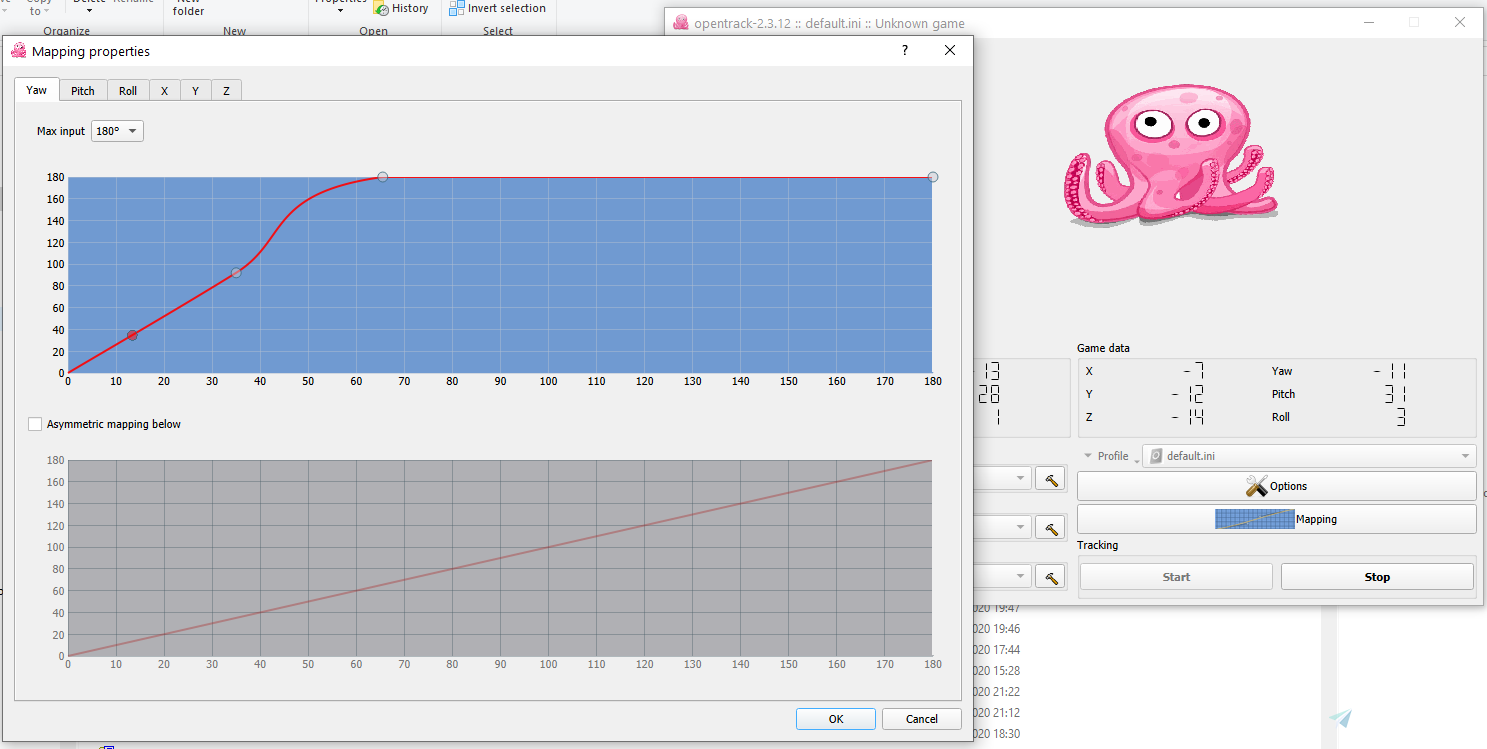
    These are good starter settings that work well with the open source app OpenTrack for head tracking, e.g. with SmoothTrack or other head tracking mods. They make the head movements a bit more sensitive and also set a sensible smoothing up to keep the tracking less jerky and more smooth.

    Instructions
    Copy the .ini file to C:\Users\\Documents\opentrack-2.3

    Comments(34)

    Log in to join the discussion

    Log In

    3 months ago

    can you update please?
    and if anyone have better setting please share 🌹

    7 months ago

    Can we use the automatic profile start with MSFS? I can't use/open the flightsimulator.exe file in the settings, because the access is denied. On all my other games (Dirt Rally, Truck Simulator...) I can use the .exe files and the OpenTrack profile autostart works fine...

    9 months ago

    how is this not compatible with 2024? the setting is in opentrack and should be independent with what program u use it??

    4 months ago

    the profile was uploaded in 2020, when nobody even was aware of 2024 coming. Works fine with 2024

    9 months ago

    This setting is really nice!! Thanks for your efforts.

    10 months ago

    Thanks for this. Hardly any shaking. One issue is no matter what key I bind to centre and stop tracking, they do not work when I'm in the sim?

    over 1 year ago

    В папке Documents пусто, место установки не менял,по умолчанию

    over 1 year ago

    Moving up also makes my "camera" go up, just like shift Q or Shift E, any clues?

    over 1 year ago

    It is meant to do that, you would have to disable the Z axis

    almost 2 years ago

    good job! Works fine in my game

    almost 2 years ago

    Works very well to my liking, thanks!

    almost 2 years ago

    Works very well with opentrack + Beam Eye tracker

    Thanks!

    almost 2 years ago

    nothing happens for me on open track after pasting the ini. file in. Open track doesnt show its tracking my cam anymore?

    over 2 years ago

    Where do you get the msfs.ini file to load it inot the profile. mine shows default and obviously not working

    Thanks

    over 2 years ago

    You put it in This PC>Documents>opentrack..

    over 2 years ago

    cant find where to place file

    over 2 years ago

    You put it in This PC>Documents>opentrack..

    over 2 years ago

    Thank you!

    over 2 years ago

    Simpley works perfect with my ps3 camera. Thank you very much.
    MSFS 2020MSFS 2024

    OpenTrack settings for MSFS

    Enhance your head tracking experience with these OpenTrack settings for MSFS. These starter settings improve sensitivity and smoothing for a more immersive flight simulation. Simply copy the provided .ini file to your OpenTrack directory to apply.

    Downloads13K
    Version1.0
    File Size1.05 KB
    Published5 years ago
    Updated5 years ago

    User Reviews

    5.0

    5 reviews

    5
    100%
    4
    0%
    3
    0%
    2
    0%
    1
    0%

    More Information

    Simulator
    MSFS2020
    CategoryUtilities
    Sub-CategoryMiscellaneous

    Version History

    No version history available.
