
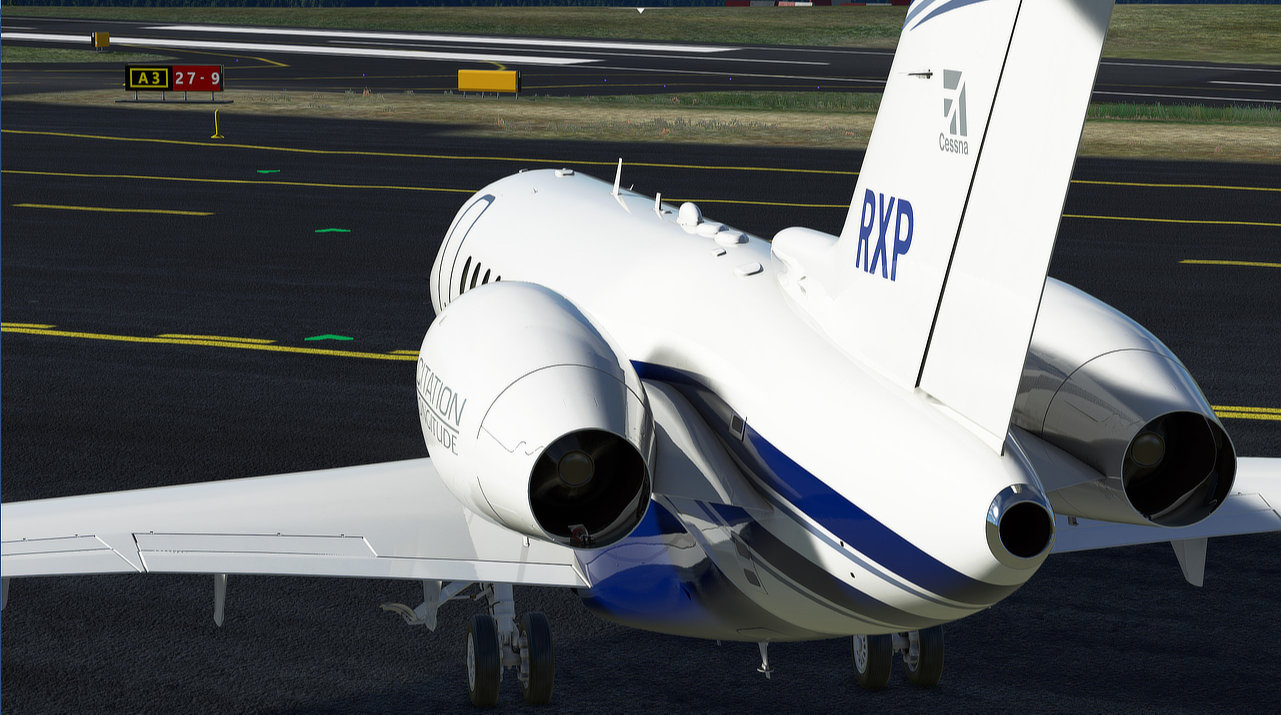
Description
Tested on MSFS Version 1.34.16 (SU13)
Description: This mod changes the Taxi Ribbon and Parking Assistance 3D objects colors and sizes.
It consists in unobtrusive modifications to Asobo_UI.bgl to make the helpers naturally
blending with the ground, less invasive in VR and more convenient in 3D.
Smaller Green Taxi Ribbon Arrows
- Blending naturally with the taxi lines and displaying only a few meters away from the aircraft.
- Visible at night.
Blue/Green Parking Box
- Displaying as thin blue/green patterns over the ground.
- Visible at night.
Blue/None Parking Box
- Displaying a thin blue pattern over the ground and disappearing once inside the area.
- Visible at night.
White/None Parking Box
- Displaying almost like ground painted parking lines and disappearing once inside the area.
- Reflective only.
- Double click rxp-taxi-helpers-mod.bat to run the installation script.
- This script auto-detects the location of the package files and will guide you through the installation process.
- Follow the instructions for customization options, wait until completed - done!
- Alternatively, you can directly invoke the script from a PowerShell prompt:
PS> .\rxp-taxi-helpers-mod.ps1- Use the following PowerShell command to get additional help:
PS> Get-Help .\rxp-taxi-helpers-mod.ps1 -Detailed - Proceed with the guided installation and choose every first item in the lists.
- Or use the following PowerShell command:
PS> .\rxp-taxi-helpers-mod.ps1 -RestoreDefaults A backup copy is saved every time you make any change to the original file in the original folder.
Every Asobo update comes with a new Asobo_UI.bgl file, reinstall after each update.
- Taxi Navigation Ribbon Asobo_UI modification details and recipe
- Neo4316 for additional ideas and variations
This mod was built directly from the current default Asobo_UI.bgl file from SimUpdate 9 version 1.25.6
RXP Small Taxi Ribbon and Parking Helpers (3D/VR)
This mod changes the Taxi Ribbon and Parking Assistance 3D objects colors and sizes. It consists in unobtrusive modifications to Asobo_UI.bgl to make the assistance helpers naturally blending with the ground, less invasive in VR and more convenient in 3D.


User Reviews
11 reviews
Version History
- Addresses a few issues with Power Shell launches (minor .bat file changes). - Updates Copyright notice.
Log in to join the discussion
Log InComments(108)
over 3 years ago
Works perfectly, looks great
and is a great upgrade for the MSFS.
It is compatible with SU12,
thanks for that
about 1 year ago
about 1 year ago
I only tried changing it too smaller across and to green....it just kinda merged into the taxi way ...so not intrusive anymore.
Big thanks.
almost 2 years ago
Best regards
almost 2 years ago
thanks for sharing
over 2 years ago
almost 3 years ago
almost 3 years ago
But one thing, I can't change the color of the ribbon to yellow, which I would really like to do.
Right now in the script I changed the color to blue, which is OK for me, but not the perfect color:
[Parameter(ParameterSetName='Normal')]
[ValidateSet("Blue", "Green", "Cyan", "Yellow", "Magenta", "None","")]
[String]$Ribbon = "Blue",
hello, good work many thanks, BUT I can also like the user "Justin_Credible" see below, NOT change to the color yellow !!! what can I do, why does it not change the color as desired ???
Thanks Daniel
.
about 3 years ago
But one thing, I can not change the ribbon colour to yellow, which I really would like to do.
Right now in the script I have changed the colour to blue, which for me is OK but not the perfect colour:
[Parameter(ParameterSetName='Normal')]
[ValidateSet("Blue","Green","Cyan","Yellow","Magenta","None","")]
[String]$Ribbon = "Blue",
But every time I change this to "Yellow", in game I do not get yellow but the old green ribbons. Please give me a hint how to get yellow ribbons.
almost 3 years ago
almost 3 years ago
Thank you for your reply. But I definitely can not confirm that I can get "Yellow" when I double-click the .bat file and use the GUI. I tested it with all of the available sizes from 100% to 10% (I usually use 15%). And every time I get "Green" when I select "Yellow". And it seems that there are also problems with other colours, at least I also do not get "Magenta".
over 3 years ago
Works perfectly, looks great
and is a great upgrade for the MSFS.
It is compatible with SU12,
thanks for that
almost 4 years ago
I get this error in powershell when I run the script. Can you help?
PromptYesNo : The term 'PromptYesNo' is not recognized as the name of a cmdlet, function, script file, or operable
program. Check the spelling of the name, or if a path was included, verify that the path is correct and try again.
At D:\MSFS2020\MyApps\rxp-taxi-helpers-mod-v2.0.3_qk_Ug\rxp-taxi-helpers-mod-v2.0.3\rxp-taxi-helpers-mod.ps1:147
char:11
+ if (!(PromptYesNo "Do you want to continue?")) { Exit 0 }
+ ~~~~~~~~~~~
+ CategoryInfo : ObjectNotFound: (PromptYesNo:String) [], CommandNotFoundException
+ FullyQualifiedErrorId : CommandNotFoundException
PromptYesNo : The term 'PromptYesNo' is not recognized as the name of a cmdlet, function, script file, or operable
program. Check the spelling of the name, or if a path was included, verify that the path is correct and try again.
At D:\MSFS2020\MyApps\rxp-taxi-helpers-mod-v2.0.3_qk_Ug\rxp-taxi-helpers-mod-v2.0.3\rxp-taxi-helpers-mod.ps1:166
char:43
+ $restoreDefaultSettings = PromptYesNo "Do you want to ...
+ ~~~~~~~~~~~
+ CategoryInfo : ObjectNotFound: (PromptYesNo:String) [], CommandNotFoundException
+ FullyQualifiedErrorId : CommandNotFoundException
Select customization options...
Select-ItemList : The term 'Select-ItemList' is not recognized as the name of a cmdlet, function, script file, or
operable program. Check the spelling of the name, or if a path was included, verify that the path is correct and try
again.
At D:\MSFS2020\MyApps\rxp-taxi-helpers-mod-v2.0.3_qk_Ug\rxp-taxi-helpers-mod-v2.0.3\rxp-taxi-helpers-mod.ps1:174
char:30
+ $Scale = Select-ItemList @selectItemListParams -D ...
+ ~~~~~~~~~~~~~~~
+ CategoryInfo : ObjectNotFound: (Select-ItemList:String) [], CommandNotFoundException
+ FullyQualifiedErrorId : CommandNotFoundException
over 4 years ago
Hello, I have an idea for the development of this mod. Is it possible to make a selection of the distance to where the arrows can be seen. Only 2 arrows are e little bit short.
over 4 years ago
Hi,
A lot of things can be done (with a few limitations), after all, it is only a glTF 3D model... The problem is that there are only 24h in a day!
over 4 years ago
I feel with you! Thank you for your reply
over 4 years ago
I had to modify the execution policy in the bat file to "-ExecutionPolicy Bypass" to get it to run on my system.
over 4 years ago
this is what happens
Windows PowerShell
Copyright (C) Microsoft Corporation. All rights reserved.
Try the new cross-platform PowerShell https://aka.ms/pscore6
File I:\rxp-taxi-helpers-mod-v2.0.3\rxp-taxi-helpers-mod.ps1 cannot be loaded.
The file
I:\rxp-taxi-helpers-mod-v2.0.3\rxp-taxi-helpers-mod.ps1 is not digitally signed. You cannot run this script on the current system. For more information about running scripts and setting execution policy, see about_Execution_Policies
at https:/go.microsoft.com/fwlink/?LinkID=135170.
+ CategoryInfo : SecurityError: (:) [], ParentContainsErrorRecordException
+ FullyQualifiedErrorId : UnauthorizedAccess
PS I:\rxp-taxi-helpers-mod-v2.0.3>
over 4 years ago
This is expected if you double-click the .ps1 Powershell script, and why installation instructions are recommending to basically double-click the .bat instead, which is simple bootstrap to run the .ps1 script.
However, the current .bat is not working for everyone and we're planning an update. If you prefer not waiting, you can manually edit the .bat and replace the content with the following single line:
@PowerShell.exe -NoLogo -NoProfile -ExecutionPolicy Bypass -Command "& '%~dpn0.ps1'"