
![[A32NX] Airbus A320neo LUFTHANSA D-AINB in 8k - Image 1](https://cdn.flightsim.to/images/16/sRCOc5Hx.png)
Description
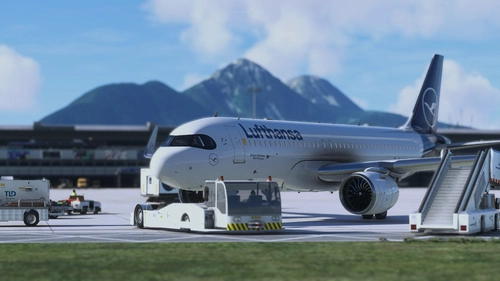
A New Livery for A320neo old LUFTHANSA livery D-AINB - in 8k - NOW FOR FLYBYWIRE
Notice:
inspired by the picture: click here
Features:
- FlyByWire Version
- CUP with old LUFTHANSA Logo
- SimUpdate 8+ compatible
I wish you a lot of fun with it and let the wings dance :-))
Simple installation:
1 - Extract the ZIP
2 - open the new folder - In the folder there is another folder with the same name
3 - copy the file "FBW_A320neo_DAINB" and paste it in you community folder.
4 - Take a deep breath and rejoice now
5 - Now you are ready to fly. Have fun
I am happy for a good rating (1 to 5 stars)
Selcuk Dikilitas
Note about livery requests:
I like to fulfill your wishes. However, I ask you to show your appreciation in the form of a coffee or a small donation. So many wishes come in that I cannot guarantee whether the wish will be fulfilled.
Comments(29)
Log in to join the discussion
Log Inover 4 years ago
Hi Seli! This was your first livery that I downloaded. It simply ticked all of my boxes. It's simple yet beautiful! Timeless. And you rendered it spectacularly.
Thank you!
over 4 years ago
Great review thank you and have a good flight
almost 5 years ago
On the Left hand side sharklet is the Lufthansa logo missing. besides that, a very beautiful livery
almost 5 years ago
Please delete the old file. This 2.0 file contains the updated wingets
almost 5 years ago
Could you update your liveries with new winglet textures?
almost 5 years ago
File was updated
almost 5 years ago
Sehr schöne Livery!
almost 5 years ago
Vielen Dank. Wünsche viele schöne Flugstunden.
almost 5 years ago
Hi, I was already wanting to install the star alliance livery for the a32nx but I didnt quite understand the simple installation -I couldnt find the community folder- and adter gave up and didnt install it, I would really appreciate it if you could help install it.
almost 5 years ago
If you installed on disk C, for example like this ...
C:\User\YourName\AppData\Local\MSFSPackages\Community
almost 5 years ago
Ok I have that in the sim now, but i click on it and nothing happens.Should I drag the file to it?I also have a sdk update showing in the developer mode.
almost 5 years ago
When you have unzipped the file, copy the file with the same name in the folder into the community folder. Where are you from?
almost 5 years ago
ok I will try it out, sorry that is my personal thing, Do I unsip it in fs or in in the file thingy, I will probably reply tommorow, thanks for the help.
almost 5 years ago
1 - unzip the file
2 - Open the unzipped folder
3 - Copy the folder in the folder (FBW_A320 ....)
4- Insertion in community
almost 5 years ago
Hi,will it show up whenever i copy the unzipped folder and paste it in community.I did it now should I leave the game and come back?
almost 5 years ago
It is also sufficient if you load another livery and go back again
almost 5 years ago
Well, I think I will have to survive it without any extra plane or livery because of how Im dumb, and thank you for your effort. I just couldnt understand any thing that I was upposed to do.
[A32NX] Airbus A320neo LUFTHANSA D-AINB in 8k
A new livery for the Airbus A320neo featuring the old LUFTHANSA D-AINB design in 8k resolution, now compatible with FlyByWire. Inspired by a real-world photo, this livery includes the classic LUFTHANSA logo on the fuselage and is SimUpdate 8+ compatible. Simply extract the ZIP file, copy and paste the designated file into your community folder to enjoy this nostalgic livery.

User Reviews
4 reviews
More Information
Version History
Now SimUpdate 5 compatible
Related
![[A32NX] Lufthansa A320neo D-AINH 8k](https://cdn.flightsim.to/images/22/lufthansa-a320neo-d-ainh-true-8k-aiC4e.jpg?width=500)
[A32NX] Lufthansa A320neo D-AINH 8k
Experience the Lufthansa A320neo D-AINH in stunning 8k resolution with this add-on. Includes first to fly version and a new livery option.
by OrientePS
FBW A32NX | Lufthansa Fleet Package
Experience the new Lufthansa A320neo fleet package, featuring aircraft with the latest livery updates. Currently includes D-AIJA, D-AINM, D-AINZ, and D-AINW based at various airports. Stay tuned for the upcoming D-AIJC addition. Share feedback and enjoy smooth landings with this immersive fleet package.
by Kontoauszug
![Lufthansa A320Neo (Dirty) [8K] - FBW A32NX](https://cdn.flightsim.to/images/13/qKYhdIUB.jpg?width=500)
Lufthansa A320Neo (Dirty) [8K] - FBW A32NX
Experience the realistic detail of the Lufthansa A320Neo (Dirty) livery in stunning 8K resolution, designed specifically for the FBW A32NX aircraft in Microsoft Flight Simulator.
by mjv5757 (Mike V)
![[A32NX] Lufthansa First to fly A320neo D-AINA 8k](https://cdn.flightsim.to/images/17/lufthansa-first-to-fly-a320neo-d-aina-true-8k-brRGQ.jpg?width=500)
[A32NX] Lufthansa First to fly A320neo D-AINA 8k
Experience the iconic Lufthansa A320neo D-AINA in stunning 8k resolution, featuring both the standard livery (old) and the upgraded standard livery (new).
by OrientePS
3 months ago