
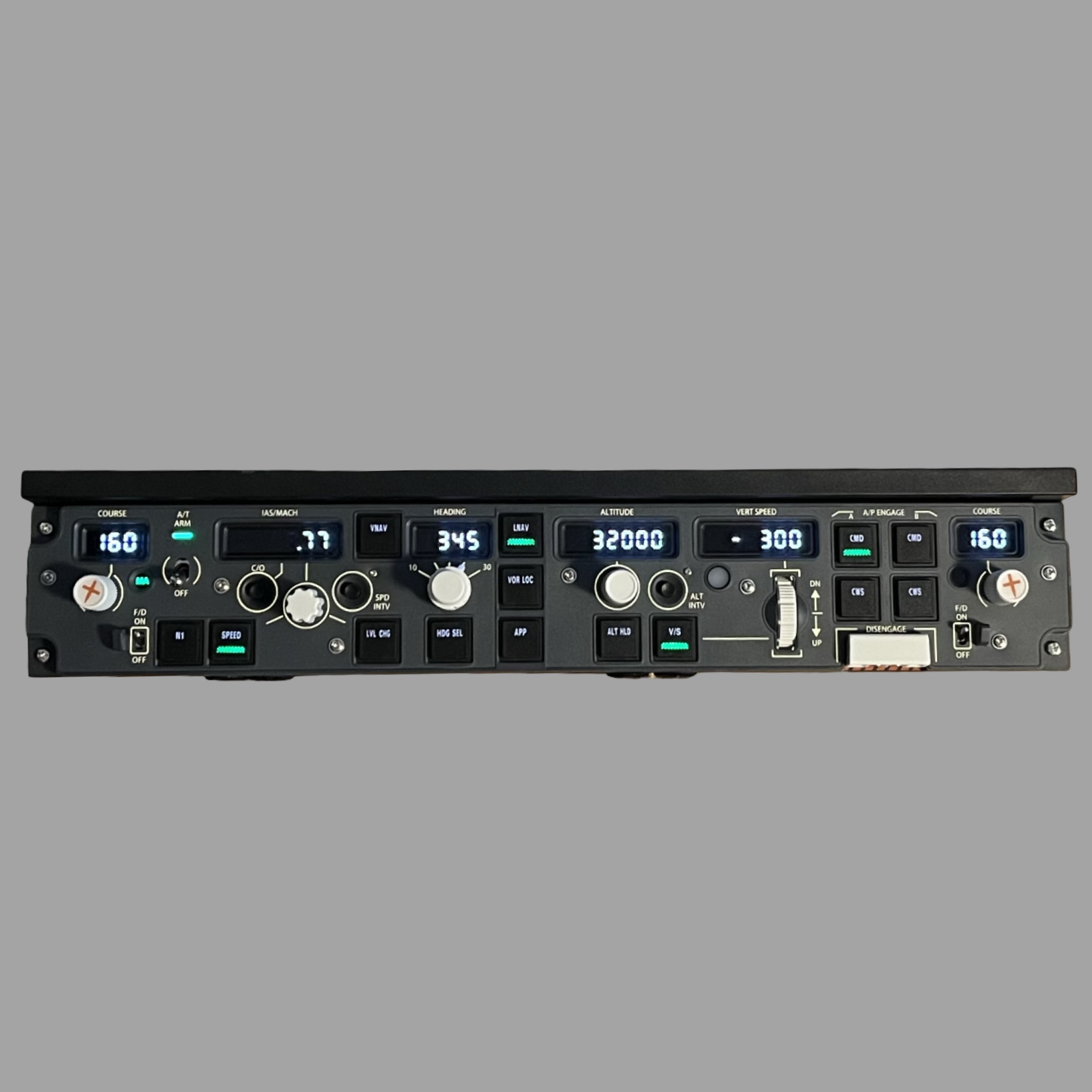
Description
WINWING PAP3 MCP profiles for PMDG 737 (MSFS2020 & 2024) and PMDG 777 (All variants, MSFS2020 & MSFS 2024)
Functions:
- L+R course knobs
- L+R FD switches + M/A lights
- A/T Arm disarm switch (up for arm/disarm) (non-magnetic)
- N1, SPEED, VNAV, LVL CHG, HDG SEL, LNAV, VOR LOC, APP, ALT HLD, V/S, CMD AB, CWS AB buttons (with LED)
- IAS MACH display with working C/O button and display turns off with VNAV/N1 or SPD INTV
- Flashing A and B in speed display
- HEADING display (working HDG/TRK mode in the PMDG 777)
- Bank Angle switch (from 10 to 30)
- ALTITUDE display
- VERT SPEED display and turns off with VNAV and on ground (working FPA mode in PMDG 777, but not fpa and vs display)
- ALT INTV button
- A/P disengage working in PMDG 737 (double movement cycle required for up-position)
-Working PDC3M only not the 3N
MOBIFLIGHT BETA REQUIRED:
- Extra's -> Settings -> Beta Versions -> Yes
Instructions:
- Copy both .mfproj to your MobiFlight Profile folder location
- When opening the files, MobiFlight wants to connect your PAP3 device to the correct profile, select both for PAP3 and click assign, after that, click save.
-Make sure you have python installed.
!Will be updated with for the Boeing EFIS (when released)!
Any questions or problems please let me know :)
PMDG 737 & 777 Profiles | Winwing PAP3 Boeing MCP +WINWING PDC3M Boeing EFIS |
This add-on provides WINWING PAP3 MCP profiles for PMDG 737 and PMDG 777 aircraft in Microsoft Flight Simulator 2020 and 2024. It features numerous functional controls such as course knobs, flight director switches, altitude displays, and autopilot disengagement options. Users are required to have MobiFlight Beta for proper configuration and must follow specific instructions for installation and setup. Future updates will include support for the Boeing EFIS.
User Reviews
2 reviews
Version History
Fixed A/T arm switch for 777 to be both L and R
Log in to join the discussion
Log InComments(18)
6 months ago
This comment has been deleted
about 1 year ago
12 months ago
over 1 year ago
Tested with the 737 ,excellent work !
One issue I can't figure is the MAGNETIC A/T switch... which is not working.
Do I have to set something for it ?
Thank you.
about 1 year ago
about 1 year ago
All working now 👌
Thx for the replay.
9 months ago
over 1 year ago
over 1 year ago
over 1 year ago
saw some logic issues with AP button and A/T button.
fixed both with logic that copes with the button fysics, been that its not the magnetic version.
are you oke that I upload them in a profile I created for home cockpit use ?
ofcourse I will mention your name as base creator of the pap mappings
over 1 year ago
over 1 year ago
over 1 year ago
over 1 year ago
over 1 year ago
over 1 year ago
over 1 year ago
over 1 year ago