
Description
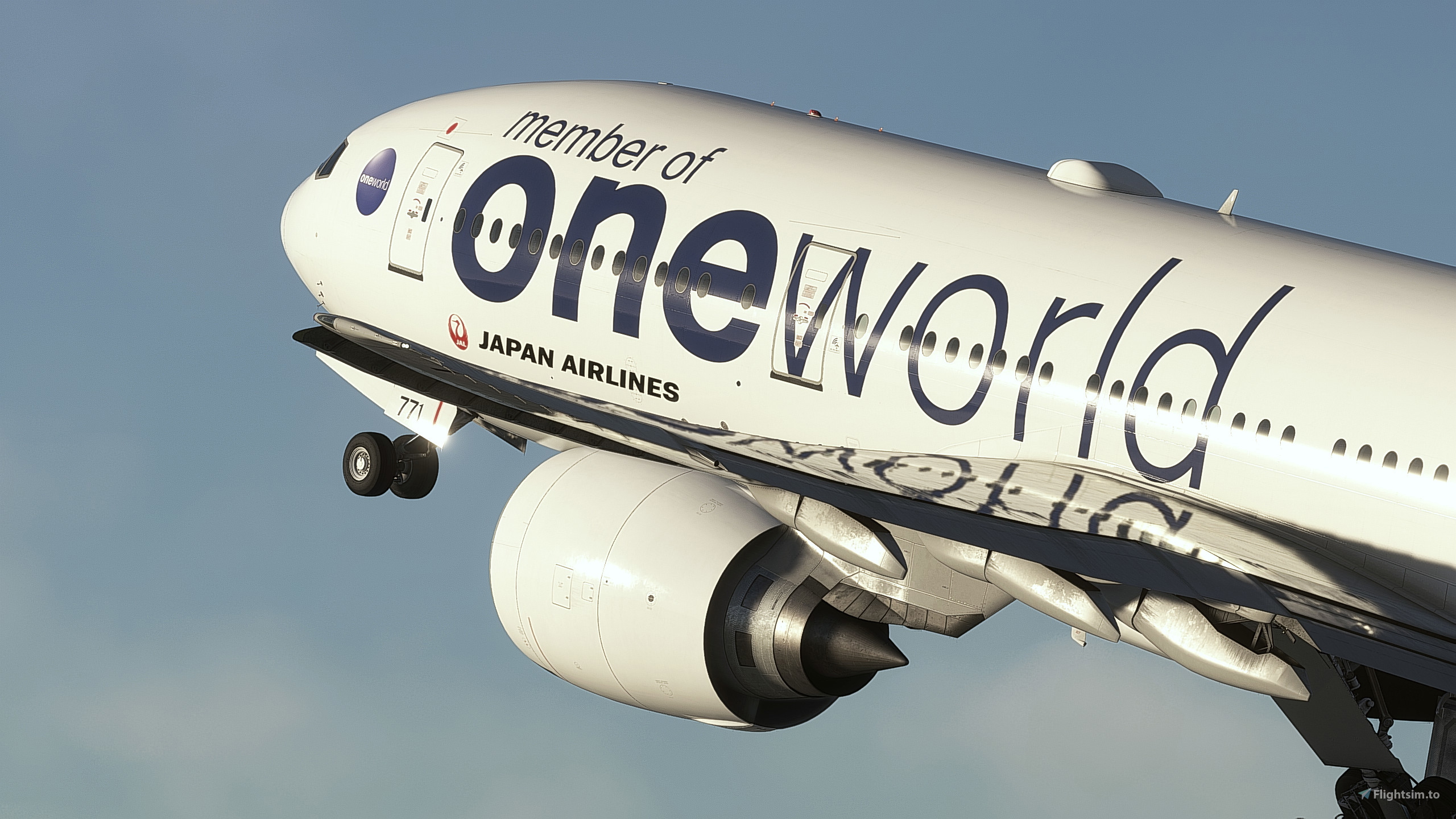
Japan Airlines New Tsurumaru Domestic Fleet Special Livery Pack (PW4000 variant) for PMDG 777-200.
REGISTRATION NUMBER INCLUDED IN THIS PACK
- Oneworld Livery: JA771J
- SKYTREE Livery: JA8978
More to come!
FEATURES
- Exterior paintjob based on real airframe with 8K textures.
- Specific SELCAL for each airframe.
- JAL SKY NEXT cabin design and textures. (Still WIP)
- Custom texture for pens, placards and stickers inside cockpit specific for JAL.
KNOWN ISSUES
- Cabin wall are bright but seats are so dark in the night when cabin lighting set to 100% in FMS.
That's issue related to PMDG but they said it's shader's problem.
For installation, just unzip the compressed archive then drag the root folder of livery to the Community folder.
- Just drag and drop the root folder of livery to the Communtiy folder.
- OC3 is not required for the installation.
- Config files included in each livery folder if you need.
If you like my work and you would like to support me you can donate to this link: Paypal or Buy me a Coffee.
如果您喜歡我的塗裝,可以透過以下連結支持我:Paypal 或 給我買杯咖啡。
Copies, Modifications or any reupload of all containing files is strictly forbidden. Those will be reported in the forum and could lead to legal consequences.
Japan Airlines | New Tsurumaru Domestic Fleet Special Livery Pack | PW | PMDG 777-200ER
This livery pack features the Japan Airlines New Tsurumaru Domestic Fleet special liveries for the PMDG 777-200ER PW4000 variant, including Oneworld and Skytree versions. The add-on includes 8K exterior textures, accurate SELCAL codes, and custom cockpit details tailored for JAL. Cabin textures with JAL SKY NEXT design are included and are a work in progress. Known issues involve lighting discrepancies in the cabin at night due to shader limitations.

Contributors

User Reviews
2 reviews
Version History
・Updated compatibility of FS2024. From Oct, 2026, FS2020 version of this livery pack will be archived as addition file and will not receive any update for the future.
Related
![Japan Airlines [JA703J] w/Cabin PMDG B777-200ER](https://cdn.flightsim.to/images/27/japan-airlines-ja703j-wcabin-pmdg-b777-200er-176187-1746380666-PDU4b.jpg?width=500)
Japan Airlines [JA703J] w/Cabin PMDG B777-200ER
This add-on features Japan Airlines livery for the PMDG Boeing 777-200ER, highlighting the registration JA703J, known for its last flight. It includes custom textures for both the interior and exterior, alongside tailored airline-specific logos and designs. The add-on requires a manual installation process for 2024 due to ongoing compatibility issues with PMDGs Operations Center. Notable caveats include potential mismatches in cabin models and mirrored cabin textures.
by Atarium
Japan Airlines JA8985 Arc of the Sun Livery
This add-on features the Japan Airlines JA8985 "Arc of the Sun" livery specifically designed for the PMDG 777-200ER in Microsoft Flight Simulator 2020 and 2024. It includes high-fidelity textures and accurate detailing that reflect the airlines iconic branding and commitment to excellence. The livery comes with authentic registration for JA8985 and can be easily installed using the OC3 Manager.
by Toyuko
Japan Airlines | New Tsurumaru Fleet Pack | SS7 Cabin | GE | PMDG 777-200ER
Introducing the Japan Airlines New Tsurumaru Fleet Pack for the PMDG 777-200ER, featuring an authentic SS7 cabin design and 8K exterior textures based on real aircraft. This pack includes registration numbers for specific airframes, the GE90-94B engine variant, and unique SELCAL codes. Custom textures are provided for various cockpit elements, enhancing realism during flight. Installation is facilitated through the PMDG Operations Center 3, with a configuration file included for ease of use.
by Kasamori54

Japan Airlines "Star Jet Altair" (circa 1996) JA8983
This add-on features a 4K texture of Japan Airlines "Star Jet Altair" livery for the aircraft JA8983, representing the airlines style from around 1996. The package currently includes a passenger cabin that is still under construction. Users can easily install the add-on by dragging and dropping the file into the MSFS community folder.
by TexturasBR
Log in to join the discussion
Log InComments(9)
6 days ago
about 4 hours ago
6 months ago
9 days ago
over 1 year ago
over 1 year ago
9 days ago
over 1 year ago
over 1 year ago