
Flightsim.to
    WinWing FCU + EFIS-L Inibuilds A350 Profile - Image 1

    Description

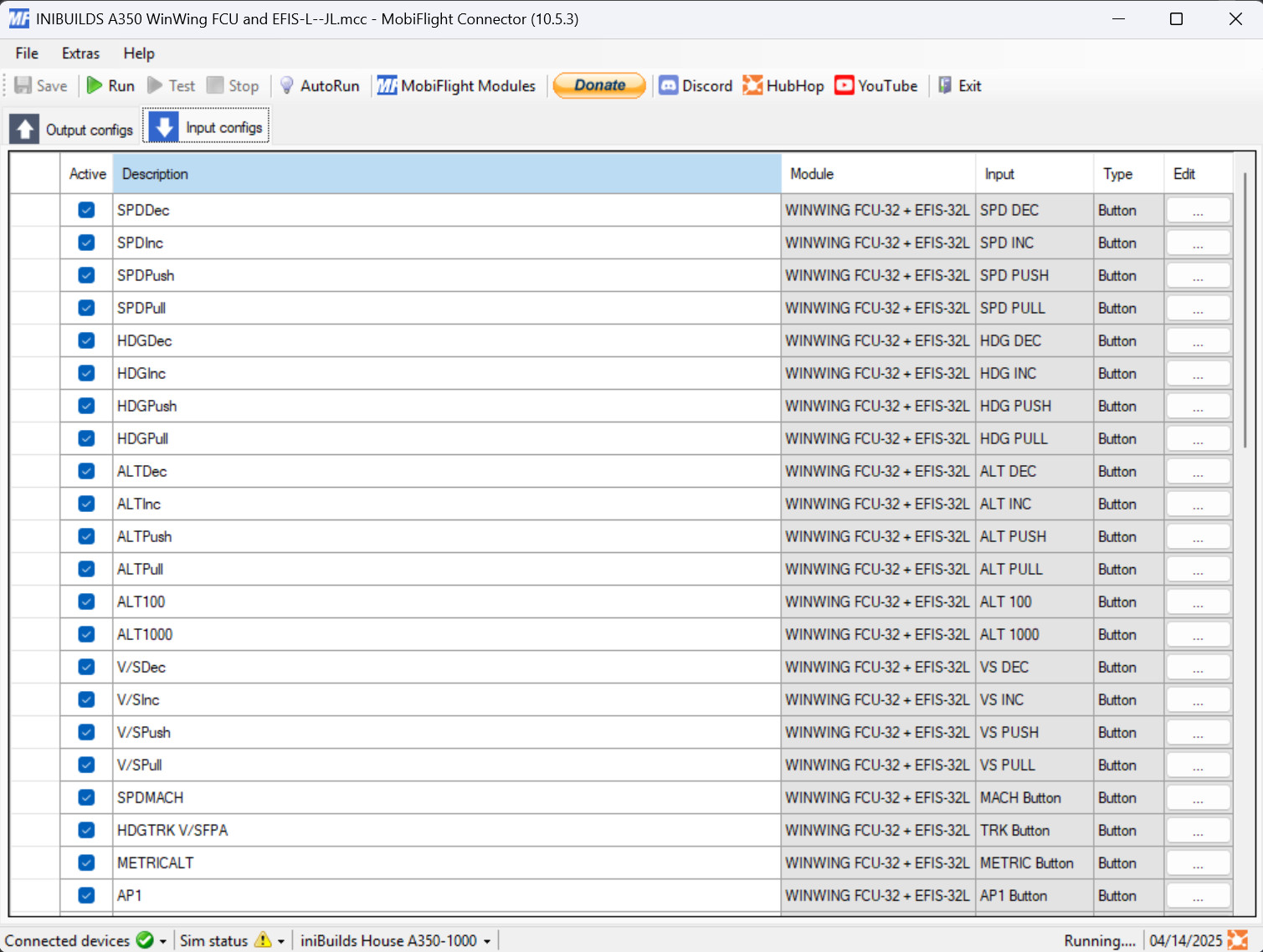
    This addon is a profile for winwing's FCU, EFIS-L and MCDU for the A350 from inibuilds.

    EFIS-R can be easely added by duplicating the EFIS-L part of the profile and changing from left to right inputs and outputs


    This profile is could still have bugs, please report them in the comments.


    if alt 100/1000 is inverted flicker it half way and reput it in the same position as before.


    If lights stop working turn lights on in simapppro and rerun the profile.

    Comments(18)

    Log in to join the discussion

    Log In
    P

    6 months ago

    Hi,
    Could you also help me implement the right efis? I tried to do it my self but i didnt understand. I added you on discord.
    Thanks!
    j
    jules1468Author

    6 months ago

    hey, i would be happy to help, but i don't see you on discord, maybe retry to add me
    P

    6 months ago

    Gotcha! Added you now
    J

    8 months ago

    Are there any instructions on how to add this to the sim and what else is needed to get this to function?
    j
    jules1468Author

    8 months ago

    As it stands in the title it is a mobiflight profile, you will need to download mobiflight at this link: https://www.mobiflight.com/en/index.html and then load it up by doing into file and then open ! i would recomend you to get the beta version of mobiflight (get MCDU screen wotking if python is installed but keep in mind the A350 isn't supported yet and the ability to load up the .mfpoj instead of the .mcc), for that go into settings adn in the general tab under beta versions chek the box, and then restart, let it update and all and then do the same as the other one for loading up the file ! Here is a link to there Doc's if you need anything else: https://docs.mobiflight.com/getting-started/
    Q

    9 months ago

    Thanks for the profile, everything works well.
    Did you map a ENT mcdu button from the a350 to the winwing mcdu?
    I can't find it.
    Thanks
    j
    jules1468Author

    9 months ago

    Yes there is one if i remember correctly it is the ovfy key.
    y

    about 1 year ago

    Thank's for your answe, but I am not on discord, and do not want to be there.
    Yves
    j
    jules1468Author

    about 1 year ago

    Hi, what other communications would you like to use ? I will be happy to help you implementing it !
    y

    about 1 year ago

    I try to make it my myself : I try to cpy and paste what you did and change from EFIS L to EFIS R.
    Thank's
    yves
    y

    about 1 year ago

    Hi,

    Can you please add the Right EFIS, I have it and it would be nice.
    Thank's
    for your job!
    Yves
    j
    jules1468Author

    about 1 year ago

    Unfortunatly i cant because i dont have it but if you want add me on discord i will help you implementing it (discord:jules1468)
    I

    about 1 year ago

    Hi, Thanks for the profile it works great but there is still some bugs may need to be fix

    1. when cruising and desent the speed and heading will suddenly change to numbers, so it will not follow the Auto pilot path.

    2. the lights on FD, LS, LOC, AP1 and other seems not bright enough (already turn it on simapppro) but when jump to simulator it look super dim cant see at all.

    so far this two major bugs i am experiancing..hope it can be fix. if there is any more find out i will let you know
    j
    jules1468Author

    about 1 year ago

    Hi thanks for reporting the bugs i will take a look at them.
    the dim lights seem to be an issue with simapp controiling them in the background, verify sim app pro isn't running if the issue persist please comment it back.
    j
    jules1468Author

    about 1 year ago

    Hi, i've submitted an update for the 1st issue, it should come out in a few hours if the issue persists please report it again. Thanks !
    I

    about 1 year ago

    Hi, Yeah i did not run sim apppro, i only run the mobiflight app.

    i will download the update and give it a try.
    j

    about 1 year ago

    where do i put the file?
    j
    jules1468Author

    about 1 year ago

    Hi, you can put the file anywhere you want click File->Open on mobiflight.
    Hope this will help you !
    MSFS 2020MSFS 2024

    WinWing FCU + EFIS-L Inibuilds A350 Profile

    This add-on provides a profile for the WinWing FCU and EFIS-L designed for the A350 aircraft from Inibuilds. Users can easily add an EFIS-R by duplicating the EFIS-L elements and adjusting the inputs and outputs. Compatibility with MSFS2024 is not guaranteed at this time, and users are encouraged to report any bugs in the comments. Additional features such as the MCDU will be included upon its release.


    Downloads1K
    Version1.3.5
    File Size21.89 KB
    Published1 year ago
    Updated1 year ago

    User Reviews

    5.0

    1 reviews

    5
    100%
    4
    0%
    3
    0%
    2
    0%
    1
    0%

    More Information

    Simulator
    MSFS2020/24

    Version History

    Fixed display and backlight brightness always = 100 on MCDU

    Related